Dealing with a parking brake malfunction in your BMW? You’re looking at one of those warning messages that can’t be ignored. Modern BMWs use an electronic parking brake (EPB) system that, while convenient, can sometimes throw errors that leave you wondering what to do next. I’ll walk you through exactly how to diagnose and reset these issues across different BMW models.
What Causes BMW Parking Brake Malfunctions?
When that dreaded “Parking Brake Malfunction” warning lights up your dashboard, several culprits could be responsible:
Low Battery Voltage
Your BMW’s electronic parking brake is voltage-sensitive. When battery power drops below optimal levels, the EPB system may trigger a malfunction warning. This commonly happens in vehicles that sit unused for extended periods or have aging batteries.
Think of it this way: the EPB needs steady power to operate correctly, and even slight voltage fluctuations can trick the system into thinking something’s wrong with the actuators.
Actuator Motor Issues
The EPB uses electric motors (actuators) built into the rear brake calipers to physically apply and release the brakes. These components endure heat, moisture, and mechanical stress that can lead to failure over time.
Common actuator problems include:
- Corroded motor windings
- Seized gears
- Damaged connections
- Worn mechanical parts
Software Glitches
Just like your smartphone occasionally needs a restart, your BMW’s parking brake system can experience software hiccups. These electronic gremlins may appear after:
- Software updates
- Battery disconnection
- Computer module resets
- Communication failures between vehicle systems
Brake Pad Wear and Hydraulic Issues
The EPB monitors brake pad thickness and hydraulic pressure. When pads wear excessively or air enters the brake lines, the system may disable itself as a safety measure.
Sensor and Wiring Problems
Your BMW’s EPB relies on multiple sensors to function properly. Damaged wheel speed sensors or corroded wiring harnesses can disrupt data flow to the control module, triggering malfunction alerts.
BMW Parking Brake Reset: Model-Specific Procedures
The reset process varies significantly depending on your BMW’s generation and model. Here’s a breakdown:
E-Series Models (2000-2013)
E53 X5 (2000-2006)
The first-generation X5 uses a manual parking brake with a cable-operated system. To reset:
- Raise the rear of the vehicle securely
- Locate the 7mm adjustment hole on the brake rotor shield
- Turn the rotor until you can see the star wheel adjuster through the hole
- Use a screwdriver to tighten the adjuster clockwise until the rotor locks
- Back off by one notch to ensure proper operation
E70/E71 X5/X6 (2007-2013)
These models introduced an early electronic parking brake system that allows for a basic reset:
- Turn the ignition to “On” position (don’t start the engine)
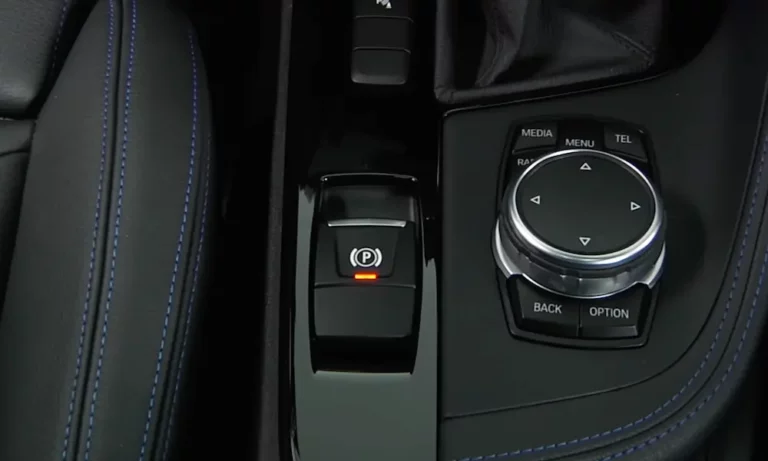
- Press and hold the parking brake button for 10-15 seconds
- Wait for the dashboard indicator to flash, indicating reset
- Test by engaging and disengaging the brake several times
For more stubborn issues, you’ll need a diagnostic tool to access “EMF Workshop Mode.”
F-Series Models (2014-2018)
The F15/F16 X5/X6 and other F-series BMWs require a diagnostic tool for proper EPB resets:
- Connect an OBD-II scanner with BMW-specific capabilities
- Navigate to the EPB/EMF module
- Select “Service Mode” to retract the actuators
- After servicing, use the tool to reactivate the parking brake
- Run a function test to verify proper operation
G-Series Models (2019-Present)
The latest G05 X5 and other G-series BMWs feature an integrated EPB system that works with the Dynamic Stability Control (DSC):
- Enter diagnostic mode by pressing the start button three times without pressing the brake pedal
- Use BMW-specific diagnostic software (like ISTA+)
- Perform a full system reset including actuator calibration
- Test the system thoroughly after reset
DIY Reset Using Diagnostic Tools
Several diagnostic tools can help you reset your BMW parking brake without a trip to the dealership:
BimmerLink and BimmerCode
These smartphone apps, when paired with a compatible OBD-II adapter, provide DIY access to your BMW’s EPB system:
- Connect your OBD-II adapter (like OBDLink CX) to your vehicle
- Launch the BimmerLink app and navigate to the EPB menu
- Select “Activate Service Mode” to retract the actuators
- After servicing, use “Deactivate Service Mode” to recalibrate
Dedicated Scan Tools
Professional-grade scanners like Autel MaxiCOM or Foxwell scanners offer more comprehensive EPB management:
- Access the EPB/EMF control module
- Initiate “Brake Pad Replacement Mode” or “Service Position”
- Follow on-screen instructions to complete the reset
- Perform validation tests afterward
Parking Brake Reset Without Tools
If you’re in a pinch and don’t have access to diagnostic equipment, you can try these manual methods that sometimes clear minor glitches:
Battery Reset Method
- Disconnect your vehicle’s battery (negative terminal first)
- Wait 15-30 minutes to allow capacitors to discharge
- Reconnect the battery (positive terminal first)
- Start the vehicle and test the parking brake functionality
Button Combination Reset
Some users report success with this sequence:
- Turn ignition to position II (don’t start engine)
- Press and hold the parking brake button while simultaneously pressing the brake pedal
- Hold for 20-30 seconds until you notice a change in dashboard indicators
- Release and test the system
Note: These manual methods may only work for minor electronic glitches and not mechanical issues.
Critical Parking Brake Reset Precautions
Before attempting any BMW parking brake reset, follow these important precautions:
Ensure Voltage Stability
Connect your BMW to a battery maintainer or ensure the battery is fully charged before performing any reset. Voltage drops during the procedure can corrupt the EPB module.
Protect the Actuators
Never force retracted actuators manually! This can strip internal gears and cause permanent damage requiring expensive repairs.
Thorough Testing
After any reset procedure:
- Engage and disengage the parking brake 5-10 times
- Verify that the brake engages firmly and releases completely
- Check that warning lights remain off during operation
Safe Working Environment
Always:
- Park on level ground
- Block wheels if working underneath
- Use proper jack stands when lifting the vehicle
- Follow BMW-specified lifting points
When Professional Help Is Needed
Despite your best DIY efforts, some parking brake issues require professional intervention:
Hardware Failures Requiring Dealership Service
| Component | Symptoms | Professional Repair Cost |
|---|---|---|
| Actuator Motors | Grinding noise, incomplete engagement | $300-$600 per caliper |
| Control Module | Multiple system errors, unresponsive | $500-$1,200 including coding |
| Wiring Harness | Intermittent functionality, multiple errors | $400-$800 depending on location |
Complex Issues Requiring Specialized Tools
- Adaptive recalibration after component replacement
- Integrated system resets affecting multiple modules
- Firmware updates to resolve software-related malfunctions
Preventing Future Parking Brake Malfunctions
After successfully resetting your BMW parking brake, take these steps to avoid future problems:
Regular Maintenance
- Keep brake fluid fresh with changes every 2 years
- Inspect brake pad thickness regularly
- Test parking brake functionality monthly
Battery Health
- Use a trickle charger during extended storage
- Replace aging batteries before they cause voltage issues
- Ensure proper battery registration after replacement
Cautious Operations
- Allow the system to fully engage/disengage before driving
- Avoid using the parking brake on steep inclines with a cold engine
- Don’t manually force the parking brake in emergency situations
BMW Parking Brake System Evolution
Understanding how BMW’s parking brake system has evolved helps pinpoint the right solution for your specific model:
Early Electronic Systems (2006-2012)
First-generation electronic parking brakes used dedicated actuators with limited integration to other vehicle systems. These systems are generally simpler to reset but may require physical adjustment.
Integrated Systems (2013-2018)
Mid-generation BMWs integrated the parking brake with stability control and brake-by-wire systems. Resets require diagnostic access but are more comprehensive in resolving interlinked issues.
Latest Technology (2019-Present)
Current BMWs feature fully integrated brake systems where the parking brake functions as part of a complex dynamic stability network. These systems offer enhanced functionality but require advanced diagnostic capabilities for proper reset.
Technical Specifications for Common BMW Models
| BMW Model | EPB System Type | Recommended Reset Tool | Special Notes |
|---|---|---|---|
| E90 3 Series | Basic Electronic | BimmerLink, Foxwell NT510 | Sensitive to low voltage |
| F30 3 Series | Integrated Electronic | ISTA+, Autel MaxiSys | Requires DSC coordination |
| G20 3 Series | Advanced Integrated | ISTA+, BimmerTool Pro | Includes automatic hold function |
| F15 X5 | Integrated Electronic | ISTA+, Launch X431 | High actuator failure rate |
| G05 X5 | Advanced Integrated | ISTA+, Autel MaxiSys | Multiple calibration steps needed |
By following this comprehensive guide to BMW parking brake malfunction resets, you’ll be able to address most common issues and determine when professional help is necessary. The electronic parking brake system, while occasionally challenging, represents a significant advancement over traditional handbrakes in both convenience and safety.