Your Toyota’s nav system is sending you down roads that no longer exist. Frustrating? Absolutely. Expensive to fix? Not necessarily. This guide walks you through every legitimate way to update your Toyota navigation system for free — based on your exact model year. Read to the end, because the method that works for you depends on which system you actually have.
First, Figure Out Which Toyota Navigation System You Have
Before anything else, you need to know what you’re working with. Toyota has used three very different systems over the years, and the free update path changes completely depending on which one is in your car.
Head to Settings > System Info and Software Update on your screen. The version string you see — something starting with “82T,” “76T,” or similar — tells you which generation you have.
Here’s a quick cheat sheet:
| System Generation | Typical Model Years | Example Models | Storage Type |
|---|---|---|---|
| Entune 1.0 / 2.0 | 2012–2017 | Camry, RAV4, Corolla | SD Card or HDD |
| Entune 3.0 | 2018–2021 | Tacoma, Tundra, Camry | Internal Flash + Cloud |
| Toyota Audio Multimedia | 2022–Present | Sequoia, Crown, Highlander | Cloud Cache |
Once you know your generation, pick the right method below.
How to Update Toyota Navigation System for Free: By Generation
2022 and Newer (Toyota Audio Multimedia) — OTA Updates During Your Trial
Good news: if your car is a 2022 or newer model with the Toyota Audio Multimedia system, updates happen automatically over the air (OTA). You don’t plug in a USB or swap an SD card. The system streams and caches map data through its built-in 4G/5G connection — and that doesn’t touch your phone’s data plan.
The catch? It’s free during your trial period only.
Here’s how to make the most of it:
- Register your vehicle in the Toyota App immediately after purchase. This kicks off your trial and activates the telematics connection.
- Your Drive Connect trial (which includes Cloud Navigation) typically runs one to three years, depending on your trim level.
- Safety Connect and Service Connect trials now extend up to 10 years on select 2023+ models — keeping your car’s cellular connection alive for background firmware syncs even after Drive Connect expires.
During the trial, your maps update in the background without you doing a thing. Toyota’s system even uses predictive caching — if you’re heading somewhere with spotty cell coverage, it pre-downloads maps for that area automatically.
After the trial ends? Jump to the CarPlay/Android Auto section below. Seriously.
2018–2021 (Entune 3.0) — Activate Your 3-Year Dynamic Navigation Trial
Entune 3.0 introduced the first real “free update” window through a bundled three-year Dynamic Navigation trial. This system runs on Automotive Grade Linux and pulls live map data from Toyota’s servers.
Steps to activate it:
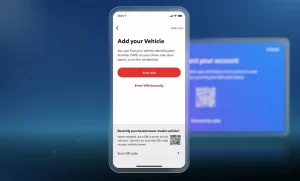
- Download the Toyota App and create an account.
- Add your vehicle using your VIN.
- Connect the app to your head unit — this triggers the telematics handshake.
- Check Connected Services within the app to confirm your trial is active.
Once active, your system pulls real-time road changes, updated points of interest, and routing improvements automatically whenever you’re in cell coverage.
Important: If you’ve never activated this trial, it may still be available — even on older used vehicles. Check Toyota’s Connected Services Trial page to see what’s available for your VIN.
Yaris iA and Select SD-Card Models — Use the Naviextras Toolbox
If you drive a 2016–2019 Yaris iA (or certain international RAV4 and Prado variants), Toyota uses a specific tool called the Naviextras Toolbox for free updates. This works through a USB fingerprinting process.
Here’s exactly how to do it:
Step 1 — Create the fingerprint:
- Format a USB drive (8GB–16GB, FAT32 format) and plug it into your car’s infotainment port.
- In the navigation menu, select “Update” or “Download System Information.”
- The car writes a unique system ID (the “fingerprint”) to your drive.
Step 2 — Check for updates on your PC:
- Plug the USB into your computer.
- Open the Naviextras Toolbox and let it read the fingerprint.
- The software checks Toyota’s servers and shows you any updates you’re eligible for.
Step 3 — Install the update:
- Download any available update to the USB drive.
- Plug the drive back into your car and follow the on-screen prompts to install.
Critical notes:
- The free update window is three years, starting once your car has driven 100 km (about 63 miles) with the SD card inserted.
- Don’t mess with the file structure on the USB. The car looks for a specific
synctoolfolder at the root level. Move it and the process fails. - If your three-year window has passed, the Toolbox won’t show any free options — but the CarPlay method below still works.
You can also check update eligibility directly at the Yaris iA map update portal.
2012–2017 (Entune 1.0 / 2.0) — Your Best Free Option Is a Smartphone Retrofit
Here’s the hard truth: official free updates for 2012–2017 Toyota systems basically don’t exist anymore. These vehicles used the Blackberry QNX operating system with physical SD cards or HDDs. Updates required dealer-level tools and unique security keys — as documented in NHTSA’s official HDD Navigation Map Update Process records. Toyota has largely abandoned this hardware with manufacturer support.
Your real free option? Make your phone the navigation system.
The Smartest Free Long-Term Strategy: CarPlay and Android Auto
Since 2019, Toyota has included Apple CarPlay and Android Auto on nearly all models as standard. If your 2019+ car has it, use it. And if you have a 2014–2018 model that doesn’t, a retrofit module makes it possible.
Why This Beats Native Toyota Nav
- Google Maps, Waze, and Apple Maps update almost daily — native Toyota maps lag by six to twelve months.
- No subscription fee to Toyota. Ever.
- Offline maps work in dead zones. Download a 1,000-square-mile area on your home Wi-Fi, and you’ve got full turn-by-turn navigation with zero cell signal.
Retrofitting Older Models
If your 2014–2018 Toyota blocked CarPlay, third-party modules from companies like Naviks or Vline can add it using your original screen. Cost runs $300–$600 upfront. Compare that to paying $169 for an official map card every few years, and the math works out fast.
Free Firmware Updates: Don’t Skip These
Map updates and firmware updates are different things. Firmware updates fix bugs, reduce UI lag, and improve Bluetooth connectivity. Toyota releases these for free through their official firmware portal.
Here’s how to check:
- Visit toyota.com/firmware-updates.
- Enter your model year and system version.
- If an update is available, download it to a FAT32 USB drive.
- Plug it into your car and follow the on-screen prompts.
Keep your engine running during the entire process. A full update can take 45–100 minutes. If the car loses power mid-install, you risk corrupting the flash memory — and that’s an expensive fix. Run the engine, not just the accessory power.
Don’t Buy Used Nav SD Cards on eBay
It’s tempting. A $30 eBay “nav card” versus a $169 official one? Sounds great. It’s usually not.
Toyota’s SD cards lock to your VIN after 100 km of driving. Once locked, that card is useless in any other vehicle. A used card someone already drove is worthless to you.
Worse, many cheap cards are clones — copies of official releases that can’t authenticate with Toyota’s servers. They might work temporarily, but they can’t receive future updates. And if a cloned card contains corrupted boot files, it can put your head unit in a reboot loop that requires a full replacement.
Research on second-hand memory cards has found that up to two-thirds contain personal data from previous owners — including sensitive files and photos. It’s not worth the risk.
If you genuinely need a new SD card, buy it from Toyota’s authorized map update sources only.
What Happens When Your Trial Expires
If you own a newer Toyota Audio Multimedia vehicle and your Drive Connect trial ends, the navigation screen may go dark — showing only a prompt to subscribe for $15/month. Your GPS antenna still works (emergency services can still locate you), but the visual map layer locks behind a paywall.
Owners of the Grand Highlander and Tundra have run into this exact issue, and many have switched permanently to CarPlay as a result.
If you don’t want to pay $15/month for Cloud Navigation, that’s a completely reasonable call. Just use CarPlay or Android Auto. It’s more current anyway.
Quick-Reference: Best Free Update Path by Generation
| Your System | Best Free Update Method |
|---|---|
| 2022+ Toyota Audio Multimedia | Activate trial via Toyota App → OTA auto-updates |
| 2018–2021 Entune 3.0 | Activate 3-Year Dynamic Navigation trial via Toyota App |
| 2016–2019 Yaris iA (SD card) | Naviextras Toolbox (within 3-year window) |
| 2012–2017 Entune 1.0/2.0 | CarPlay/Android Auto retrofit |
| Any model, trial expired | Apple CarPlay or Android Auto with offline maps |
One Last Thing: Check Your Firmware Every 6 Months
Even if your map trial has expired, Toyota still releases free firmware updates that improve system speed and fix connectivity bugs. Make it a habit to check the firmware portal twice a year. It takes five minutes, it’s always free, and it keeps your system running smoothly regardless of which navigation method you’re using.