Having trouble with your Hyundai remote start? You’re not alone. Many Hyundai owners face this frustrating issue, but the fix might be simpler than you think.
Your Hyundai remote start may not be working due to low battery power, poor phone signal, or key fob issues. The problem could also stem from unlocked doors or an open hood, which are easy to check and fix.
Keep reading to learn the quick fixes that can get your remote start working again. We’ll walk you through simple troubleshooting steps that have helped many other Hyundai owners solve this exact problem.
Common Issues with Remote Start
Remote start problems can happen for several key reasons. Your vehicle needs proper battery power, strong signals, and working software to start remotely.
Key Fob Battery Problems
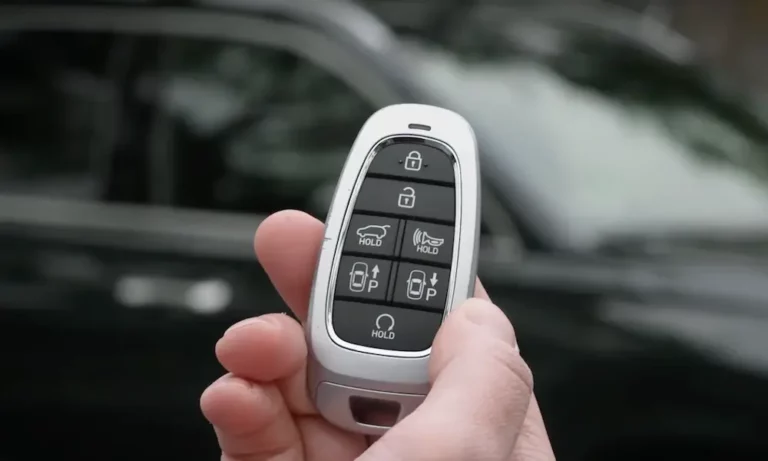
Your key fob needs enough power to send signals to your car. A weak or dead key fob battery will stop remote start from working.
Look for these signs of a dying key fob battery:
- Shorter working range
- Need to press buttons multiple times
- No LED light when pressing buttons
Most key fobs use CR2032 batteries that last 2-3 years. Replacing the battery is quick and cheap – you can do it at home with a small screwdriver.
Software and Firmware Issues
Your Hyundai’s remote start relies on current software to work right. Old or buggy software can block remote start functions.
Check these software-related items:
- BlueLink app version
- Vehicle software updates
- Phone operating system updates
The BlueLink app needs regular updates to keep working. Your dealer can help update your car’s software if needed.
Signal Interference or Transmission Issues
Remote start can fail when signals can’t reach your car. This happens more in areas with:
- Tall buildings
- Parking garages
- Rural areas with weak cell service
- Bad weather
Try moving closer to your car or to an open area. The signal needs a clear path between your phone or key fob and the vehicle.
Car Battery and Electrical Issues
A weak car battery can prevent remote start from working. The system needs enough power to turn over the engine.
Watch for these warning signs:
- Slow engine cranking
- Dim headlights
- Dashboard warning lights
- Remote start failing in cold weather
Test your car battery if it’s over 3 years old. Keep jumper cables handy in winter when batteries are more likely to fail.
Troubleshooting Your Hyundai Remote Start
Remote start problems can often be fixed with simple steps at home. Most issues stem from battery problems, incorrect settings, or system errors that you can resolve quickly.
Initial Steps and Quick Checks
Make sure your car doors are closed and locked. The engine hood must be fully closed too.
Check if your car’s alarm is armed by using the key fob to lock the doors first.
Basic Requirements for Remote Start:
- All doors locked
- Hood closed
- Alarm armed
- Key fob within range
- Vehicle parked outside
Understanding Error Messages and Warning Lights
Your Hyundai may display error codes when remote start fails. Common messages include “Start Failed” or “Connection Error.”
A flashing key symbol on your dashboard often means there’s a connection problem between your key fob and the car.
If you’re using the BlueLink app, check your phone’s signal strength. Poor cell service can prevent remote start from working.
When to Replace the Key Fob Battery
Replace your key fob battery if the remote’s range decreases or buttons become unresponsive.
Most Hyundai key fobs use CR2032 batteries. They typically last 2-3 years with normal use.
Signs of Low Battery:
- Decreased range
- Multiple button presses needed
- Remote start fails intermittently
- Key fob LED dims
Resetting or Reactivating Remote Start Features
Try disconnecting your car battery for 5 minutes to reset the remote start system.
For BlueLink users, log out of your app and log back in. Sometimes removing and re-adding your vehicle fixes connection issues.
Reset Steps:
- Turn off the car
- Remove negative battery terminal
- Wait 5 minutes
- Reconnect battery
- Test remote start
If these steps don’t work, you might need to visit your dealer to reprogram the system.
Considering Aftermarket Remote Starters
Aftermarket remote starters can extend your Hyundai’s capabilities with longer range and extra features. These systems need careful planning to work properly with your car.
Pros and Cons of Aftermarket Options
Aftermarket remote starters offer range up to 1,000 feet, which is much better than factory remotes. You can often start your car from inside buildings or across parking lots.
These systems usually come with extra features like smartphone control and temperature settings. Some even let you check if your car is running from your phone.
Poor installation can cause system failures. Make sure you pick a certified installer who knows Hyundai vehicles.
The cost is higher than factory-installed systems, usually ranging from $200-500 plus installation.
Compatibility with Hyundai Vehicles
Your Hyundai needs specific wiring setups for aftermarket starters to work right. Many installers can add a “3-lock start” feature to your factory key fob, letting you start the car by pressing lock three times.
If your battery dies or gets replaced, the system might need reprogramming. Keep your installer’s contact info handy for future support.
Some newer Hyundai models with push-button start need special bypass modules. Ask your dealer if your model has any known issues with aftermarket systems.
Maintaining Your Vehicle for Reliable Remote Start
Regular maintenance keeps your Hyundai’s remote start system working smoothly. Good care of your car’s battery and electrical system helps prevent most common remote start issues.
Periodic Maintenance Tips
Remote start problems often come from simple maintenance issues you can prevent. Keep your car’s battery terminals clean and tight to ensure good connections.
Check all fuses related to the remote start system every 6 months. A blown fuse can stop the system from working.
Make sure your car’s hood latch and door sensors stay clean. These safety switches need to work properly for remote start to function.
Battery Maintenance for Optimal Performance
Your key fob battery typically lasts 2-4 years. Replace it when the LED light gets dim or stops blinking.
Keep your car’s main battery in good shape. A weak battery can prevent remote start from working even if everything else is fine.
Test your car battery every spring and fall. This helps catch problems before they leave you stranded.
Software Update Best Practices
Check for Blue Link app updates monthly. Old versions can cause connection problems.
Visit your dealer yearly for system updates. These fix bugs and improve remote start reliability.
Set up automatic updates on your phone to ensure your Blue Link app stays current.
Make sure your Blue Link subscription stays active. The remote start feature won’t work if your subscription expires.