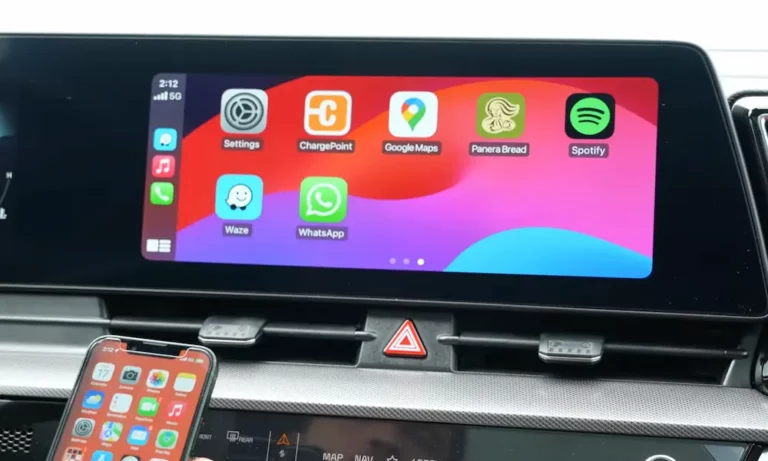
Your Kia’s screen just sits there, blank and stubborn, while your iPhone charges happily in the cupholder. You’ve wiggled cables, restarted everything twice, and muttered some choice words at your dashboard. Sound familiar? Let’s cut through the confusion and get your CarPlay connection back where it belongs.
Why Your Kia Won’t Connect to CarPlay
Here’s the frustrating truth: “Kia CarPlay not working” isn’t one problem—it’s usually a combination of sneaky culprits working against you.
Most connection headaches boil down to three main troublemakers: a dying USB port in your car (especially common in 2022-2025 models), software conflicts between your Kia’s system and your iPhone’s latest iOS update, or settings on your phone that’re blocking the connection without telling you.
The good news? About 89% of CarPlay problems aren’t actually your car’s fault—they’re fixable without a dealer visit.
The Wired vs. Wireless Mystery You Need to Understand
This catches everyone off guard: your friend’s base-model Kia Seltos connects wirelessly, but your loaded Telluride SX Prestige won’t. What gives?
Kia deliberately restricts wireless CarPlay to lower trims. If your Kia has that gorgeous 10.25-inch or 12.3-inch navigation screen, you’re stuck with wires. Only the smaller 8-inch “Display Audio” systems—the ones without built-in navigation—support wireless connections.
Why’d they do this? The wireless signal interferes with your car’s GPS antenna. Kia chose navigation accuracy over wireless convenience for premium models. It’s backwards, but it’s intentional.
Quick check: Does your car have factory navigation maps? Then it’s wired-only. Simple as that.
The exception: brand-new 2025 models with the “ccNC” system (like the EV9) finally allow both. But for 2014-2024 Kias, the split remains firm.
Start Here: The 5-Minute Fix That Works Surprisingly Often
Before you blame hardware or book a service appointment, try this reset sequence. It clears out corrupted pairing data that’s gumming up the works.
On your Kia’s screen:
- Go to Setup → Device Connections → Phone Projection
- Find your iPhone in the list and delete it completely
- Also delete the Bluetooth connection (yes, both matter)
On your iPhone:
- Settings → General → CarPlay
- Tap your Kia’s name → “Forget This Car”
- Then Settings → Bluetooth → Tap the “i” next to your Kia → Forget This Device
Now locate the tiny pinhole button on your Kia’s head unit (usually near the volume knob). Push a paperclip in there for 5-10 seconds until the screen goes black and the Kia logo reappears.
This forces your car’s computer to rebuild everything from scratch. Wait 30 seconds, then try connecting again with a genuine Apple cable.
The Cable Situation (It’s More Critical Than You Think)
You can’t troubleshoot Kia CarPlay not working without ruling out the cable first. Period.
Gas station cables? They’re often power-only—no data wires inside. Your phone charges, the car sees nothing, and you waste hours chasing ghosts.
Here’s what actually works:
- Original Apple cables (1 meter or shorter)
- Certified MFi cables from Anker or Belkin
- Nothing longer than 3 feet—longer cables lose signal strength
Kia’s infotainment system is picky about voltage drop. That high-res widescreen needs stable data flow, and cheap cables can’t deliver it.
Test this: If your “broken” connection works perfectly with a brand-new Apple cable, congrats—you just diagnosed the problem. If the disconnections continue with a known-good cable, your car’s USB port is failing.
The iOS 18 Settings That Kill CarPlay Dead
Apple’s iOS 18 update introduced two silent connection killers that nobody warned you about.
VPN Kill Switch Conflict
If you run a VPN (NordVPN, ExpressVPN, Google One), it’s probably strangling your CarPlay connection. The VPN sees your car as an “untrusted network” and blocks it.
Fix it: Settings → General → VPN & Device Management → make sure it shows “Not Connected.” Don’t just disconnect—turn off “Connect on Demand” or delete the VPN profile entirely to test.
Vocal Shortcuts Bug
This new accessibility feature hijacks audio routing. CarPlay connects visually but sound stays on your phone, or the whole thing disconnects instantly.
Fix it: Settings → Accessibility → scroll to Vocal Shortcuts → turn it OFF.
Siri Requirements
CarPlay won’t function without Siri, period. Check Settings → Siri & Search:
- “Listen for Hey Siri” must be ON
- “Allow Siri When Locked” must be ON
One more: Settings → Face ID & Passcode → scroll down → “USB Accessories” must be enabled. Otherwise your locked phone won’t talk to your car.
When Your USB Port Is Actually Dying
Here’s where things get real: the USB port in 2022-2025 Sportages, EV6s, K5s, and Tellurides fails at an alarming rate.
Classic symptoms:
- Phone charges fine, but CarPlay never connects
- Connection drops every time you hit a bump
- You have to wiggle the cable to make it work
- “Reading USB” message loops endlessly
- Works perfectly cold, fails after 15 minutes of driving
What’s happening? The data pins (D+ and D-) inside the port crack from vibration and heat expansion. Power pins keep working—hence the charging—but data transfer dies.
This isn’t something you caused. It’s a documented hardware defect.
The fix requires replacing the USB jack assembly. Part numbers vary by model:
- Sportage NQ5: 96120-D9600
- EV6: 96125-CV000
- K5: 96120-L8000 series
- Telluride: 96120-S9000 series
Competent DIYers can handle this. It involves removing the center console trim to access the back of the USB module, unplugging the harness, and snapping in the new part. Dealers charge $200-400 for labor, but the part itself runs $30-60.
If your Kia’s under warranty, push for the replacement. This is their defect, not normal wear.
Software Updates Your Kia Desperately Needs
Kia’s released multiple Technical Service Bulletins specifically to fix CarPlay stability. If your car hasn’t been updated since you bought it, you’re driving with buggy firmware.
TSB ELE 286 targets 2022-2023 Sportages, Sorentos, and Seltos with unstable Apple CarPlay. It rewrites the USB driver to handle newer iOS security protocols.
TSB ELE 303 fixes frozen radio icons—when your entire infotainment locks up, CarPlay dies with it.
How to update:
You’ll need a PC or Mac and a 64GB USB flash drive formatted in exFAT (newer systems) or FAT32 (older systems). NTFS won’t work.
- Visit update.kia.com and download the Navigation Updater software
- Run it and download the latest update file to your flash drive
- Start your car (don’t just turn accessories on—actually start it)
- Insert the drive into your data port
- The system detects the update and prompts you to proceed
- Wait 35-60 minutes while it updates—the screen goes black and reboots multiple times
- Don’t turn off the car during this process or you’ll brick the system
After completion, use that pinhole reset button again to clear cached data.
For 2024+ models with Kia Connect, some updates arrive over-the-air. Recent OTA patches fixed iOS 18 compatibility issues and resolution scaling bugs.
Going Wireless on a Wired-Only Trim
Since premium Kias won’t do wireless natively, aftermarket adapters bridge the gap. They plug into your USB port, pretend to be a wired connection to your car, then broadcast Wi-Fi and Bluetooth to your phone.
Best options:
Carlinkit 5.0 – The all-around winner. Boots in 15-20 seconds, works with both CarPlay and Android Auto, gets frequent firmware updates. Costs around $100-120. Most reliable according to user testing.
Ottocast U2-Air – Slightly slower to boot (25-30 seconds) but optimized specifically for Apple devices. Better visual quality if you’re CarPlay-only. Similar price point.
Both work well, but there’s one annoying quirk: Kia’s USB ports stay powered for 5-10 minutes after you turn off the car. The adapter stays active, hijacking phone calls and audio even when you’re inside your house. Some folks install an in-line power switch on the cable to kill it manually.
“Magic Box” AI Boxes are a different animal—they run full Android, letting you stream Netflix and YouTube on your car screen. But they’re expensive ($150-300), laggy, and less stable than simple bridges. Only go this route if you specifically need video streaming.
Checking Your Fuses Before Anything Else
Blown or corroded fuses cause weird electrical gremlins that mimic bigger problems. Your driver’s side footwell has a fuse panel behind a plastic cover.
Critical fuses to check:
| Fuse Name | Rating | What It Does |
|---|---|---|
| MULTIMEDIA | 10-15A | Main power for head unit |
| IG3 | 10A | Ignition signal to AVN system |
| MEMORY/MEMORY2 | 10A | Saves pairing data—if blown, car “forgets” your phone every restart |
| AMP | 25A | Powers sound—screen works but no audio? Check this |
Don’t just eyeball them. Use a multimeter to verify continuity. Fuses can fail partially, causing intermittent issues that visual inspection misses.
Model-Specific Quick Fixes
2023-2025 Sportage: The USB jack fails early and often. If you’ve eliminated cable issues and software conflicts, the port replacement is almost guaranteed. Priority fix for this model.
2022-2025 EV6: Same USB port defect as Sportage, plus unique charging-related bugs. Check for specific EV6/EV9 TSBs addressing multimedia issues.
2020-2025 Telluride: Firmware obsolescence is your enemy. Most disconnection issues resolve completely after updating via USB. Don’t skip this step.
2021+ K5: Native wireless on base trims suffers from 2.4GHz interference—toll transponders and dash cams are common culprits. Delete and re-pair the phone, and keep transmitting devices away from the center console.
The Engineering Mode Diagnostic (Advanced)
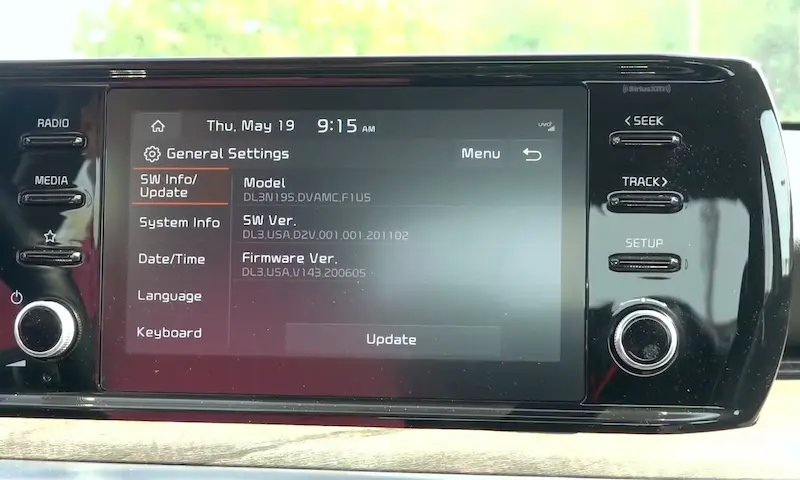
For deep troubleshooting, Kia’s hidden Engineering Mode lets you check port voltage and module status. Warning: don’t mess with settings you don’t understand—you can brick your head unit.
Access varies by system. For Gen5W units:
- Settings → System Info
- Tap left side of “Update” button 5 times, then right side once
- Enter passcode (varies by firmware date)
Common codes:
- Older systems: 2400, 2900, 2603
- 2023 firmware: 20230411, 20230928
- 2024 firmware: 20240101, 20240210
Inside, navigate to Module Info or Diagnosis. You can verify WiFi module status (for wireless systems) and USB port voltage. This definitively confirms hardware failure before ordering parts.
Your Diagnostic Checklist
Work through this sequence systematically:
Software first:
- Disable VPN and Vocal Shortcuts on iPhone
- Verify Siri is fully enabled and allowed when locked
- Delete phone from car and car from phone
- Pinhole reset the head unit
- Update Kia firmware via official updater
Hardware validation:
- Test with genuine Apple cable, 1 meter or shorter
- Inspect iPhone charging port for lint (use compressed air)
- Try cable in different USB port if your car has multiples
- Check all multimedia-related fuses with multimeter
Port diagnosis:
- If disconnections happen during physical movement or bumps, the USB jack is failing
- If phone charges but never establishes data connection, data pins are broken
- Order replacement part for your specific model
Wireless adaptation:
- Confirm your trim actually supports wireless (probably doesn’t if you have navigation)
- If wired-only, consider Carlinkit 5.0 or Ottocast adapter
- Be aware of the post-shutdown power issue
The reality about Kia CarPlay not working is this: it’s fixable. Whether it’s a $15 cable, a free software update, or a $50 USB port replacement, you don’t need to live with a broken connection. Work through the checklist methodically, and you’ll nail down the cause.
And here’s something dealers won’t tell you upfront: that “wired only” limitation on your premium trim isn’t actually a limitation—it’s just Kia being overly cautious about GPS interference. A solid wireless adapter eliminates the problem entirely for under $120.
Your CarPlay isn’t broken. It just needs the right fix.