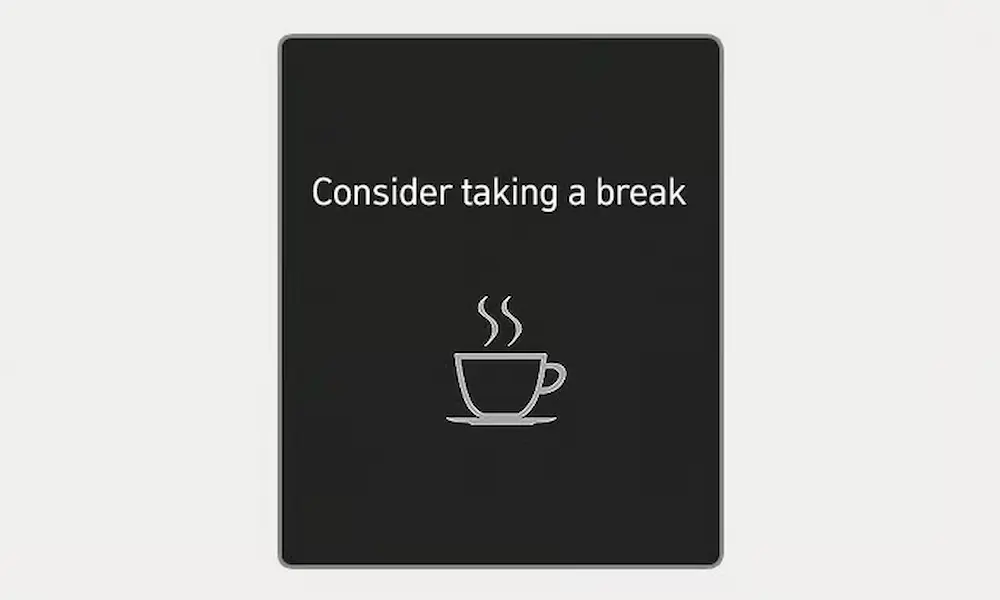
You’re cruising down the highway when suddenly a coffee cup pops up on your dashboard with a friendly reminder to “consider taking a break.” If you’re wide awake and confused, you’re not alone in wondering what triggered your Kia’s concern. Let’s break down what’s really happening with this common alert and how you can manage it.
What Is the “Consider Taking a Break” Warning?
Your Kia’s “consider taking a break” message comes from the Driver Attention Warning (DAW) system, a safety feature that monitors your driving patterns for signs of fatigue or distraction. Think of it as a digital co-pilot watching how you handle the wheel.
The system uses a front-facing camera mounted behind your rearview mirror to track your lane positioning, steering movements, and overall driving behavior. It rates your attention level on a scale from 1 to 5, with 5 being fully alert and 1 indicating you might need that coffee break. When your score drops below 1, you’ll get the warning message, a coffee cup icon, and an audible alert.
Here’s the catch: the system won’t activate unless you’ve been driving for at least 10 minutes, and it won’t bug you again if less than 10 minutes have passed since the last warning. It works when you’re traveling between 0-110 mph in most models, though some newer Kias extend this range to 0-130 mph.
How the Driver Attention Warning System Works
The DAW system isn’t reading your mind—it’s reading your driving. The front-facing camera continuously analyzes multiple vehicle signals to determine whether you’re driving like your usual self or showing signs of inattention.
What the system monitors:
- Steering angle changes and how much force you’re applying
- How well you’re staying centered in your lane
- Frequency of lane departures or corrections
- Total driving time without stopping
- How often Lane Keep Assist kicks in
The system gets smarter the longer you drive. During the first few minutes, it learns your normal driving style. Then it compares your current behavior against that baseline. Major deviations trigger the warning.
Some newer Kia models include a second camera—this one pointed at you. This driver-facing camera tracks eye movement, head position, and signs of drowsiness using infrared technology. It’s like having a really attentive passenger watching your every move.
Common Triggers That Set Off the Warning
Here’s where things get frustrating. The system doesn’t just activate when you’re actually tired. Plenty of normal driving situations can trip the sensor and make you feel like your car doesn’t trust you.
Time-based triggers:
- Driving more than 2 hours without a complete stop
- Extended highway cruising without taking your hands off the wheel
Driving behavior that raises red flags:
- Crossing lane lines frequently without signaling
- Making sharp or sudden steering corrections
- Weaving within your lane, even slightly
- Triggering Lane Keep Assist warnings repeatedly
Environmental factors you can’t control:
- Strong crosswinds pushing your car around
- Poor or faded lane markings confusing the camera
- Construction zones requiring constant lane changes
- Rural roads with inconsistent lane markers
One driver shared their experience: “I get this warning every time I drive on windy days. I’m not tired—I’m fighting gusts that want to push me into the next lane.”
Why You’re Getting False Alerts
The most annoying part? You can be completely alert and still trigger the warning. False positives happen more often than you’d think, and here’s why.
Normal driving maneuvers misread as inattention:
- Checking your blind spots or mirrors
- Merging onto highways with frequent lane changes
- Adjusting your position to avoid potholes
- Compensating for road camber or slopes
Road and weather conditions:
- Windy conditions requiring constant micro-adjustments
- Construction zones with confusing lane markings
- Curved roads where lane-keeping is harder
- Wet or reflective surfaces that confuse the camera
System calibration issues:
- Short trips where the system hasn’t learned your driving style
- Driving immediately after someone else used your car
- Recent windshield replacement affecting camera alignment
The system limitations are real. Heavy rain, snow, fog, ice on the windshield, or even bright sunlight can interfere with the camera’s ability to accurately read lane markings and your driving patterns.
How to Adjust or Disable the System
This is where model year makes a huge difference. If you’re driving an older Kia, you’ve got options. If you’ve got a 2023 or newer model, you’re more limited.
Pre-2023 Models: Full Control
Older Kias generally let you turn off the Driver Attention Warning completely. Navigate to:
Settings → Vehicle → Driver Assistance → DAW (Driver Attention Warning) → Off
You can also adjust sensitivity levels in most pre-2023 models, choosing between normal and high sensitivity settings.
2023+ Models: Limited Options
Starting with 2023 models, Kia integrated DAW into mandatory safety systems to comply with evolving regulations. You can’t completely disable it anymore, but you can adjust:
- Warning timing: Switch between Normal and Late sensitivity
- Warning method: Adjust volume or turn off haptic feedback (steering wheel vibration)
- Leading Vehicle Departure Alert: Toggle this related feature on or off
Some 2023+ models still offer an “Inattentive Driving Warning” toggle, but it’s becoming rare. Check your specific model’s settings menu to see what’s available.
Sensitivity Settings Explained
| Setting | What It Means | Best For |
|---|---|---|
| Normal Sensitivity | Standard detection threshold | Most driving conditions |
| High Sensitivity | Earlier warnings, more aggressive monitoring | Long highway trips when you want maximum safety |
| Late Warning | Delayed activation, fewer alerts | Experienced drivers who find normal mode too intrusive |
What to Do When the Warning Appears
When you see the coffee cup icon, you’ve got a decision to make. Don’t just dismiss it automatically—sometimes it’s genuinely helpful.
If you’re actually feeling tired:
- Take the hint seriously
- Find a safe place to pull over within the next few miles
- Rest for at least 15-20 minutes
- Grab that coffee or take a short walk
If you know you’re alert:
- Check your surroundings for what might’ve triggered it
- Consciously focus on smoother steering inputs
- Make sure you’re centered in your lane
- Continue driving normally—the system will recalibrate
The attention level resets automatically when you:
- Turn off the engine
- Unfasten your seatbelt AND open the driver’s door
- Stop for more than 10 minutes
Don’t try to game the system by making exaggerated steering movements or other tricks. It won’t help and might actually make things worse.
Troubleshooting System Malfunctions
Sometimes the DAW system acts up for technical reasons rather than your driving. Here’s what different warning messages mean.
“Check DAW (Driver Attention Warning) system”
This indicates a genuine malfunction requiring professional diagnosis. Don’t ignore it—the system might need calibration or repair.
“Inattentive Driving Warning disabled. Camera obscured”
Your front camera is blocked by debris, snow, ice, or weather conditions. Clean your windshield, particularly the area behind the rearview mirror. The system should resume normal operation once the camera has a clear view.
“Driver Assistance system limited. Camera obscured”
Similar to the above, but this affects multiple driver assistance features beyond just DAW. Check for obstructions and clean the windshield area thoroughly.
When You Need Professional Service
Certain situations require a visit to your Kia dealership:
- Consistent malfunctions that don’t clear after cleaning
- Warnings immediately after windshield replacement
- Erratic behavior following collision repair
- System errors that persist across multiple drives
Windshield replacement is particularly important to mention. The front camera needs precise calibration to function properly. If your windshield was replaced at a non-Kia facility, they might not have recalibrated the camera correctly.
Real-World Driver Experiences
Reading owner forums and discussions reveals patterns in how the system performs across different driving conditions.
One Kia EV6 owner notes: “I get the warning every single time I drive in construction zones. The temporary lane markings confuse the camera, and it thinks I’m weaving when I’m just following the actual lanes.”
Another driver with a 2024 Sportage shares: “After two hours of highway driving, I get the coffee cup even though I’m completely alert. I’ve learned it’s just a timer thing, not actually reading my fatigue level.”
A Telluride owner discovered: “Covering the driver-facing camera stopped most of my false alerts, but now I get a persistent ‘Driver Monitoring System malfunction’ warning instead. Pick your annoyance.”
These experiences highlight a common theme: the system works better in ideal conditions with clear lane markings, stable weather, and highway driving. It struggles with construction zones, rural roads, and challenging weather.
Making Peace with the Coffee Cup
Look, nobody enjoys their car nagging them when they’re perfectly alert. The “consider taking a break” warning can feel like an overprotective parent questioning your judgment. But understanding how the system works, what triggers it, and how to adjust it makes the feature more manageable.
For older Kias, you’ve got the freedom to disable it entirely if it bugs you too much. For newer models, you’re stuck with it, but adjusting sensitivity and warning methods helps reduce the annoyance factor. And occasionally, just occasionally, it might actually catch you during a moment of genuine inattention and prompt a break you actually needed.
Your best approach? Learn your vehicle’s specific settings, keep the camera clean, drive smoothly, and don’t stress when the coffee cup appears. Acknowledge it, assess whether you’re actually tired, and continue your drive. The system recalibrates constantly, and that attention level will climb back up as you demonstrate consistent, alert driving.
The technology isn’t perfect, but it’s improving with each model year. Until AI gets sophisticated enough to truly understand the difference between fighting crosswinds and fighting fatigue, we’re dealing with a system that occasionally cries wolf. Stay patient with it, adjust what you can, and remember—it’s trying to keep you safe, even if its methods sometimes feel a bit misguided.