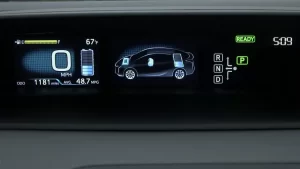
Your Prius won’t keep its engine running for an oil change check? That’s where Prius service mode comes in. This special diagnostic feature forces the gas engine to run continuously—and it’s easier to activate than you’d think. Here’s everything you need to know about using it safely.
What Is Prius Service Mode?
Prius service mode (sometimes called maintenance mode) overrides your hybrid’s normal stop-start behavior. Instead of the engine cycling on and off like usual, it runs continuously at idle.
Think of it as telling your Prius: “Hey, I need you to act like a regular car for a bit.” The hybrid system backs off, and the gas engine stays running until you turn off the vehicle.
This isn’t some hidden hack—it’s a built-in feature Toyota designed for mechanics and tech-savvy owners who need the engine running for specific maintenance tasks.
Service Mode vs. Other Diagnostic Features
Your Prius has three different diagnostic capabilities. Don’t mix them up:
Service/Maintenance Mode forces the engine to run continuously. It physically changes how your car operates.
Self-Diagnosis Menu shows you system status and battery voltage through your infotainment screen. It doesn’t change anything—just displays information.
OBD-II Diagnostics uses the standard port under your dash to read trouble codes with an external scan tool.
Each serves a different purpose. You’ll want service mode when you need that engine running.
Why You’d Actually Use Service Mode
Service mode isn’t for everyday situations. It’s for specific maintenance tasks that require a running engine.
Bleeding the coolant system is probably the most common reason. Air bubbles in your cooling system need the engine at operating temperature to work their way out. Service mode lets you do this properly.
Checking for oil leaks after a change works better with a warm, running engine. You can spot drips you’d miss otherwise.
Emissions testing sometimes requires continuous idle. Some state inspection procedures won’t work without it.
Listening for weird engine noises becomes possible when the engine stays running. That intermittent rattle? You can finally track it down.
Here’s what you shouldn’t use it for: routine diagnostics, checking your hybrid battery health, or reading error codes. A simple OBD-II scanner handles those tasks without the safety concerns.
Before You Start: Critical Safety Requirements
Let’s get the scary stuff out of the way first.
DO NOT DRIVE in service mode. Seriously. You’ll cause severe damage to your transmission and inverter. The mode disables traction control, stability control, and other systems that keep you safe. It’s designed for stationary use only.
Some owners have learned this the hard way.
Park on level ground and engage your parking brake. This isn’t optional—it’s part of the activation sequence.
Get proper ventilation. Your engine will run continuously, pumping out carbon monoxide. Never activate service mode in a closed garage. Open the door, turn on a fan, or do it outside.
Work quickly. You’ve got 60 seconds to complete the activation sequence. Some sources say even less—around 15 to 20 seconds. Practice the steps before you start.
Step-by-Step Activation Process
The good news? The activation process works the same across most Prius generations from 2004 to 2023. You’re basically doing a specific dance with your pedals and shifter.
What You’ll Do
Step 1: Enter Accessory Mode
Press your START/POWER button twice without touching the brake pedal. Your dashboard lights up, but you won’t see “READY” on the display.
Step 2: First Accelerator Sequence
Push the gas pedal to the floor twice while in Park. Make it quick and deliberate.
Step 3: Shift to Neutral
Hold the brake, shift to Neutral, release the brake.
Step 4: Second Accelerator Sequence
Gas pedal to the floor twice in Neutral.
Step 5: Back to Park
Hold the brake, shift to Park, release the brake.
Step 6: Final Accelerator Sequence
Gas pedal to the floor twice in Park.
Step 7: Check for Confirmation
Your display should show “MAINTENANCE MODE” or similar message. This confirms you did it right.
Step 8: Start the Engine
Hold the brake and press START/POWER once. The engine fires up immediately and stays running.
That’s it. Your engine now idles continuously until you shut off the vehicle.
Differences Between Prius Generations
The basic procedure stays consistent, but each generation has quirks worth knowing.
Gen 2 (2004-2009)
Uses the exact same activation steps. Your confirmation message might look different on the smaller display, but the process is identical.
Gen 3 (2010-2015)
Perfect match with newer generations. You’ll see “MAINTENANCE MODE” clearly on your larger display screen.
Gen 4 (2016-2021) Including Prius Prime
Same activation sequence works for both regular Prius and Prime models. Some displays show “Two Wheel Drive Maintenance Mode” instead. Don’t worry—it’s the same thing.
Gen 5 (2022+)
Here’s where things get murky. The traditional procedure might not work on the newest models. Toyota may have changed the activation method. If you’ve got a 2022 or newer, check with a Toyota tech first.
What Happens in Service Mode
Once activated, your Prius behaves differently in several ways.
The gas engine runs constantly at idle—no more cycling on and off. The hybrid battery takes a back seat.
Your dashboard clearly shows you’re in maintenance mode. Don’t ignore that message.
Safety systems go offline. No traction control, no stability control, no electronic brake distribution. Your car has basically disabled its self-preservation instincts.
The vehicle becomes unsafe to drive. Those disabled systems? They’re critical for normal operation.
Getting Out of Service Mode
Easy part: press START/POWER to turn off your Prius. That’s it.
When you restart normally (brake pedal held, press START/POWER once), everything returns to standard operation. All your safety systems come back online.
No special exit sequence needed. No need to reverse the activation steps. Just turn it off like normal.
The Self-Diagnosis Menu Alternative
Sometimes you don’t need service mode—you just want to check on your car’s health. The self-diagnosis menu gives you that without running the engine.
For Gen 2 & 3 (2004-2015)
Hold your DISPLAY button and flip your headlight switch in this pattern: off-on-off-on-off. Do it 3-4 times quickly. You’ll access diagnostic screens showing battery voltage and system status.
For Gen 4 (2016+)
Hold HOME or MENU button. Do the light switch dance: off-tail-off-tail-off-tail-off. Wait for the service menu to appear on your big touchscreen.
This menu lets you monitor your hybrid battery voltage and check various systems without any safety concerns. It’s purely informational.
Should You DIY This?
Honest answer? It depends on your comfort level with cars.
Service mode is designed for professional techs who understand hybrid safety procedures. Those high-voltage components under the hood aren’t forgiving.
That said, knowledgeable owners can safely use service mode for basic tasks like coolant bleeding or leak checking. Just respect the safety warnings.
For routine diagnostics and battery monitoring, skip service mode entirely. Get an OBD-II scanner designed for hybrids. You’ll get the information you need without the risks.
If you’re bleeding coolant or need that engine running for a specific repair, service mode is your tool. Just don’t get creative with it.
Common Service Mode Applications
Let’s talk about when you’d actually reach for this feature.
Coolant System Work
After replacing coolant or doing cooling system repairs, air bubbles get trapped. Service mode lets you run the engine at operating temperature while squeezing hoses and burping the system. Those bubbles need heat and flow to work their way out.
Post-Oil Change Inspection
Changed your oil at home? Service mode lets you warm up the engine and check for leaks around your drain plug and filter. A warm engine makes leaks obvious—cold oil might not drip at the same spots.
Diagnostic Sound Checks
That mystery rattle that only happens sometimes? With service mode, you can make the engine run while you poke around under the hood. No more waiting for the engine to randomly start.
Emissions Testing Requirements
Some state inspection procedures require steady idle for emissions testing. Your hybrid’s normal cycling confuses the equipment.
The Bottom Line on Service Mode
Prius service mode is a practical maintenance tool when used correctly. It’s not complicated—just a specific button and pedal sequence that forces your engine to stay running.
The key is understanding when you actually need it. Coolant bleeding? Yes. Checking for leaks? Absolutely. Reading trouble codes? No—use a scanner instead.
Respect the safety warnings, work in a ventilated area, and never attempt to drive in service mode. Follow those rules, and you’ve got a useful feature that makes certain maintenance tasks actually possible on a hybrid.
Your Prius was designed with this mode for a reason. Use it right, and it’s perfectly safe. Use it wrong, and you’re looking at expensive repairs.