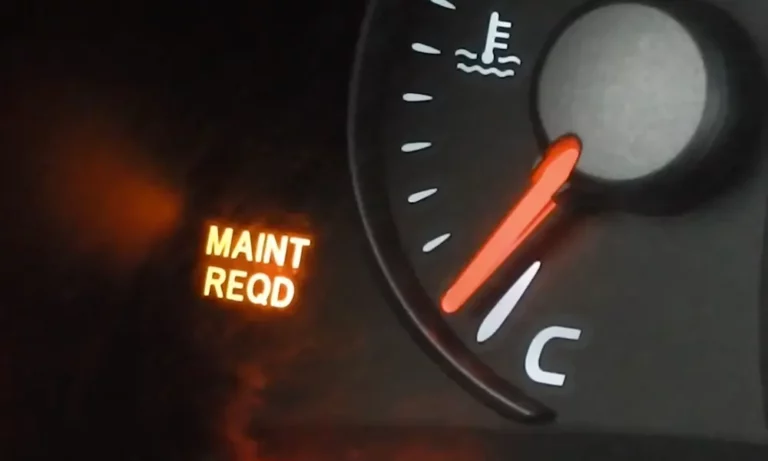
That annoying “MAINT REQD” light just popped up on your Toyota’s dashboard, and you’re wondering how to make it disappear. Whether you’ve just completed an oil change yourself or visited a mechanic who forgot to reset it, you don’t need to make a special trip to the dealership. With a few simple steps, you can reset this maintenance reminder yourself in under a minute.
What Does the Toyota Maintenance Required Light Mean?
The Toyota “MAINT REQD” light is simply a mileage-based reminder system that illuminates every 5,000 miles. It’s not connected to any sensors that detect actual problems with your vehicle – it’s just a helpful nudge to schedule routine maintenance, typically an oil change.
Unlike warning lights (like check engine or low oil pressure), this indicator isn’t alerting you to an urgent issue. It’s more like your car’s way of saying, “Hey, time for a checkup!”
How to Reset Toyota Maint Reqd Light in Newer Models (2016-2025)
Modern Toyotas with multi-information displays make the reset process straightforward using dashboard controls:
- Turn the ignition to “ON” position (don’t start the engine)
- Use the steering wheel controls (usually arrows) to navigate to Settings (look for the gear icon)
- Select Vehicle Settings and press OK
- Find and select Scheduled Maintenance
- Choose Reset Data and confirm by selecting Yes
- You’ll see “Reset Complete” on the display
This method works for most newer Toyota models including Camry, Corolla, RAV4, Tacoma, Tundra, 4Runner, Avalon, Prius, and Sienna with digital displays.
Reset Method for Toyotas with Push-Button Start
If your Toyota has keyless ignition with a push-button start:
- With the vehicle off, press the start button twice without pressing the brake pedal (this puts the car in accessory mode)
- Press the trip meter button until you see Trip A on the display
- Turn the ignition completely off
- Press and hold the trip meter button while simultaneously pressing the start button twice
- Continue holding until the display flashes zeros or “000000”
- Release the button, and the light should be off
The timing can be tricky on this method, so if it doesn’t work the first time, try again with slightly different timing between button presses.
Traditional Reset Method for Older Toyota Models (Pre-2016)
For older Toyotas with basic displays, follow these steps:
- Turn the ignition to “ON” position (don’t start the engine)
- Make sure the odometer displays total mileage (not Trip A or B)
- Turn the ignition to “OFF”
- Press and hold the trip reset/odometer button
- While holding the button, turn the ignition back to “ON” position
- Keep holding the button until the display shows all zeros (“000000”) and the maintenance light disappears
- Release the button once the light turns off
This classic method works on many Toyota models from the 1990s through the mid-2010s.
Model-Specific Reset Instructions
Toyota Camry (2012-2017)
- Turn ignition to “ON”
- Switch display to odometer mode
- Turn ignition “OFF”
- Hold trip reset button while turning ignition back to “ON”
- Continue holding until zeros appear (about 5 seconds)
Toyota Corolla (2014-2019)
For Corollas with color multi-information displays:
- Turn ignition “ON” (or press start button twice without brake)
- Use steering wheel buttons to navigate to Settings
- Select Scheduled Maintenance
- Choose Reset and confirm by selecting OK
Toyota RAV4 (2013-2018)
- Turn key to “ON” position
- Press trip meter reset button until odometer displays
- Turn key to “OFF”
- Hold trip reset button and turn key to “ON”
- Hold button until maintenance light flashes and then goes out
Toyota Tacoma (2016-2023)
With the digital display:
- Turn ignition to “ON” position
- Press the “APPS” button on the steering wheel
- Navigate to “Settings” using the arrow buttons
- Select “Maintenance Reset”
- Choose “Yes” to confirm
Common Challenges When Resetting Maint Reqd Light
Light Won’t Reset on First Try
The timing of button presses can be crucial. If your first attempt fails, try again with slightly different timing. Sometimes you need to hold the button longer or be quicker with the ignition switch.
Can’t Find the Right Menu Option
Newer Toyota models might have slightly different menu layouts. If you can’t find “Scheduled Maintenance,” look for similar options like “Maintenance Reset,” “Service,” or “Vehicle Settings.”
Reset Worked But Light Returned
If the light comes back on immediately after reset, your vehicle might have multiple maintenance items due. Some Toyotas track different service intervals separately. In rare cases, this could indicate an actual issue requiring diagnosis.
When Should You Reset the Maintenance Light?
Only reset the maintenance light after completing the recommended service. The system doesn’t know whether you’ve actually changed the oil or performed other maintenance – it’s your responsibility to ensure the work is done before clearing the reminder.
If you’ve skipped the service but reset the light anyway, you risk forgetting about needed maintenance, which could lead to engine damage or other problems down the road.
What Maintenance Does Your Toyota Need?
When the maintenance light appears, Toyota typically recommends:
| Mileage | Service Needed |
|---|---|
| 5,000 miles | Oil change, tire rotation, fluid level check |
| 15,000 miles | Same as 5K + cabin/engine air filter inspection |
| 30,000 miles | More comprehensive service including transmission fluid |
For the most accurate maintenance schedule for your specific model and year, check your owner’s manual or the Toyota owner’s website.
The Smart Way to Track Toyota Maintenance
Instead of relying solely on the maintenance light:
- Use a maintenance tracking app or the Toyota owner’s portal
- Keep service records in your glovebox or digitally
- Place an oil change sticker on your windshield with the next service mileage
- Consider the maintenance light a backup reminder rather than your primary system
By staying proactive with your Toyota’s maintenance schedule, you’ll maximize its reliability and lifespan while potentially avoiding costly repairs down the road.
Remember: The maintenance light is just a simple mileage counter – it’s up to you to ensure your Toyota actually receives the care it needs when that light comes on.