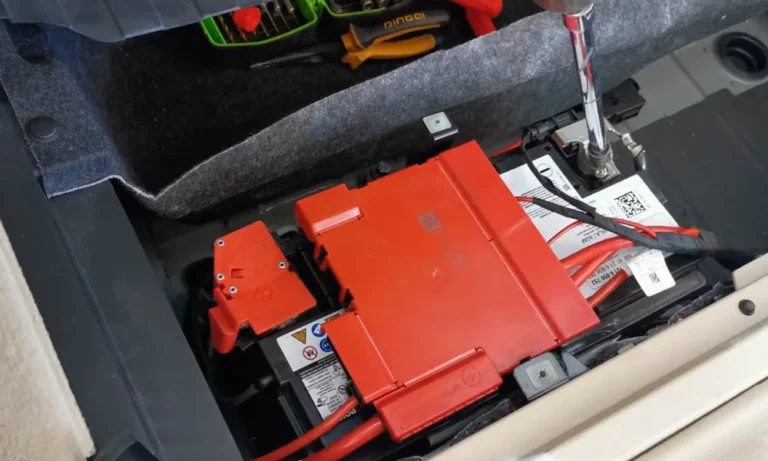
Ever noticed your BMW acting strange after replacing the battery? Your car’s sophisticated electronics might be confused. That’s where a BMW battery reset comes in – it’s not just a nice-to-have but a necessity for modern BMWs. This guide walks you through everything you need to know about resetting your BMW’s battery system properly.
What Is a BMW Battery Reset?
A BMW battery reset (also called battery registration) is a crucial procedure that informs your car’s computer system about a new battery installation. It’s not just clicking a reset button – it’s a digital handshake between your new battery and your BMW’s brain.
When you install a new battery, your BMW needs to know about it to:
- Optimize charging patterns
- Monitor battery health accurately
- Adjust power management settings
- Reset aging profiles from the old battery
Without proper registration, your BMW might treat your brand-new battery like it’s already worn out, significantly reducing its lifespan and causing potential electrical issues.
Why BMW Battery Reset Is Critical
Unlike older vehicles, modern BMWs use an Intelligent Battery Sensor (IBS) that constantly monitors battery condition, charge levels, and usage patterns. When you skip the reset process, several problems can occur:
- Shortened battery life: Your new battery could fail in 18 months instead of lasting 4-5 years
- Charging issues: Improper charging can damage the new battery
- Engine start/stop malfunctions: The system may not work correctly
- Dashboard warning lights: Battery or electrical system warnings may appear
- Electrical glitches: Random electrical problems throughout the vehicle
A recent Reddit thread shows many owners reporting premature battery failure when skipping this crucial step.
BMW Battery Registration vs. Coding: Know the Difference
Many BMW owners confuse these two terms, but they’re actually different procedures:
Battery Registration
Registration simply tells your BMW’s computer that a new battery has been installed. It’s required for all battery replacements, even when using identical batteries.
Battery Coding
Coding is an additional step needed when installing a battery with different specifications:
- Different capacity (changing from 70Ah to 90Ah)
- Different chemistry (switching from lead-acid to AGM)
- Different manufacturer specs
This table breaks down when each procedure is needed:
| Scenario | Registration Needed | Coding Needed |
|---|---|---|
| Same battery type/capacity | Yes | No |
| Higher/lower capacity | Yes | Yes |
| Switching to AGM battery | Yes | Yes |
| Switching to lithium battery | Yes | Yes |
How to Reset BMW Battery: DIY Methods
You have several options for resetting your BMW’s battery system yourself:
Method 1: Using OBD-II Diagnostic Tools
This is the most reliable DIY approach for models after 2002:
- Get the right equipment:
- OBD-II scanner with BMW-specific software (BimmerLink, Carly, Foxwell, etc.)
- Compatible OBD adapter
- Connect and register:
- Plug the adapter into your BMW’s OBD port (usually under the dashboard)
- Open the app and navigate to service functions
- Select “Battery Registration” or “Battery Reset”
- Follow the on-screen prompts to complete the process
- Verify success:
- Look for confirmation message
- Check that any battery warnings have cleared
- Take the car for a 30-minute drive to help calibrate the system
The BimmerLink app is particularly popular for this purpose, with an intuitive interface for battery registration.
Method 2: Manual Reset Procedure (Limited Models)
For some pre-2008 BMWs, you can try this method, though it’s less comprehensive than proper registration:
- Sit in the driver’s seat with the key in your hand
- Insert the key and turn to position II (ignition on without starting the engine)
- Press and hold the odometer reset button for approximately 10 seconds
- Navigate to service menu option “19” using the odometer button
- Hold the button again to reset
This method mainly resets service intervals rather than fully registering the battery, so it’s not ideal for newer models with advanced battery management systems.
Step-by-Step Battery Replacement and Registration
For a complete battery replacement with proper registration:
1. Prepare for Replacement
Before touching anything:
- Park on level ground
- Turn off all electronics
- Have memory saver connected (optional but recommended to preserve settings)
- Have the right tools ready (wrenches, gloves, safety glasses)
2. Remove the Old Battery
Safety first:
- Disconnect the negative (black) terminal first
- Then disconnect the positive (red) terminal
- Remove any battery hold-down brackets
- Carefully lift out the old battery
3. Install the New Battery
- Clean the battery tray if needed
- Place the new battery in the same orientation
- Make sure vent tubes are properly connected (especially for AGM batteries)
- Reconnect the positive terminal first, then the negative
- Secure all hold-down brackets
4. Register the New Battery
Using an OBD tool like BimmerLink or Carly:
- Connect the OBD adapter
- Launch the app
- Navigate to Service > Battery Registration
- Select your battery type
- Enter the battery capacity (Ah rating)
- Confirm and complete the registration
For different battery types, you’ll need to specify:
| Battery Type | Typical Settings |
|---|---|
| Standard Lead-Acid | Type: Lead-acid, Capacity: 70-80Ah |
| AGM | Type: AGM, Capacity: 80-90Ah |
| Lithium | Type: Lithium, Capacity: 60Ah (special coding required) |
Common Issues After BMW Battery Reset
Even after registration, you might encounter these issues:
Dashboard Warning Lights Won’t Clear
If battery or electrical system warnings persist:
- Try disconnecting the negative terminal for 15 minutes
- Drive the car for at least 30 minutes at highway speeds
- Check for other electrical issues using a diagnostic tool
Vehicle Won’t Start After Battery Replacement
This could indicate:
- Improper battery connection
- Failed registration
- BST (Battery Safety Terminal) activation
- DME lockout requiring reset
If your BMW won’t start after battery replacement, check all connections first, then try a 30-minute reset by disconnecting the negative terminal completely.
Electrical Glitches After Reset
Some systems might need time to relearn settings:
- Climate control may reset to default settings
- Power windows might need initialization
- Radio presets could be lost
- Automatic start/stop might be temporarily inactive
Most of these will resolve after driving the car for 50-100 miles.
Battery Registration Tools Comparison
Several tools can handle BMW battery registration:
| Tool | Price Range | Ease of Use | Features |
|---|---|---|---|
| BimmerLink App + Adapter | $79-120 | Easy | Registration only, works with smartphone |
| Carly Scanner | $100-150 | Easy | Full diagnostics plus registration |
| Foxwell NT510 Elite | $160-200 | Medium | Dedicated scanner with multiple functions |
| ISTA+ Software | $30-300 | Complex | Professional dealer-level tool (requires laptop) |
The Carly system offers a good balance of features and usability for most DIY owners.
BMW Battery Types and Their Requirements
Choosing the right battery is critical:
AGM (Absorbent Glass Mat) Batteries
Modern BMWs typically use AGM batteries, which:
- Handle frequent start-stop cycles better
- Provide more consistent power delivery
- Last longer in demanding electrical environments
- Cost 30-50% more than standard batteries
When upgrading to AGM, you must code the new battery type using your diagnostic tool.
Standard Lead-Acid Batteries
These are:
- Less expensive
- Less durable for modern BMWs
- Not recommended for vehicles with start-stop technology
- Adequate for older models with fewer electronics
Lithium-Ion Batteries
The newest option offering:
- Lighter weight (50-70% lighter than lead-acid)
- Longer lifespan
- Better cold-weather performance
- Much higher cost
- Special coding requirements
Installing lithium batteries requires specific coding procedures beyond standard registration.
DIY vs. Professional BMW Battery Reset
Should you DIY or go to a professional?
DIY Advantages:
- Cost savings ($150-200 compared to dealer prices)
- Convenience of doing it at home
- Learning experience
- Ability to handle future resets yourself
Professional Advantages:
- Guaranteed proper registration
- Access to dealer-level diagnostic tools
- No need to purchase equipment
- Warranty on the work performed
If you’re comfortable with technology and willing to invest in an OBD tool, DIY is perfectly feasible. A single quality tool will pay for itself after 1-2 battery replacements compared to dealer prices.
Maintaining Your BMW Battery After Reset
After successful registration, follow these tips to maximize battery life:
- Drive regularly for at least 30 minutes to ensure proper charging
- Limit short trips where the battery doesn’t fully recharge
- Consider a trickle charger for vehicles that sit for extended periods
- Have your charging system checked annually
- Monitor battery voltage through your iDrive system or OBD tool
- Avoid leaving electronics running when the engine is off
Most BMW batteries last 4-5 years with proper care and registration, compared to just 1-2 years without proper management.
BMW Models and Their Battery Reset Requirements
Battery registration procedures vary slightly across BMW models:
3 Series (E90/F30/G20)
Most sensitive to proper registration, especially with start-stop technology. The F30 generation requires precise battery type coding when upgrading to AGM.
5 Series (E60/F10/G30)
Higher electrical demands mean registration is critical. The F10 models in particular need exact capacity matching during registration.
X Series (X3/X5/X7)
SUV models have additional electrical systems and often benefit from higher capacity batteries, requiring both registration and coding when upgrading.
i Series (i3/i4/i8)
Electric and hybrid models have specialized high-voltage battery systems in addition to the conventional 12V battery, requiring specific registration procedures.
Preventative Battery Maintenance Saves Money
Regular battery maintenance is far cheaper than replacement:
- Check connections for corrosion every 6 months
- Keep the battery and terminals clean
- Test voltage levels periodically (healthy BMW batteries show 12.6V when fully charged)
- Address any electrical issues promptly
- Register the battery immediately after replacement
With proper care and registration, you’ll extend your battery’s life by 2-3 years – representing a significant cost saving over the life of your BMW.
Professional BMW Battery Registration Options
If you prefer professional help:
- BMW dealerships offer registration for $150-250
- Independent BMW specialists typically charge $75-150
- Some auto parts stores now offer the service when purchasing a battery
- Mobile mechanics with BMW-specific tools can perform the service at your location
Many independent BMW shops now offer more affordable registration services than dealerships.