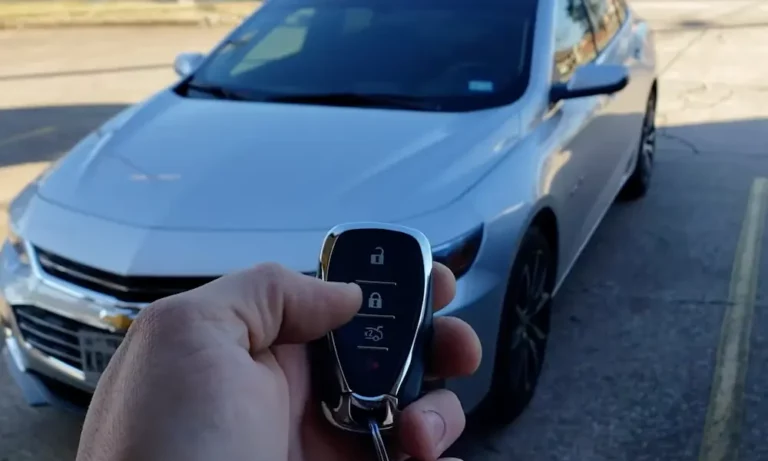
Is your Chevy’s remote start acting up? You’re not alone – this common issue can be super frustrating when you’re trying to warm up or cool down your car from a distance.
Your remote start might not be working because of simple issues like a dead key fob battery, having your car in the wrong gear, or due to safety features that need to be checked. Most problems have quick and easy fixes that you can try before heading to the dealership.
The good news is that most remote start problems can be solved right at home. Keep reading to discover the common causes and simple solutions that could get your remote start working again in minutes.
Common Reasons for Chevy Remote Start Issues
Remote start failures on Chevy vehicles usually come from battery problems, sensor malfunctions, temperature issues, or system settings. These problems can stop your car from starting remotely, but most have simple fixes.
Key Fob Battery Problems
A weak or dead key fob battery is often why your remote start stops working. You might notice the remote working only sometimes or needing multiple button presses.
Signs of a failing key fob battery:
- Shorter working range than normal
- Multiple clicks needed to lock/unlock
- Remote start works inconsistently
Replacing your key fob battery is easy and cheap. Most Chevy key fobs use CR2032 batteries that cost about $5. Clean the battery contacts while you’re changing it for best results.
Hood Latch Sensor Issues
Your Chevy’s remote start won’t work if the hood latch sensor thinks the hood is open. This safety feature prevents the engine from starting while someone might be working on it.
Common hood sensor problems:
- Dirt and debris blocking the sensor
- Misaligned hood latch
- Damaged wiring to the sensor
Check that your hood closes fully and the latch moves freely. A quick cleaning of the hood latch sensor area can often fix the problem.
High Coolant Temperature Troubles
Your remote start system checks engine temperature before starting. If it’s too high, the system won’t start to protect the engine.
Watch for these signs:
- Temperature gauge reading high
- Check engine light on
- Steam from under hood
Let your engine cool down completely before trying remote start again. Check coolant levels and look for leaks if this happens often.
Valet Mode Restrictions
When valet mode is on, your remote start won’t work. This setting protects your car when others are driving it.
To check valet mode:
- Look for a “valet” light on your dash
- Check your key fob for a valet button
- Review your vehicle settings menu
Turn off valet mode using your key fob or vehicle settings menu to restore remote start function.
Troubleshooting Your Chevy Remote Start
Your Chevy’s remote start can stop working for several common reasons that are easy to fix. A few simple checks and steps will often get your system running again quickly.
Ensuring Proper Remote Start Procedure
Make sure your Chevy is in Park before trying to use the remote start system. If it’s not working, shift out of Park and back in again to reset the sensor.
Double-check that you’re following the correct button sequence. Press the lock button first, then press and hold the remote start button until the parking lights flash.
Your key fob battery might be getting weak. Try replacing the battery with a fresh one if the remote’s signal seems weak or inconsistent.
Limiting Remote Start Attempts
Your Chevy has built-in safety features that prevent multiple start attempts in a short time. If you’ve tried starting twice already, the system will temporarily lock you out.
To reset the system:
- Insert your key in the ignition
- Turn it to the “ON” position
- Wait 30 seconds
- Remove the key
- Try remote start again
Checking the Check Engine Light
A lit Check Engine light will disable your remote start functionality. This is a safety feature to prevent damage to your engine.
Check your gas cap – a loose cap can trigger the Check Engine light. Tighten it and wait a few drive cycles to see if the light clears.
If the light stays on, visit your local Chevy dealer to have the code read and fix any underlying issues. Once the problem is fixed and the light turns off, your remote start should work again.
Fixing Common Remote Start Problems
Most remote start issues have simple fixes that you can handle yourself with basic tools and knowledge. The problem often comes down to a worn battery, faulty sensor, or incorrect system settings.
Replacing the Key Fob Battery
A dead key fob battery is the most frequent cause of remote start failure. When your remote works inconsistently or needs multiple presses, it’s time for a new battery.
Buy a fresh CR2032 battery from any hardware store or auto parts shop. Look for the small notch on your key fob’s edge. Use a coin or flat screwdriver to gently pry it open.
Remove the old battery and note its position. The positive (+) side usually faces up. Insert the new battery in the same orientation. Press the fob halves together until they click.
Test your remote start from different distances to confirm the fix worked.
Addressing the Hood Latch Sensor
Your remote start system won’t work if the hood latch sensor isn’t properly connected. This safety feature prevents the engine from starting while someone works on it.
Clean the hood latch sensor with electrical contact cleaner. Check for loose or corroded wires around the sensor.
Make sure the hood closes completely. A slightly open hood will trigger the sensor and block remote start.
If cleaning doesn’t help, you might need to adjust or replace the sensor. The part is typically inexpensive and attaches with just two bolts.
Managing Coolant and Oil Pressure for Remote Start
Low coolant levels or oil pressure will disable your remote start to protect the engine. Check your coolant level when the engine is cold.
Top off the coolant if it’s below the “MIN” line. Use the type specified in your owner’s manual. Look for any obvious leaks while you’re under the hood.
Check your oil level with the dipstick. Add oil if needed. Important: Use the correct grade and weight of oil for your Chevy model.
Let the engine run for a few minutes after adding fluids. This helps ensure proper pressure readings.
Deactivating Valet Mode
Valet mode can prevent remote start from working. Many drivers forget they turned it on.
Press and hold the lock and trunk buttons on your key fob for 3 seconds. Some models use different button combinations – check your manual for the exact sequence.
Watch for the dashboard lights to flash, confirming valet mode is off. Try your remote start again.
If you can’t turn off valet mode with the key fob, you might need to use the vehicle’s infotainment system menu or OnStar app.
Chevy Remote Start Enhancements and Extra Tips
Getting the most from your Chevy’s remote start means knowing the right techniques and hidden features. You can make this convenient feature work better with some simple tweaks and knowledge.
Optimizing the Remote Start Function
Make sure to press the lock button first before using remote start. This safety feature helps prevent accidental starts.
Keep your key fob battery fresh. A weak battery can reduce the remote start range and reliability. Replace it every 12-18 months.
Try standing closer to your vehicle when using remote start in cold weather. Cold temperatures can affect signal strength.
Position yourself with a clear line of sight to your vehicle. Buildings and other obstacles can block the signal.
Learning from the Owner’s Manual
Your Chevy’s manual contains specific remote start timing information. Some models need you to hold the button for 2-4 seconds, while others work with a quick press.
Check if your model has special safety features like preventing remote start when a key is inside the car.
Look up the maximum number of remote start attempts allowed. Many Chevys limit consecutive starts to prevent battery drain.
Find out if your model has temperature-based auto-shutoff. This helps protect your engine in extreme weather.