
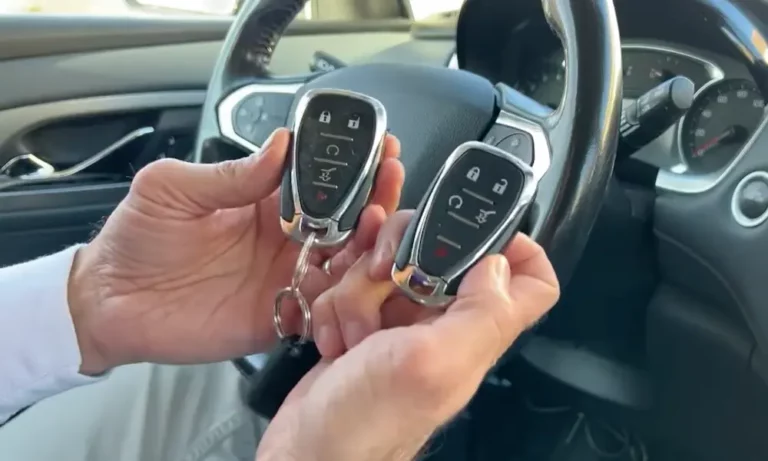
That “2 Keys Programmed” message just popped up on your Chevy’s dashboard, and now you’re wondering if someone’s trying to steal your truck. Here’s what’s actually happening: this message is usually harmless—it’s just your car’s way of telling you how many keys it recognizes. But sometimes, especially in certain Silverado models, it can signal a serious electrical problem. Let’s break down what this message means and what you should do about it.
Understanding the “2 Keys Programmed” Message
Your Chevy’s Body Control Module (BCM) keeps track of every key fob it’s authorized to start your vehicle. When you see “2 Keys Programmed,” it’s simply the system announcing the current count.
This message appears in three situations:
Right after programming a new key. When you successfully add a key, the dashboard confirms the new total. If you had two keys and just added a third, you’ll see “3 Keys Programmed.”
After a battery issue or jump start. This is the scenario that freaks people out. When your battery dies or drops below 9.5 volts, the BCM can reset. Once power returns, it boots up and broadcasts its status—including the key count. You didn’t get hacked. Your car’s just saying “hello” after waking up.
During the key programming process. Some Chevys require two existing keys to program a third. The message appears as a confirmation: “I see your two keys. You can proceed.”
The Silverado/Sierra Problem: When This Message Signals Danger
If you’re driving a 2014–2018 Silverado, Sierra, or Tahoe, pay attention. The “2 Keys Programmed” message can appear alongside a terrifying cascade of warnings:
- Service StabiliTrak
- Steering Assist Reduced
- Service Trailer Brake System
- Radio goes black
- AC stops working
According to NHTSA safety reports, this happens because these trucks have a design flaw in their ground connections.
What’s Actually Breaking
Your truck’s BCM and electric power steering share a common ground point called G218. It’s located behind the driver’s side kick panel. During factory assembly, paint or sound-deadening material wasn’t properly cleared from the metal contact point.
Here’s the failure sequence:
- You hit a bump or turn on a high-power accessory (turn signal, AC)
- The poor ground connection creates resistance
- Voltage to the BCM drops below operating threshold
- The BCM shuts down for milliseconds
- Your power steering dies (terrifying at highway speeds)
- The BCM reboots and proudly announces “2 Keys Programmed”
The message itself isn’t the problem—it’s the BCM’s startup script running while you’re driving. It’s like your computer showing the Windows logo in the middle of typing an email.
The Fix (It’s Not Your Keys)
Don’t waste money programming new keys or replacing the ignition. Here’s the proper repair:
- Locate ground point G218 (driver’s side kick panel area)
- Remove the ground nut and wire connectors
- Use sandpaper to remove all paint and primer until you see bare metal
- Install a star washer to bite into the metal
- Torque the nut to specification
Also check your negative battery cable. The 2014–2015 models had faulty crimps that cause similar symptoms.
How to Program a New Chevy Key (When You Have Two Keys)
Most modern Chevys let you program additional keys yourself—but only if you already have two working keys. This security feature prevents thieves from adding keys easily.
The Quick Method (Push-Button Start Vehicles)
For Cruze (2016+), Malibu (2016+), Tahoe (2015+):
- Get in the car with both existing key fobs
- Close all doors
- Insert the first key into the transmitter pocket
- Press the Engine Start button twice (don’t start the engine)
- Remove the first key within 5 seconds
- Insert the second key into the pocket
- Press Engine Start twice again
- Remove the second key
- Insert the NEW key into the pocket
- Press Engine Start—you’ll hear two chimes
- The message will update to “3 Keys Programmed”
Critical detail: The “transmitter pocket” location varies by model:
| Model | Pocket Location |
|---|---|
| Cruze (2016+) | Front cupholder (lay flat) |
| Malibu | Center console bottom (remove rubber mat) |
| Tahoe/Suburban | Under removable tray in center console |
| Silverado (2019+) | Center console armrest area |
The Keyed Ignition Method
For Cruze (2011–2015), Silverado (2014–2018):
- Insert the first existing key, turn to ON (not start)
- Turn to OFF and remove within 5 seconds
- Insert the second existing key, turn to ON
- Turn to OFF and remove within 5 seconds
- Insert the NEW key, turn to ON
- The security light will turn off—the key is programmed
- “2 Keys Programmed” will update to “3 Keys Programmed”
The “All Keys Lost” 30-Minute Procedure
Lost all your keys? Some Chevy models let you program a new key from scratch—but it takes patience and a battery charger.
This works on: Most keyed ignition models (Cruze 2011–2015, Silverado 2014–2018, older Malibu).
This doesn’t work on: Most push-button start vehicles without dealer tools.
The Process
- Connect a battery charger first. This process drains batteries and if voltage drops during the final write cycle, you can brick your BCM.
- Insert the new (blank) key and turn to ON. The security light stays on.
- Wait exactly 10 minutes and 30 seconds. The light turns off.
- Turn OFF for 5 seconds. Turn back to ON.
- Wait another 10 minutes and 30 seconds.
- Turn OFF for 5 seconds. Turn back to ON.
- Wait a final 10 minutes and 30 seconds.
- Turn OFF, then back to ON. The message “1 Key Programmed” appears.
Don’t skip the battery charger. Seriously.
The One-Key Problem (Why You Can’t Program a Third Key)
Bought a used Tahoe or newer Silverado that only came with one key? You’re stuck.
Newer GM vehicles (2015+ Tahoe, 2019+ Silverado, 2016+ Cruze/Malibu with push-button start) require two working keys to add a third via the dashboard method. There’s no workaround.
According to discussions on locksmith forums and user communities, your only options are:
- Visit a Chevy dealer (expect $200–400 for programming)
- Hire an automotive locksmith with an Autel IM508/IM608 programmer
- Buy a second used key fob first, program it, then program your third
The Cruze Frequency Trap
If you bought a 2017 Cruze key fob online and it won’t program, check the frequency.
GM changed from 315 MHz to 433 MHz mid-year in 2017. According to Cruze owner reports, there’s no error message—the car just won’t detect the wrong frequency. It’ll time out silently.
Check your owner’s manual or ask a dealer which frequency your specific VIN uses before ordering replacement fobs.
Canadian Vehicles: Why Nothing Works
Does your VIN start with the number 2? Your truck was built for the Canadian market.
Canada requires stricter anti-theft compliance (ULC S338 standard). GM disables all user programming features on Canadian vehicles. The dashboard method doesn’t work. The 30-minute procedure doesn’t work.
Your only option is a GM dealer with the MDI diagnostic tool and proper security codes. No exceptions.
This catches people who buy used trucks imported from Canada. You won’t know until you try to program a key and nothing happens.
Programming Capability by Model
Here’s what you can actually do yourself based on your specific Chevy:
| Model & Year | Ignition Type | Can Add Key With 1 Key? | Can Do “All Keys Lost”? | Watch Out For |
|---|---|---|---|---|
| Silverado 2007–2013 | Keyed | Yes | Yes (30-min) | Generally reliable |
| Silverado 2014–2018 | Keyed | Yes | Yes (30-min) | G218 ground fault |
| Silverado 2019+ | Push-button | No (need 2 keys) | No (dealer only) | – |
| Cruze 2011–2015 | Keyed | Yes | Yes (30-min) | Flip key pivot fails often |
| Cruze 2016–2019 | Push-button | No (need 2 keys) | No | 315 vs 433 MHz issue |
| Malibu 2016+ | Push-button | No (need 2 keys) | No | Hidden pocket location |
| Tahoe 2015–2020 | Push-button | No (need 2 keys) | No | One-key buyers need locksmith |
How to Clear a Stuck “2 Keys Programmed” Message
Sometimes the message won’t go away, even though the car runs fine. It’s just stuck on the dashboard, blocking your speedometer.
Quick fix: Press the checkmark (✓) button on your steering wheel controls. This is GM’s universal “dismiss” command.
If that doesn’t work:
- Turn off the car
- Disconnect the negative battery cable
- Wait 15 minutes (or touch the negative cable to the positive post for 30 seconds)
- Reconnect the cable
The BCM will reset its display cache and allow you to dismiss the message.
When the Message Means Theft Deterrent Mode
If the message displays but the engine won’t start—and the security light is flashing—you’re in anti-theft mode.
This happens when:
You just tried programming a key. If you entered the wrong sequence, the system locks you out for 10–20 minutes. Leave the key in the ON position (engine off) until the security light stops flashing.
The key frequency is wrong. You bought a 315 MHz key for a 433 MHz car. Try your old key to verify.
The transponder chip died. The chip inside the key head can crack from dropping keys repeatedly. Try your spare.
You hit the 8-key limit. GM systems max out at 8 programmed keys. If a previous owner programmed that many, you’ll need dealer tools to delete old ones.
What About Dealer Programming?
Dealers use the GM MDI (Multiple Diagnostic Interface) connected to the Global Diagnostic System. This gives them abilities you don’t have:
- Program keys without the 2-key requirement
- Delete specific keys from memory
- Update BCM firmware to fix “ghost” message glitches
- Access vehicles with all keys lost (push-button start models)
Expect to pay $150–400 depending on your location and whether they need to order a key fob.
Should You Worry About the Message?
In most cases, no. If you see “2 Keys Programmed” once after jumping your battery, dismiss it and move on.
Do worry if:
- You drive a 2014–2018 Silverado/Sierra/Tahoe
- The message appears with StabiliTrak warnings
- Your steering becomes heavy while driving
- The message appears repeatedly during normal driving
These symptoms point to the G218 ground fault—a safety issue that needs immediate attention.
The Bottom Line
The “Chevy 2 Keys Programmed” message is usually your car’s security system doing a status check. It’s not a warning that someone added a key or hacked your truck. It’s just the BCM announcing how many keys it knows about.
The exception is K2XX platform trucks (2014–2018 Silverado/Sierra/Tahoe), where this message appearing alongside electrical failures points to a dangerous ground connection problem.
Before you panic or spend money at the dealer, check your battery voltage, try dismissing the message with the steering wheel controls, and verify you’re not trying to program a key with the wrong procedure for your specific model and year.
If you’re adding a new key, make sure you have two existing keys (for newer models), know where your transmitter pocket is located, and keep a battery charger connected during the 30-minute procedure if you’re starting from scratch.
And if you bought a used truck from Canada? Save yourself the frustration and just go to the dealer.














