Lost your Ford key? Need to add a spare? Or did you just swap a module and now your truck won’t start? FORScan keyless programming can solve all three — but only if you know what you’re doing. This guide walks you through every step, every PATS type, and every mistake to avoid. Read it before you touch that OBD port.
What Is FORScan Keyless Programming (and Why Should You Care)?
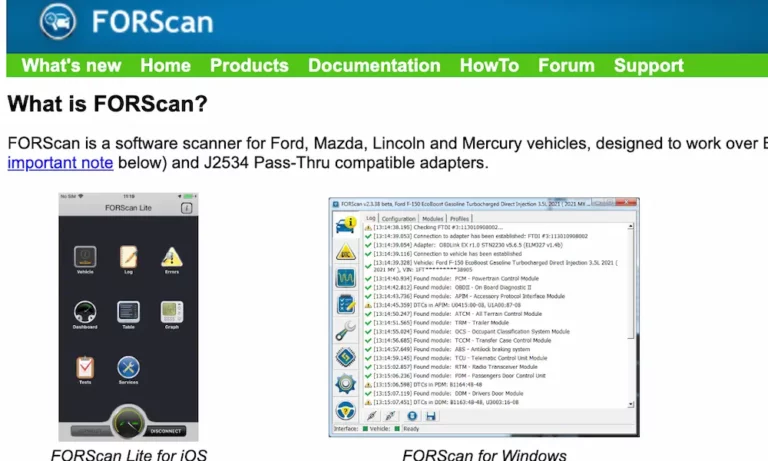
FORScan is a specialized diagnostic software suite built specifically for Ford, Lincoln, Mercury, and Mazda vehicles. Unlike generic OBD2 scanners, it speaks Ford’s native language — including the proprietary protocols that control the Passive Anti-Theft System (PATS).
PATS has been Ford’s electronic immobilizer since the mid-1990s. Every time you turn the ignition, the system runs a silent handshake between a transponder chip in your key and a receiver near the ignition. No match? The engine stays dead.
FORScan keyless programming gives independent technicians and serious DIYers the power to:
- Program new transponder keys
- Add smart fobs to push-button start vehicles
- Reset the security system after a module replacement
- Recover from an “all keys lost” situation
That’s dealership-level access without the dealership bill.
Understanding Ford PATS Types Before You Program Anything
Here’s where most people go wrong. They jump straight into FORScan without checking which PATS type their vehicle runs. The type determines where the security logic lives — and that changes everything about how you program keys.
According to Ford’s PATS initialization documentation, there are seven PATS types, each with different requirements:
| PATS Type | Security Logic Location | Minimum Keys Required | Notes |
|---|---|---|---|
| Type A | Standalone PATS Module | 1 | Starter interrupt only |
| Type B | PATS Module / PCM | 2 | Fuel injection disable |
| Type C | Instrument Cluster | 2 | Parameter Reset needed for new cluster |
| Type D | Standalone PATS Module | 1 | Similar to Type A |
| Type E | Powertrain Control Module | 2 | Fuel injection disable |
| Type F | PCM (Integrated) | 2 | Parameter Reset required |
| Type G | Instrument Cluster Module | 2 | Parameter Reset required |
Why does this matter? Replace the Instrument Cluster on a Type C or G vehicle and your existing keys become useless. The new cluster doesn’t recognize them. You’ll need a Parameter Reset to re-sync everything — not just a key program. Miss that detail and you’re stuck with a car that won’t crank even after spending $400 on a new key.
For Type A and D vehicles, swapping the PCM is much lower-risk. The standalone PATS module still holds the key data, so your original keys usually survive the swap.
Hardware You Actually Need for FORScan Keyless Programming
Don’t cheap out here. The adapter you choose makes or breaks the entire session.
Why the Adapter Matters
Ford uses a multi-bus architecture. You’ve got High-Speed CAN (HS-CAN) for engine data and Medium-Speed CAN (MS-CAN) for body modules. Your adapter needs to handle both and switch between them automatically. Generic ELM327 dongles from Amazon often can’t do this reliably — and a dropped connection at the wrong moment during a security write can brick your module.
The Two Adapter Categories
Wired USB (recommended for PATS work):
Devices like the OBDLink EX or Vgate vLinker FS auto-switch between HS-CAN and MS-CAN. No toggle switches, no manual intervention, no signal noise. For any security-tier operation, wired is the only sensible choice.
Bluetooth/Wireless:
The OBDLink MX+ is fast, but wireless interference can disrupt the 10-minute security access window. One dropout at minute nine means starting the whole wait over — or worse, triggering an anti-scan lockout.
Driver setup tip: USB adapters use FTDI or Silicon Labs chipsets. You’ll need to manually configure Virtual COM Port drivers to ensure FORScan can access the adapter at the high baud rates (128,000–256,000 bps) that security writes demand.
Software License Requirements
FORScan is free to download, but key programming sits behind an Extended License. Standard diagnostics like reading fault codes don’t need it, but the PATS service functions do. Get the license before you start.
Step-by-Step: How FORScan Keyless Programming Actually Works
Security Access: Two Ways In
FORScan uses two methods to unlock the PATS programming gate:
Timed Access — The standard method. Your tool maintains a continuous connection for 10 to 12 minutes while the PATS module enters “Security Access Granted” mode. Turn the ignition off, disconnect the battery, or let voltage drop, and the timer resets. Some models also hit a 30–60 minute anti-scan lockout if you fail multiple times.
Coded Access — Faster. The vehicle generates a hexadecimal Outcode, you feed it to an authorized generator, and it spits back a matching Incode. Enter that Incode and you’re in instantly. FORScan has built-in generators for many older models, but newer vehicles may need third-party services.
The Key Programming Sequence
Once you have security access, here’s the core programming flow:
- Stabilize your power supply. Connect a battery maintainer set to “Diagnostic” mode. You need 13.0V–13.5V throughout. Drop below 11.5V during a write and you risk corrupting the security table — a permanent no-start condition.
- Execute “Ignition Keys Erase.” This wipes the PATS memory. The vehicle is now fully immobilized until you complete programming.
- Insert the first transponder key and turn to ON. FORScan reads the new electronic signature and writes it to non-volatile memory.
- Remove the first key and insert the second. It must have a different transponder ID. Cloned keys fail here — PATS requires two distinct identities. This isn’t a bug; it’s a deliberate anti-duplication measure.
- Verify the “Number of Keys Programmed” PID reads “2.” Test each key. The Theft light should extinguish and the engine should crank.
Critical warning: If you exit the PATS menu after erasing but before registering both keys, the module locks. You’ll need another 10-minute wait or a BCM hard reset to reopen the learning window.
Smart Fobs and Intelligent Access: Different Rules Apply
Push-button start vehicles don’t use a traditional transponder coil near the ignition. Instead, they use a series of Low-Frequency antennas and a Remote Function Actuator or BCM to manage the proximity handshake.
When a smart fob’s battery is dead — or when you’re programming a new one — the fob’s passive transponder chip needs direct inductive coupling. That happens at a specific physical location called the backup slot or programming pocket.
Here’s where to find it on common Ford and Lincoln models:
| Vehicle | Backup Slot Location |
|---|---|
| F-150 / F-250 / F-350 | Inside front or rear cup holder (remove mat) |
| Explorer / Edge | Front center console compartment |
| Escape (2014–2019) | Right side of steering column (wireless icon) |
| Escape (2020+) | Bottom of front cup holder |
| Expedition | Front cup holder near dashboard |
| Fusion / C-Max | Steering column side or center console bin |
| Lincoln MKS | Inside glove box, far right side |
| Lincoln MKZ | Under removable plate in cup holder |
| Lincoln Navigator | Side or rear of center console |
Fob orientation matters. Many models need buttons facing the rear or the key-ring end pointing up. Get it wrong and you’ll see a “No Key Detected” error even though the fob is physically in the slot.
Module Replacement and Parameter Reset: Don’t Skip This
Replacing a PCM, BCM, or Instrument Cluster on a modern Ford isn’t just a plug-and-play swap. These modules share a cryptographic “Secret Key.” A fresh module doesn’t have it.
For vehicles running PATS Types B, C, F, and G, you need a Parameter Reset after any major module replacement. Here’s the sequence for a BCM replacement on an F-150:
- Upload As-Built Data to the new BCM so it knows the vehicle’s VIN and factory options
- Complete the 10-minute security access in the PATS service menu
- Run Module Initialization to sync the BCM with the existing PCM and Instrument Cluster
- Re-program all keys using the Erase and Program steps
- Reset the BMS and PCM KAM to clear security-related fault codes
Skip any step and you’re likely looking at another diagnostic session to figure out why the car still won’t start.
2018+ Vehicles: The Gateway Module Problem
In 2018, Ford added a Gateway Module (GWM) — essentially a firewall between the OBD2 port and the vehicle’s internal networks. For many 2018+ models, the PATS programming options in FORScan are either missing or non-functional.
Getting through the GWM requires a “signed” security token, which only Ford’s official IDS or FJDS software can generate. That means a paid subscription and, in some cases, a VSP credential.
The cutoff isn’t perfectly clean. Some 2019 models like the Fusion Hybrid have been successfully programmed with FORScan, suggesting Ford rolled the GWM restrictions out platform-by-platform. But for anything 2020 and newer, assume you’ll need Ford-authorized tools or professional locksmith equipment for key programming.
Reading PATS Fault Codes: What the DTCs Actually Mean
When programming fails, FORScan shows you exactly why — if you know how to read it.
| DTC Code | Meaning | Most Likely Cause |
|---|---|---|
| B1600 | Non-Transponder Key | Key has no chip or is a plain mechanical copy |
| B1601 | Unprogrammed PATS Key | Transponder works but isn’t registered yet |
| B1602 | Partial Key Read | Signal interference or key too far from coil |
| B1213 | Minimum Keys Not Met | Started after Erase with only one key registered |
| B2103 | Antenna Not Connected | Transceiver coil failure or wiring issue |
| B2431 | Transponder Programming Failure | Aftermarket clone key can’t handle the cryptographic write |
You can use FORScan to check a blank PATS key before programming to confirm it has a functioning transponder chip. Do this before you waste 10 minutes on security access only to fail at step three.
One more trap: MyKey restrictions. If a key is programmed as a MyKey (with speed and volume limits), it can’t authorize adding a third key. Clear the MyKey restrictions in the BCM service menu first.
Key Procurement: OEM vs. Aftermarket
Before you buy a replacement fob, check two things:
- FCC ID — Must match your original key exactly. Verify FCC ID and part numbers before ordering to avoid the wrong-key mistake.
- Frequency — North American models typically use 315 MHz, while European and some international models use 433 MHz. These aren’t interchangeable.
For standard transponder keys, quality aftermarket options usually work fine. For Intelligent Access fobs on push-button start vehicles, go OEM. The cryptographic routines in these fobs are complex, and cheap aftermarket versions regularly fail the programming stage entirely.
Remote Start Activation via FORScan
Programming a new key also opens the door to adding remote start on trucks that weren’t factory-equipped. On many 2011–2016 F-150s, the remote start logic already lives in the BCM — it’s just switched off.
The process:
- Install the Ford-specific remote start hood switch and antenna module
- Program a key with a Remote Start button
- Use FORScan’s BCM configuration menu to set “Remote Start” to Enabled
- Enable the Remote Start settings in the IPC menu so the dashboard display shows climate and duration preferences
It’s one of the most popular FORScan keyless programming use cases — and it works reliably on pre-2018 models.
Quick Reference: FORScan Keyless Programming Checklist
Before you start any PATS programming session, run through this:
- ✅ Confirmed PATS type for your specific vehicle
- ✅ Extended License activated in FORScan
- ✅ Wired USB adapter connected (OBDLink EX or Vgate vLinker FS)
- ✅ Battery maintainer running at 13.0–13.5V
- ✅ Verified FCC ID and frequency of new key/fob
- ✅ Two unique transponder keys ready (not clones)
- ✅ MyKey restrictions cleared if applicable
- ✅ Confirmed vehicle is 2017 or older, or researched GWM compatibility
Ford’s PATS system is genuinely clever engineering — it’s kept millions of vehicles from being stolen since the late ’90s. But with the right adapter, the right software, and this guide in your back pocket, FORScan keyless programming puts that dealership-level control exactly where it belongs: in your hands.