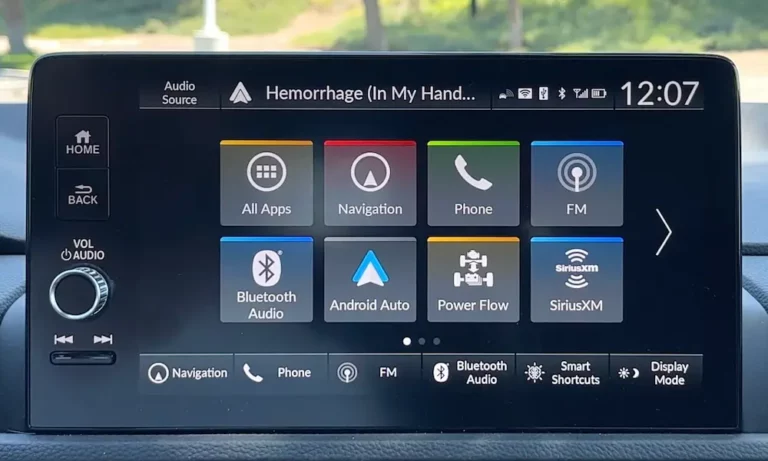
Your Honda CR-V’s screen is flashing like a strobe light, beeping nonstop about brightness, or stuck on the “Notice” screen. Maybe it’s gone completely dark in broad daylight. You’re not imagining it—this is a documented issue affecting thousands of CR-Vs, and there’s a fix. This guide cuts through the confusion and gets your screen working again.
What’s Actually Causing Your Brightness Problems?
The Honda CR-V brightness glitch isn’t one problem—it’s several different issues disguised as the same symptom.
For 2017-2019 Models: You’re dealing with a hardware defect. The capacitive touch panel sensor inside your display is failing. Heat and humidity make the screen layers expand, creating phantom touches that cycle through brightness settings without you touching anything.
For 2023-2025 Models: It’s usually not broken. Your sunload sensor (the photodiode on your dashboard) is probably covered by something. A sunglass holder, phone mount, or even papers can block the sensor, tricking your CR-V into thinking it’s nighttime.
The difference matters because the fix is completely different depending on your model year.
The 2017-2019 Ghost Touch Problem
If you’ve got a 2017-2019 CR-V with the 7-inch Display Audio, you’re experiencing what Honda officially calls a “capacitive touch panel sensor issue.” Here’s what’s happening inside your screen.
Why Direct Sunlight Makes It Worse
The screen uses layers of glass and conductive material to detect your finger. When your cabin heats up or sunlight hits the screen directly, the adhesive between these layers expands. This creates false touch inputs.
Your system interprets these phantom touches as real commands. If they happen to occur over the brightness slider, the screen cycles through settings on its own. It’s not possessed—it’s literally being triggered by temperature changes.
Honda’s Official Fix: TSB A19-066
Honda released Technical Service Bulletin A19-066 acknowledging this defect. The TSB states that “current parts stock may have the same issue,” which confirms this was a supplier problem, not a random failure.
The bulletin provides two solutions:
- Software update that reduces touch sensitivity
- Complete head unit replacement if the software doesn’t work
Here’s the important part: Honda extended the warranty on affected 2017-2019 CR-V audio units to 6 years/unlimited miles. If you’re within this window, the repair is free. Don’t let a dealer charge you for a $1,000+ replacement.
What the Software Update Actually Does
The TSB update doesn’t fix the hardware—it can’t. Instead, it changes how aggressively the system responds to touch inputs. It requires two USB drives with specific files and involves entering a hidden diagnostic mode to flash the firmware.
This is dealer-level stuff. Don’t attempt it yourself unless you’re comfortable potentially bricking your system.
The 2023-2025 Sensor Mystery
Newer CR-Vs don’t suffer from ghost touches. Instead, owners report the screen staying dim during the day or refusing to brighten properly. This is almost always a sensor problem, not a screen problem.
Where That Sensor Actually Is
Your CR-V has a sunload sensor on the upper dashboard, right behind the windshield near the defrost vents. It measures ambient light to decide whether to use “Day Mode” (bright) or “Night Mode” (dim).
When you place sunglasses, a phone holder, or anything else on that area, you block the sensor. The system reads darkness, assumes it’s nighttime, and dims everything accordingly.
The fix: Clear your dashboard. Seriously. Remove everything from the center-forward area and watch your screen brighten instantly.
Why You Can’t Adjust Brightness During the Day
Here’s a “glitch” that isn’t a glitch at all: your brightness knob doesn’t work during daytime.
This is intentional. When your headlights are off (daytime running lights only), Honda locks the instrument cluster to maximum brightness. Why? To prevent you from accidentally dimming safety-critical gauges to the point where you can’t read your speed in sunlight.
The dimmer knob only activates when the system enters Night Mode—when your headlights are actually on. This design choice confuses people, but it’s not a defect.
The Polarized Sunglasses Effect
Some owners report the screen looking “blacked out” while wearing polarized sunglasses. This isn’t a brightness setting—it’s physics. LCD screens emit polarized light, and polarized sunglasses can block that light depending on the angle. Tilt your head or remove your sunglasses to verify this is what’s happening.
Quick Fixes You Can Try Right Now
Before you drive to the dealer or start panicking about replacement costs, try these resets in order.
The Basic Power Cycle (Works 70% of the Time)
Press and hold the Power/Volume knob for 10-15 seconds. On newer models, you’ll see a dialog asking if you want to reboot. On older systems, just keep holding until the screen goes black and the Honda logo reappears.
This soft reset clears temporary software hangs and process conflicts. It won’t fix hardware defects, but it resolves most temporary glitches.
The Transmission Trick (For Frozen Screens)
If the power button does nothing, try this unconventional method:
- Start the engine
- Shift to Reverse (activating the backup camera)
- Hold for 2 seconds
- Shift to Neutral
This forces the system to switch video sources, which can unfreeze the display logic. It’s weird, but it works when the standard reset doesn’t.
The Nuclear Option: Battery Disconnect
If soft resets fail and you’re still seeing phantom touches, disconnect your negative battery terminal for 15-20 minutes. This drains all capacitors and forces a complete system reset.
Warning: This will erase radio presets and clock settings. You might need your radio code to reactivate the system (check your owner’s manual or glovebox for the code card).
Accessing the Hidden Diagnostic Menu
To confirm whether you’re dealing with hardware failure or a setting issue, you need access to the diagnostic mode. These menus show raw sensor data and run hardware tests.
How to Enter Diagnostic Mode
The button combination varies by generation:
2017-2022 Models: Press and hold Power + Menu + Brightness for 5 seconds. (Some units use Home instead of Menu.)
2023-2025 Models: Press and hold Home + Power + Back for 5 seconds. (Some use Seek instead of Back.)
If one combination doesn’t work, swap the alternative button mentioned in parentheses. Navigation-equipped units sometimes use different combinations.
What to Check in Diagnostic Mode
Once you’re in:
LCD Check/Color Test: Cycles the screen through solid colors at full brightness. If it flickers here, your LCD panel is failing. If it’s perfect during the test but glitches during normal use, it’s a software or interference issue.
Touch Panel Check: Let’s you draw on the screen. If inputs appear without touching, your digitizer is defective—classic ghost touch confirmation.
Vehicle Signal: Shows raw CAN bus data including “Illumination Level” and sensor readings. Cover the sunload sensor while watching this screen. If the value changes, the sensor works. If it stays static, you’ve found your problem.
When It’s Actually Broken: Getting the Warranty Repair
If you’ve got a 2017-2019 CR-V with confirmed ghost touches, don’t pay for repairs.
What to Say at the Dealer
Ask your service advisor to check for the Warranty Extension on the 2017-2019 CR-V Display Audio Unit. Specifically reference TSB A19-066.
The extension often covers 6 years or unlimited miles from your original purchase date. This came about partly due to class action lawsuits arguing the defect was a safety hazard (it disables your backup camera).
Document the Problem
The issue is often intermittent. The screen might work perfectly when you arrive at the dealer. Record video of the glitch happening—the flashing brightness cycling, the phantom touches, whatever you’re experiencing. This documentation strengthens your warranty claim.
What Gets Replaced
Don’t let anyone try to “repair” or “resurface” the touchscreen. The defect is internal to the capacitive sensor array. The entire audio-navigation head unit must be replaced. The TSB explicitly states this.
Advanced Issues: When Multiple Systems Are Involved
Sometimes what looks like a brightness glitch is actually a symptom of electrical problems elsewhere.
The Battery Connection
Screen flickering (not dimming, but actual flicker) can indicate voltage instability. Your CR-V’s battery sensor manages the Auto Idle Stop system. If the battery is weak, the Body Control Module might shed electrical loads aggressively, causing visible LED backlight flicker.
Before blaming the screen, test your battery and alternator. Electrical noise from a failing alternator can bleed into the CAN bus and cause all sorts of weird behavior.
The Grounding Issue
TSB 19-032 addresses engine whirling noise and misfire codes caused by electrical interference. While it’s primarily a powertrain bulletin, poor grounding points create noise that affects the infotainment system too.
If you’ve had recent body work or accessories installed, have the ground points checked.
The Camera Confusion
Your CR-V has two different sensors that people confuse:
- Sunload sensor (on the dashboard) → Controls brightness
- Front sensor camera (behind the rearview mirror) → Controls Honda Sensing features
If your windshield area around the camera is dirty or obstructed, you’ll get “Some driver assist systems cannot operate” warnings. This is a different issue, but heat buildup in the camera area can trigger system-wide problems that get blamed on the infotainment.
Keep both areas clean.
The 2024-2025 Boot Delay Issue
If you’ve got a 2024 model where the Honda logo takes forever to appear or the screen stays black after starting, this is different from the brightness glitch.
The newer CR-Vs run Android Automotive OS, which has significant boot overhead. Cold starts (after the car’s been off for hours) take longer than warm starts. This is a software optimization issue, not hardware failure.
Honda can address this through firmware updates. If it’s excessive (more than 30 seconds), ask your dealer about available software patches.
What Doesn’t Work (Save Your Time)
Factory Reset Through Settings: Doesn’t address hardware ghost touches. You’ll just have to reconfigure everything for no benefit.
Aftermarket Screen Protectors: Won’t fix the internal capacitive layer issue. Might actually make phantom touches worse by adding another layer.
“Calibration” Software: The system doesn’t have user-accessible calibration for the touch panel. Anyone selling this is scamming you.
Replacing Just the Glass: The defect is in the digitizer assembly below the glass. Surface repairs don’t help.
The Bottom Line
The Honda CR-V brightness glitch fix depends entirely on your model year. If you’ve got a 2017-2019, you’re dealing with a documented hardware defect covered by warranty extension—get it replaced under TSB A19-066. If you’ve got a 2023-2025, clear your dashboard and understand how the automatic brightness system actually works.
Most “glitches” in newer models aren’t glitches at all—they’re logic conflicts between what you expect and how Honda programmed the system. The sensor-based brightness management is aggressive and counterintuitive, but it’s functioning as designed.
Start with soft resets, check for obstructions, and use the diagnostic menu to confirm whether you’re dealing with settings or actual hardware failure. Don’t pay for repairs that should be covered by warranty, and don’t replace parts that aren’t actually broken.
Your screen issues are fixable. You just need to match the right solution to the actual problem.