Your Hyundai key fob is acting up — doors aren’t unlocking from a distance, or the dashboard just flashed a low battery warning. Good news: knowing how to replace battery in Hyundai key fob takes about five minutes and costs less than $5. This guide covers every fob type, every common model, and what to do if things go sideways.
What Battery Does a Hyundai Key Fob Take?
Most Hyundai key fobs use a CR2032 coin cell battery. But newer models — like the Kona, Palisade, and some 2023+ Elantra trims — use a larger CR2450.
Here’s a quick reference:
| Battery Type | Diameter | Voltage | Common Models |
|---|---|---|---|
| CR2032 | 20mm | 3V | Elantra, Sonata, Santa Fe, Tucson, Venue |
| CR2450 | 24mm | 3V | Kona, Palisade, newer Smart Keys |
| CR2025 | 20mm | 3V | Older compact remotes |
| CR2016 | 20mm | 3V | Early standard fobs (sometimes stacked) |
Before you buy a replacement, check your existing battery or your owner’s manual. The battery type is printed right on the old cell.
Signs Your Hyundai Key Fob Battery Is Dying
Don’t wait until you’re stuck in a parking lot. Watch for these warning signs:
- Shorter range — you’re standing closer to the car before it responds
- Dashboard warning — modern Hyundais display a “Key Fob Battery Low” alert when voltage drops below ~2.6V
- Dim or no indicator light on the fob when you press buttons
- Proximity entry fails — you touch the door handle but nothing happens
The Smart Key system runs in near-constant standby mode, which drains the battery faster than older remotes. Plan on replacing it every two to three years.
What You’ll Need
Gather these before you start:
- Replacement battery (CR2032 or CR2450 — verify first)
- Small flat-head screwdriver or a coin
- Phillips-head screwdriver (flip-key models only)
- Soft cloth to protect the fob’s finish and catch small parts
- Isopropyl alcohol + cotton swab (optional, for cleaning contacts)
That’s it. No special equipment required for most models.
How to Replace Battery in Hyundai Key Fob — By Fob Type
Hyundai uses three main fob designs. Find yours below.
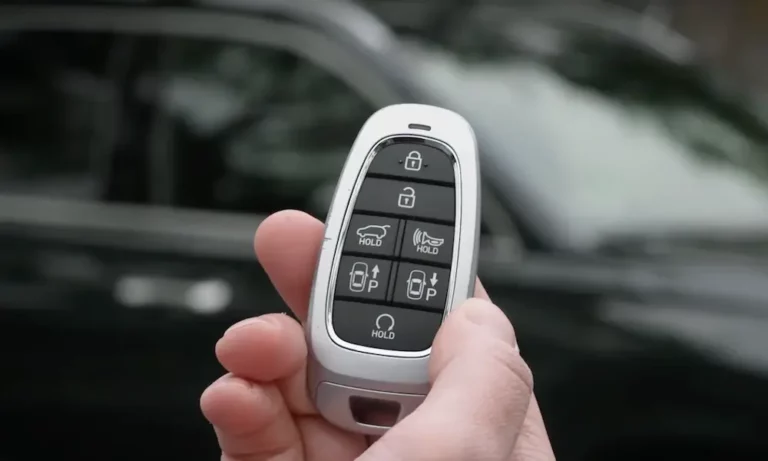
Modern Smart Key (Most 2015+ Models)
This is the most common design on current Hyundais. Here’s how to open it:
- Find the release button or sliding tab on the back of the fob
- Press it and slide out the hidden mechanical key
- Look inside the slot — you’ll see a small rectangular notch separate from the key channel
- Insert the tip of the mechanical key into that notch
- Twist gently (clockwise or counter-clockwise) to pop the housing apart
- Carefully separate the two halves by hand
Once it’s open, note which way the battery faces — positive side up in nearly every Hyundai fob. Slide the old battery out, drop the new one in the same way, and press it down until it seats firmly.
Reassemble by aligning the halves and pressing until you hear a click around the perimeter. Slide the mechanical key back in until it locks.
Standard Remote (Older Elantra, Santa Fe, Early Sonata)
These older fobs use a simpler snap-fit design:
- Look for a notch along the seam, usually near the keyring hole
- Insert a flat-head screwdriver or coin into the notch
- Twist slowly to release the snap-fit clips
- Pull the halves apart gently — don’t force it
Take your time here. Rushing can snap the internal plastic tabs, and a broken tab means the fob won’t seal properly anymore.
Swap the battery, reassemble, and press firmly until the case snaps shut with no visible gaps.
Screw-Secured Flip Key (2018–2019 Accent, Elantra GT)
This design looks simple but has a trap: don’t pry it. It uses micro-screws, and forcing it open will damage the housing permanently.
- Deploy the flip key to the open position
- Look for a small cover on the rear of the fob — pry it off carefully
- Use a precision Phillips-head screwdriver to remove the screws (they’re tiny, so use a magnetic screwdriver if you have one)
- Lift the battery cover to access the CR2032
A step-by-step video for the 2018–2019 Accent flip key is worth watching before you start. Reinstall the screws snug but don’t overtighten — the plastic housing strips easily.
Model-by-Model Battery Compatibility Guide
| Model | Year Range | Battery | Fob Style |
|---|---|---|---|
| Accent | 2000–2017 | CR2032 | Standard/Flip |
| Accent | 2018–2022 | CR2032 | Screw-type Flip |
| Elantra | 2001–2022 | CR2032 | Smart/Standard |
| Elantra | 2023–2025 | CR2032 or CR2450 | Advanced Smart Key |
| Sonata | 2000–2022 | CR2032 | Smart/Standard |
| Santa Fe | 2001–2023 | CR2032 | Smart/Standard |
| Tucson | 2005–2023 | CR2032 | Smart/Standard |
| Kona | 2018–2022 | CR2450 | Advanced Smart Key |
| Palisade | 2020–2025 | CR2450 | Advanced Smart Key |
| Venue | 2020–2025 | CR2032 | Smart Key |
Always verify by checking the old battery directly — the designation is printed on the cell.
Installing the Battery the Right Way
A few things that matter more than people realize:
- Don’t touch the circuit board contacts. The oils from your fingers cause oxidation over time. If the contacts look dirty, clean them with isopropyl alcohol and a cotton swab before reassembling
- Positive side up — confirm this against the markings inside the cradle before pressing the battery down
- Press firmly until the battery seats against all metal terminals. A loose battery causes intermittent signal loss even when the battery is brand new
- Some Smart Keys have a circuit board sitting on top of the battery. Lift the board gently to swap the cell, then replace the board before closing the case
What to Do if the Fob Still Doesn’t Work After Replacement
The battery is new but the remote still isn’t working? Run through this checklist:
- Check polarity — is the positive side facing the right direction?
- Check contact tension — the small spring contacts may be flattened. Gently bend them upward so they press firmly against the battery
- Clean the contacts — residue from the old battery or skin oils can block the electrical path
- Inspect for damage — dropped the fob recently? A cracked circuit board or broken solder joint requires a full fob replacement
- Move away from interference — phones, wireless chargers, and other electronics can occasionally disrupt the signal
If the fob still won’t sync, you likely need a resynchronization, not a new battery.
How to Resync Your Hyundai Key Fob After a Battery Change
Most of the time, the fob reconnects automatically. But if the battery was dead for a while, or the rolling code has drifted, here’s how to resync it.
Standard Ignition Models
- Get inside the vehicle with all doors closed
- Turn the key to ACC (Accessory) position
- Press and hold the Lock or Unlock button on the fob for 5–20 seconds
- Watch for the hazard lights to flash or the door locks to cycle — that’s your confirmation
Push-to-Start Smart Key Models
- Press the engine start button directly with the fob (use the fob physically on the button)
- The start button has an induction coil that powers the fob’s transponder chip to verify and re-sync it
- If that doesn’t work, disconnect the car battery for a few minutes to reset the keyless entry module
Important note: Resynchronizing an existing fob is different from programming a brand-new one. For Hyundai models from 2017 onward, adding a new key requires dealer-level diagnostic tools. The DIY resync above only works for an existing paired key.
What to Do When the Fob Battery Is Completely Dead
Dead battery and stuck outside? Hyundai built in backup options.
Get into the car: Modern Hyundai door handles look like they have no keyhole, but there’s a concealed lock cylinder behind a small plastic cap at the end of the driver’s door handle. Pop the cap off and use the emergency mechanical key inside the fob.
Start the engine: For push-to-start models, press the brake pedal and use the fob to physically push the start/stop button. The induction coil in the button reads the fob’s transponder chip directly — no battery required.
Older 2010–2015 models: Look for a “Smart Key Holder” slot inside the center console, glove box, or lower left dashboard. Inserting the fob there creates a direct link that bypasses the battery entirely.
Dispose of the Old Battery Responsibly
Lithium coin cells are classified as hazardous waste. Don’t throw the old battery in the trash. Drop it off at any hardware store, automotive parts shop, or electronics retailer that accepts battery recycling. Most do it for free.
Quick Tips to Make Your Next Battery Last Longer
- Replace proactively every 2–3 years — don’t wait for failure
- Keep the fob away from moisture and extreme heat
- Store a spare CR2032 in your glove box — they’re cheap and last years on the shelf
- If your Hyundai has the Digital Key feature (available on 2020+ Sonata and newer models), set it up as a backup on your phone
Replacing your Hyundai key fob battery is genuinely one of the easiest car maintenance tasks you’ll ever do. Five minutes, one small battery, and you’re back in business.