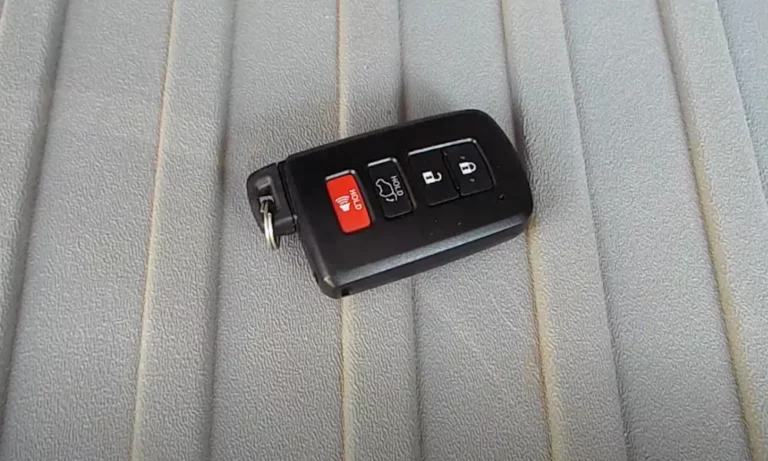
Your Toyota key fob just stopped working — or it’s acting up. Before you panic about a locksmith bill, there’s a good chance a $3 battery fix is all you need. This guide walks you through exactly how to replace your Toyota key fob battery, no matter which fob type you have. Stick around — there are a few mistakes most people make that you’ll want to avoid.
First, Figure Out Which Key Fob You Have
Not all Toyota fobs are the same. Opening the wrong one the wrong way can crack the housing or damage the circuit board inside. Toyota uses three main fob types across its lineup.
Smart Key Fobs are the most common on newer models. They don’t have a visible key blade sticking out — instead, a hidden emergency key tucks inside the housing. You’ll use that emergency key to open the fob.
Integrated Remote Head Keys are older-style fobs with a permanent metal blade molded into the handle. These often have a tiny screw holding the case together.
Smart Key Cards are ultra-slim, credit card-sized devices found on models like the 2024 Tacoma. They use a completely different battery and opening method.
Which Battery Does Your Toyota Need?
This is where most people go wrong. They grab any CR2032 off the shelf, but your fob might need something completely different. Here’s a quick reference:
| Model | Year Range | Battery Type |
|---|---|---|
| Camry | 2012–2024 | CR2032 |
| Camry | 2007–2009 | CR1632 |
| Camry | 2010–2012 | CR2016 |
| Corolla | 2020–2025 | CR2032 |
| Corolla | 2014–2019 | CR2016 |
| Prius | 2009–2022 | CR1632 |
| RAV4 | 2019–Present | CR2032 |
| RAV4 | 2004–2018 | CR2016 |
| Tacoma | 2016–2023 | CR2016 |
| Tacoma | 2024 (Key Card) | CR2412 |
All batteries above run at 3V. Always confirm your exact model year before buying. A CR2032 and a CR1632 look similar but aren’t interchangeable.
What You’ll Need Before You Start
You don’t need a toolbox full of gear. But using the right tools prevents scratched housings and snapped plastic tabs.
- Your emergency key blade — doubles as the opening tool on Smart Keys
- Plastic pry tool — safer than a metal screwdriver on the ABS housing
- Small flat-blade screwdriver (2mm tip) — for popping the old battery out
- Phillips #000 precision screwdriver — only needed for Integrated Remote Head Keys
- Non-metallic tweezers — keeps skin oils off the battery and components
One tip that AutoZone’s Toyota key fob guide specifically calls out: touch a metal surface before opening the fob. Skin oils and static electricity are the two biggest enemies of key fob circuit boards.
How to Replace a Toyota Smart Key Battery (Step-by-Step)
This covers the most common fob type across newer Camry, RAV4, Corolla, and Tundra models.
Step 1: Remove the Emergency Key
Find the small release button on the side of the fob — it’s usually a sliding switch. Press it and pull the metal key blade out. Set it close by. You’ll use it in the next step.
Step 2: Open the Fob Housing
Look inside the slot where the key blade sat. You’ll see a small rectangular notch. Insert the tip of the emergency key blade into that notch and twist gently. Work around the seam slowly — don’t just force it open at one point. The housing will pop apart with a few light clicks.
This gentle prying technique is the key to avoiding cracked tabs inside the case.
Step 3: Locate the Battery
Once open, you’ll see a green circuit board. The battery either sits face-up or on the underside of the board. If you need to lift the board, grab it by the edges only. Before you touch anything, snap a quick photo of how everything sits. Reassembly is much easier with a reference.
Step 4: Swap the Battery
Use your small flat-blade screwdriver or a non-metallic tool to pop the old battery out of its metal clip. Now here’s the part most people mess up: install the new battery with the positive side (+) facing up. Press it down until it clicks into the retaining clip. Don’t touch the battery surface with bare fingers — the oils create resistance and shorten the battery’s life fast.
Step 5: Snap It Back Together
Line up both halves of the casing and press firmly around the entire edge until you hear a series of clicks. Don’t just push one spot. Reinsert the emergency key blade until it locks. Done.
How to Replace a Remote Head Key Battery
This older key style (think 2007–2012 models) takes a slightly different approach. You’ll need that Phillips #000 screwdriver to remove the tiny retaining screw. These screws oxidize over time, so be patient and use the correct driver size — a stripped head is a real headache.
Once the screw is out, pry the remote module away from the key handle. Open the small plastic module and swap the battery — usually a CR2016. Reassemble in reverse order, making sure the screw goes back in snugly but not overtightened.
How to Replace a 2024 Tacoma Smart Key Card Battery
The Key Card is its own beast. There are no prying notches. Instead, look for a small sliding panel or tray on the side. Pull it firmly outward with your fingernail or a thin plastic tool.
The battery inside is a CR2412 — it’s significantly thinner than a CR2032. Don’t try to force a CR2032 in here. Doing so can permanently bend the internal contacts or crack the card, and then you’re looking at a full replacement.
Key Fob Still Not Working After Battery Change?
Don’t panic. Here’s how to read the LED indicator light on your fob:
| LED Behavior | What It Means |
|---|---|
| No light at all | Battery is upside down, bad contact, or defective battery |
| Dim or faint light | Skin oils on battery surface, or battery is old stock |
| Normal light, no vehicle response | Fob is out of sync with the car |
If the LED looks normal but nothing happens, your fob likely lost its rolling code sync with the vehicle.
How to Resync Your Toyota Key Fob
Most Toyota models let you re-sync the fob manually. No special equipment needed.
- Sit inside the car with all doors closed
- Insert the key and turn the ignition from OFF to ON five times in five seconds
- Open and close the driver’s door twice
- Insert and remove the key once
- If done within 40 seconds, the door locks should cycle on their own
- Press and hold LOCK + UNLOCK simultaneously for two seconds, then press LOCK once to finalize
If your car uses push-button start and the fob is completely dead, hold the Toyota emblem side of the fob directly against the START button while pressing the brake. The vehicle draws enough induction power to read the transponder chip and start the car, even with a dead battery.
Make Your New Battery Last Longer
A few simple habits can stretch your battery life from two years to four or more.
Activate Sleep Mode on spare fobs. Hold LOCK and press UNLOCK twice. The red LED flashes three times to confirm sleep mode is on. This turns off the fob’s active signal scanning, which is the main battery drain. Press any button to wake it back up.
Don’t store fobs on the dashboard. Heat kills lithium batteries faster than anything else. Extreme cold does the same. A consistent room-temperature environment keeps batteries performing at full capacity.
Use a silicone case. It’s not just about looks. A silicone or leather sleeve protects against moisture, drops, and the gradual wear that loosens fob housing seals over time.
Watch your range. A healthy fob works from up to 50 feet away. If you’re noticing it only works from five feet out, that’s your first warning sign. Replace the battery before it dies completely — a dead fob at the wrong moment is genuinely annoying.
Handle batteries with a cloth or gloves. Even brief skin contact leaves oils on the battery surface. Those oils create electrical resistance and shorten contact life. It takes two extra seconds and it’s worth it.