Your Jeep’s key fob is acting up — weak range, slow response, or a blinking start button. Good news: you probably just need a fresh battery. This guide walks you through how to replace a Jeep key fob battery for every major model, plus what battery to buy, how to open the fob without snapping it, and what to do if things go sideways.
First, Figure Out Which Jeep Key Fob You Have
Not all Jeep fobs are the same. Before you buy a battery or grab a screwdriver, you need to know which fob style you’re working with. Jeep has used five main designs over the years.
- Standard remote — no blade, buttons only. Common on late ’90s and early 2000s Cherokees and Wranglers.
- Remote head key — the transmitter is built into the top of a fixed metal blade. Think Wrangler JK and early Liberty.
- Flip key — a spring-loaded blade folds into the housing. Used on the Renegade, Compass, and Cherokee KL.
- Fobik key — a plastic wedge with no blade at all. You plug it into the dash. Found on 2008–2013 Grand Cherokees and Commanders.
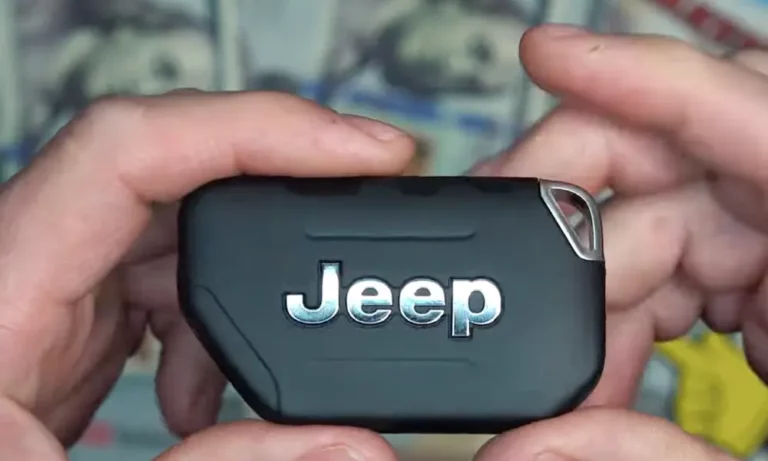
- Smart/proximity key — no contact needed. Just walk up and press start. Standard on Wrangler JL, Gladiator JT, and Grand Cherokee WL.
Here’s a quick reference so you can match your Jeep to the right fob type and battery:
| Jeep Model | Years | Fob Type | Battery Needed |
|---|---|---|---|
| Wrangler TJ | 1999–2006 | Standard Remote | CR2032 |
| Wrangler JK | 2007–2018 | Remote Head Key | CR2032 |
| Wrangler JL / Gladiator JT | 2018–2026 | Smart / Proximity | CR2450 |
| Grand Cherokee WJ | 1999–2004 | Standard Remote | Dual CR2016 |
| Grand Cherokee WK / WK2 | 2005–2021 | Fobik / Remote Head | CR2032 |
| Grand Cherokee WL | 2022–2025 | Smart / Proximity | CR2450 |
| Cherokee KL | 2014–2023 | Flip Key / Smart Key | CR2032 |
| Renegade | 2015–2021 | Flip Key / Smart Key | CR2032 |
| Compass | 2017–2021 | Flip Key / Smart Key | CR2032 |
How to Know Your Battery Is Actually Dead
Your fob won’t just quit cold turkey. It gives you warning signs first. Watch for these:
- Short range — you used to unlock from 50 feet away. Now it barely works from 10.
- Multiple presses needed — you hit the button twice, three times, nothing happens on the first try.
- Blinking Start button — on push-to-start Jeeps, a green light flashing for about 30 seconds after you shut the engine off means the car is telling you the fob battery is low.
- Dashboard warning — some models show “Key Fob Battery Low” or “Key Not Detected” on the instrument cluster.
- Remote start fails — this feature often drops out first, even when lock/unlock still works.
If any of those match what you’re seeing, don’t wait. A weak battery can leave you completely locked out after just a few more presses.
Which Battery Does Your Jeep Key Fob Need?
Coin cell batteries look similar, but they’re not interchangeable. The four-digit code tells you the size. The first two digits are the diameter in millimeters. The last two are the thickness in tenths of a millimeter.
| Battery | Diameter | Thickness | Voltage | Used In |
|---|---|---|---|---|
| CR2032 | 20mm | 3.2mm | 3V | Most Jeep fobs 2005–2021 |
| CR2450 | 24mm | 5.0mm | 3V | Wrangler JL, Grand Cherokee WL |
| CR2016 | 20mm | 1.6mm | 3V | Grand Cherokee WJ (stacked pair) |
| CR1616 | 16mm | 1.6mm | 3V | Certain slim older remotes |
Don’t try to swap a CR2032 for a CR2016 just because both say 3 volts. The different thickness means the battery won’t sit against the contacts properly, and you’ll end up with a dead fob and a cracked housing.
You can pick up a CR2032 or CR2450 at any hardware store, pharmacy, or online for $2–$6. Your dealer will charge you $15–$30 for the same battery.
How to Replace the Battery: Step-by-Step by Model
Smart Keys — Wrangler JL and Gladiator JT (2018–2026)
These fobs use a CR2450 battery and are built tough for trail use.
- Slide the release latch and pull out the emergency metal key blade.
- Insert a flathead screwdriver into the notch at the bottom of the remote.
- Give it a firm twist to pop the back cover off.
- You may see a rubber gasket inside — don’t lose it. It’s the water seal.
- Install the new CR2450 with the positive side facing up, toward the back cover.
- Snap the cover back on from top to bottom. Check the whole perimeter for gaps.
Smart Keys — Grand Cherokee WL (2022–2025)
This model uses a unique back-panel design with a CR2450.
- Slide the release and remove the emergency key.
- Find the gap on the side of the key slot and insert a flat tool there to pop the back panel.
- The CR2450 sits in a plastic cradle with aggressive retaining tabs. Use a small tool to lift it out from the relief notch.
- Insert the new battery with the positive (text) side facing outward toward the cover.
- Push it firmly until it clicks past the retaining tabs. If it’s not fully seated, the cover won’t close flush — and water can get in.
Flip Keys — Renegade and Compass (2015–2021)
These use a CR2032. The orientation is important here — and easy to get wrong.
- Flip the key blade open to reveal the recess behind it.
- Use the emergency key or a small screwdriver to pry the back cover away.
- Install the CR2032 with the positive side facing down, toward the front of the remote.
- This trips up a lot of people. Positive-side up means no power. The circuit won’t complete and the fob stays dead.
- Snap the cover back on and test.
Fobik Keys — Grand Cherokee and Commander (2008–2013)
The Fobik is the wedge-shaped key that plugs into the dash. It takes a CR2032.
- Remove the emergency key from the top and use it to pry the two plastic halves apart.
- Watch out — the circuit board is loosely seated and can fall out.
- Slide the old CR2032 sideways out of the circular metal cage.
- Install the new one with the positive side facing down.
- Before closing the case, make sure the rubber button pad is centered exactly over the switches. Even a 1mm shift makes the buttons feel dead.
Remote Head Keys — Wrangler JK (2007–2018)
The JK fob integrates into the top of the key blade. It uses a CR2032.
- Insert a screwdriver into the notch on the side of the plastic head near where the blade meets the housing.
- Split it into two halves.
- Install the CR2032 with the positive side facing down in the back half.
- These fobs take a beating off-road. While you’re in there, gently press the metal contact clips inward to restore their tension. Loose clips are a common reason fobs work intermittently even with a fresh battery.
Grand Cherokee WJ (1999–2004) — Dual Battery Setup
The WJ is a special case. It uses two CR2016 batteries stacked together. Both positive sides face the same direction as the originals.
Don’t swap in a single CR2032 thinking it’ll work since it’s the same thickness as two CR2016s. It’ll physically fit, but it only delivers half the voltage, and the fob won’t transmit.
What to Do If the Fob Still Doesn’t Work After a Battery Change
Fresh battery in, but the fob is dead? Try these before you panic.
Check the orientation. Flip the battery and test again. Getting positive/negative backward is the most common mistake.
Clean the contacts. A thin layer of oxidation on the metal clips can block the circuit. Scrub gently with a soft toothbrush dipped in high-purity isopropyl alcohol.
Resync the fob. If the fob works at close range but not far away, the rolling code may be out of sync. Try this:
- Sit in the driver’s seat with all doors closed.
- Turn the ignition to “On” without starting the engine.
- Open the driver’s door and move the door switch to “Lock.”
- With the door open, hold the Lock button on the remote for 5 seconds.
For smart keys showing “Key Not Detected”: Place the fob directly in the center console or glovebox slot. This lets the vehicle read the passive transponder chip without needing battery power.
Stuck With a Dead Fob and No Time to Fix It?
Don’t call a tow truck yet. Every Jeep has a bypass built in.
The fob contains a passive transponder chip that works with zero battery power. On Jeeps with a push-to-start button, press the Start button with the nose of the fob itself. The vehicle reads the chip through direct contact and starts normally. On older Jeeps with a keyed ignition, just insert the key or Fobik as usual.
Protect Your Fob After the Battery Is In
A few quick habits will stretch the life of your new battery and keep the fob working longer.
- Inspect the rubber seal every time you change the battery. A pinched or torn gasket lets moisture in. Realign it carefully before you close the housing.
- Got a wet fob? Pull the battery out immediately. Water plus electricity causes rapid corrosion on the circuit board. Disassemble it, rinse with distilled water if it was saltwater exposure, and let it air-dry for 24–48 hours. Skip the hairdryer — the heat can melt plastic or desolder components.
- Keep a spare fob charged. If your backup works fine and your main fob doesn’t, you’ve confirmed the problem is in the fob — not the car. That’s useful information.
- Consider a silicone cover. An aftermarket silicone case gives your fob a second layer of protection against drops and water, especially worth it if you take the Jeep off-road regularly.
A replacement coin cell costs $2–$6. A replacement OEM smart key costs $180–$250, plus $120–$160 in dealer programming fees. Changing the battery yourself every couple of years is an easy win.