Is your Honda CR-V’s infotainment system acting up? Maybe the touchscreen is frozen, CarPlay isn’t connecting, or the audio has mysteriously disappeared. You’re not dealing with a major mechanical issue—just a computer that needs a reboot. This guide will walk you through every method to reset your Honda CR-V’s infotainment system, from simple soft resets to complete factory resets.
Common Honda CR-V Infotainment System Problems
Before jumping into reset procedures, let’s identify what you might be experiencing:
- Frozen or unresponsive touchscreen
- Bluetooth connection failures
- Apple CarPlay or Android Auto not working
- Audio system glitches
- Black or blank display
- System rebooting repeatedly
- Navigation errors
Most of these issues can be resolved with a proper reset, without needing an expensive trip to the dealership.
Quick Fix: Soft Reboot Methods
Standard Power Button Reset
This is the simplest method and works for most CR-V models (2017-2025):
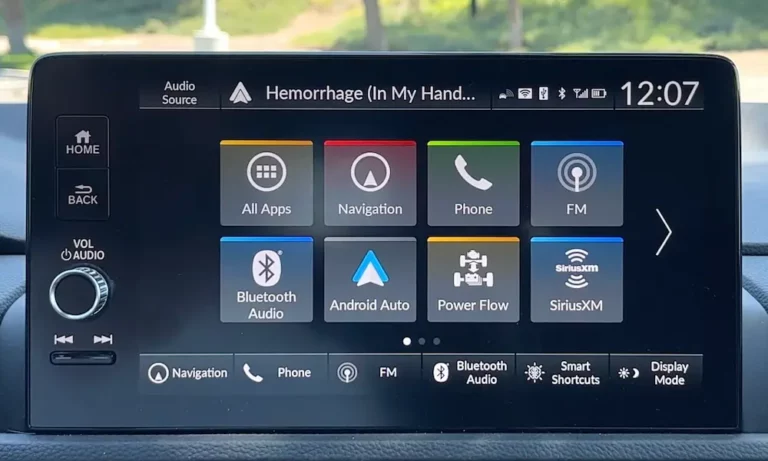
- Locate the power/volume knob on your infotainment screen
- Press and hold the button for 7-10 seconds
- Wait for the system to display “Do you want to reboot?”
- Select “Yes”
If your screen is completely unresponsive, try extending the hold to 20-30 seconds to force a reboot. This method works great for minor glitches and won’t erase your personal settings.
Button Combination Reset for 9-Inch Display Models
If you have a newer CR-V (2023-2025) with the 9-inch display, particularly in Sport Touring Hybrid models:
- Simultaneously press Home + Power/Volume Click + Skip Track Back (◀◀) buttons for 3 seconds
- When the debug menu appears, navigate to “Detailed Information and Settings”
- Press Back + Power/Volume Click + Skip Track Back (◀◀) again
- Select the “System Reboot” option from the menu
Be careful with this method as it gives you access to advanced diagnostic options that could potentially cause problems if misused.
Transmission-Based Reset (2024 Hybrid Sport)
This unique workaround works specifically for the 2024 CR-V Hybrid Sport with the 7-inch display:
- Turn your car off completely
- Start the engine, then immediately shift into Reverse
- After 1-2 seconds, shift to Neutral
- Wait for the infotainment system to boot up
You can verify if this worked by checking Settings → System → About → Status → Uptime. According to user reports, this method bypasses unresponsive touchscreens, though it may not work if there’s an actual hardware failure.
Complete Fix: Factory Data Reset
When soft resets don’t solve the problem, a factory reset might be necessary. Be aware: this will erase all your personal settings, paired devices, and saved data.
Performing a Factory Reset
- Press the MENU button on your infotainment system
- Navigate to Settings
- Select System, then Factory Data Reset
- Confirm by selecting “Yes” twice
- Wait for the system to reboot automatically
Important: Radio Code Retrieval
After a factory reset, your radio might lock and require a 5-digit code to reactivate. To prepare:
- Before resetting: Find your radio serial number by pressing and holding buttons 1 and 6 with the ignition in AUX mode (engine off)
- Retrieve your code by visiting Honda’s official portal or contacting a dealership with your serial number and VIN
- Keep this code handy to enter after the reset
Many CR-V owners have reported getting locked out of their systems after factory resets because they didn’t have the radio code ready. Save yourself the headache!
Troubleshooting Persistent Issues
Power and Hardware Checks
If your system continues to have problems after a reset, check these hardware components:
- Fuse Inspection: Verify fuses #8 (7.5A) and #18 (15A) in the cabin, plus #10 (10A) under the hood for radio power
- Battery Health: A weak battery can cause screen flickering or unexpected shutdowns
Software Updates
Outdated software can cause persistent issues:
- Go to Settings → System → Software Update to install the latest firmware
- For major updates, especially for navigation-equipped models, visit a Honda service center
Model-Specific Reset Instructions
For 2017-2019 CR-V Models
These older models use a slightly different interface:
- Press and hold the power button (volume knob) for at least 10 seconds
- The system will display a confirmation message
- Select “Yes” to reboot
For 2020-2022 CR-V Models
- Press and hold the power/volume knob for 7-10 seconds
- When prompted, select “Yes” to reboot
- If unresponsive, hold for a full 20 seconds
For 2023-2025 CR-V Models
- For standard displays: Press and hold the power/volume knob for 7-10 seconds
- For the 9-inch display: Use the button combination method detailed earlier
- For persistent issues, try the transmission-based reset method
Advanced Reset Methods and Warnings
Hidden Diagnostic Menus
For advanced users only: Pressing Brightness + Menu + Power for 2 seconds unlocks developer options, though Honda restricts full access with a passcode.
Tampering with debug settings (like Wi-Fi mode adjustments) without expertise can destabilize your system and potentially void warranties.
When Hardware Replacement Might Be Necessary
If you’ve tried multiple resets and your system continues to malfunction, you might be facing a hardware issue. Signs include:
- Screen remains completely black despite reset attempts
- Backup camera consistently fails to display
- Touchscreen no longer responds to any input
- System keeps rebooting in an endless loop
One 2024 CR-V owner reported needing a complete infotainment replacement after multiple reset attempts failed. In such cases, contact your Honda dealership.
Preventing Future Infotainment Issues
To minimize future problems with your Honda CR-V’s infotainment system:
- Keep your software updated
- Avoid extreme temperature exposure (excessive heat/cold can damage electronics)
- Disconnect devices properly before turning off your vehicle
- Don’t overload the USB ports with incompatible accessories
- Use only Honda-approved software updates
Common Questions About Honda CR-V Infotainment Resets
Will resetting erase my navigation system?
A soft reset won’t affect your navigation data. However, a factory reset will require reinstallation of maps and navigation preferences.
How often should I reset my infotainment system?
Only reset when experiencing problems. Regular resets aren’t necessary for maintenance.
Can I reset while driving?
For safety reasons, perform resets only when your vehicle is parked. Some reset options are disabled while driving according to NHTSA safety guidelines.
What if I can’t retrieve my radio code?
If you can’t find your radio code, visit a Honda dealership with proof of ownership and your vehicle’s VIN. They can retrieve the code for you.
Honda’s CR-V infotainment system is generally reliable, but like any computer, it occasionally needs a refresh. By understanding the proper reset procedures, you can save time, money, and frustration when minor glitches occur. Always start with the least invasive methods (soft resets) before trying more drastic measures like factory resets.
Remember to keep your radio code handy and back up any important settings before performing more advanced resets. With these tips, you’ll keep your Honda CR-V’s infotainment system running smoothly for years to come.