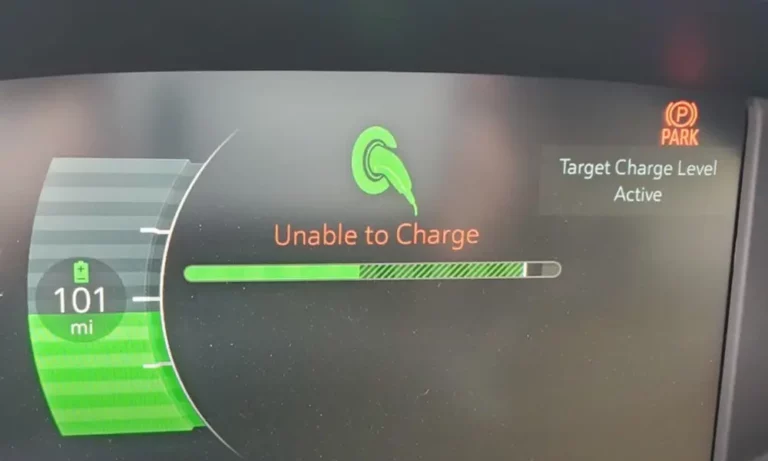
Having your Chevy Bolt display an “Unable to Charge” message can turn a routine charging stop into a major headache. Whether you’re stranded at a public charging station or can’t get juice flowing in your garage, this frustrating issue affects many Bolt owners. This guide will walk you through the most common causes and proven solutions to get your EV back on the road.
Common Causes for Chevy Bolt Charging Failures
Dirty or Damaged Charging Port
Your Bolt’s charging port is the gateway for electricity, and even small obstructions can prevent charging. Dirt, debris, or moisture inside the port creates resistance that triggers safety shutoffs.
Regular inspection reveals common culprits like:
- Pocket lint or debris blown into the port
- Corrosion on connection pins
- Water intrusion after rain or car washes
- Physical damage to the connector pins
Simply cleaning the port with compressed air can resolve many mysterious charging failures.
Faulty Charging Cable or Equipment
Not all charging problems originate in the vehicle itself. The equipment you’re using might be the source of trouble.
Cable issues that commonly trigger “Unable to Charge” warnings include:
- Frayed wires or damaged insulation
- Bent connector pins
- Loose internal connections
- Wear from repeated plugging/unplugging
Many Bolt owners report success by trying different charging cables or stations. If your Bolt charges with one cable but not another, you’ve identified your problem.
Software Glitches
The Chevy Bolt is as much computer as car, and software bugs can disable charging functions. GM has issued multiple technical service bulletins addressing charging-related software issues, especially in 2019-2022 models.
Common software-related symptoms include:
- Charging works intermittently without clear pattern
- Charging stops unexpectedly mid-session
- Error messages appear despite good physical connections
- Problems emerge after recent vehicle updates
According to a technical service bulletin from NHTSA, many charging issues are resolved through software updates at the dealership.
Charge Port Lock Actuator Failure
A particularly frustrating issue affects many Bolt EVs: the charge port lock actuator. This small component is designed to secure the charging cable during charging, but when it malfunctions, it can physically prevent the cable from connecting properly.
Signs of a faulty actuator include:
- Charging cable won’t fully insert
- Clicking sounds when attempting to charge
- “Unable to Charge” errors specifically at DC fast chargers
- Successful charging only after multiple attempts
Dealerships can reset or replace this component using diagnostic tools to address error codes P3014 and P302D that commonly appear with this issue, as documented in a GM technical document.
Onboard Charger Malfunction
The onboard charger (OBC) converts AC power from standard charging stations into DC power for your Bolt’s battery. When this component fails, your charging options become limited or nonexistent.
Telltale signs of OBC problems include:
- Level 1 and Level 2 charging fails completely
- DC fast charging still works (bypasses the onboard charger)
- Charging initiates but stops after a few minutes
- Vehicle displays multiple error codes
Multiple users on Chevy Bolt forums have reported OBC failures requiring replacement, particularly in older or high-mileage vehicles.
Battery Temperature Issues
Your Bolt’s battery management system prioritizes safety and longevity, sometimes at the expense of immediate charging needs. Temperature extremes can trigger charging restrictions that appear as failures.
Temperature-related charging problems include:
- Reduced or no charging in very cold weather
- Slowed or interrupted charging after extended DC fast charging
- Charging failures on especially hot days
- “Unable to Charge” errors that resolve when temperatures normalize
In cold weather, preconditioning your battery by driving for 15-20 minutes before charging can make a significant difference in charging success.
Troubleshooting Your Chevy Bolt Charging Problem
Step 1: Check Physical Connections
Before diving into complex fixes, start with the basics:
- Inspect the charging port for debris, damage, or moisture
- Clean the port using compressed air or a dry, lint-free cloth
- Examine your charging cable for damage, bent pins, or loose connections
- Ensure complete insertion – listen for the “click” that confirms proper connection
These simple checks resolve surprisingly many charging issues. Physical connection problems are the most common cause of charging failures.
Step 2: Try Different Charging Equipment
Testing various charging options helps isolate the problem:
- Try your original charging cord if you’ve been using an aftermarket unit
- Test at different charging stations if you’re having issues away from home
- Try both Level 1 (120V) and Level 2 (240V) chargers if available
- Attempt DC fast charging to determine if the issue is charger-specific
This diagnostic approach helps determine if your problem is with the vehicle, a particular charger, or specific charging levels. Step 3: Reset Vehicle Systems
When software glitches are responsible, these reset procedures often help:
- Power cycle your vehicle by turning it completely off, waiting 2-3 minutes, then restarting
- Reset the 12V system by disconnecting the 12V battery for 5 minutes (if you’re comfortable doing so)
- Perform a charging system reset by pressing and holding the “Energy” and “Home” buttons simultaneously for 10 seconds
- Clear error codes using an OBD2 scanner if you have one
Many Bolt owners on Chevy Bolt forums report that these reset procedures resolved mysterious charging failures.
Advanced Solutions for Persistent Problems
Charge Port Lock Actuator Reset
If you suspect your charge port lock actuator is stuck, try this procedure:
- Turn the vehicle off completely
- Attempt to insert and remove the charging cable several times
- Listen for clicking sounds from the port
- Try charging again after hearing the lock disengage
For more stubborn cases, dealership intervention may be necessary. Technicians can use their GDS2 diagnostic tool to reset or replace the actuator if needed.
Battery Preconditioning for Cold Weather
Cold batteries resist charging, but these steps can help:
For home charging:
- Schedule charging during warmer daytime hours
- Store your vehicle in a garage when possible
- Set departure times in your Bolt’s energy settings to activate preconditioning
- Keep the vehicle plugged in while preconditioning
For public charging:
- Drive the vehicle for 15-20 minutes before charging
- Use Sport mode briefly to generate battery heat
- Activate climate control to indirectly warm the battery
- Expect reduced charging speeds until the battery warms
Videos demonstrating cold weather charging show that preconditioning can make the difference between successful charging and frustrating failures.
12V Battery Maintenance
Your Bolt’s 12V battery powers critical systems needed for charging. When this battery weakens, charging problems can appear:
- Check for corrosion on 12V battery terminals
- Clean terminals with a wire brush and baking soda solution if corrosion is present
- Test 12V battery voltage (should be 12.6V or higher when fully charged)
- Replace the 12V battery if it’s more than 3-4 years old or showing signs of weakness
This often-overlooked maintenance item can prevent numerous electronic issues, including charging failures.
Software Updates
Keeping your Bolt’s software current is essential for charging reliability:
- Visit your dealership for the latest updates (some aren’t available over-the-air)
- Check for recalls or service bulletins related to charging on the NHTSA website
- Update your charging station’s firmware if using a smart home charger
- Register for GM notifications to stay informed about new software releases
Software updates have resolved many charging issues, particularly with the charge port lock mechanism and battery management system.
Comparison of Charging Problems by Charging Type
| Charging Type | Common Problems | Likely Causes | Best Solutions |
|---|---|---|---|
| Level 1 (120V) | • Slow or no charging • Frequent interruptions • “Unable to Charge” errors |
• Faulty OBC • Poor electrical connection • Extension cord issues |
• Test with original charging cord • Check home circuit • Avoid extension cords |
| Level 2 (240V) | • Charging starts then stops • Reduced charging speed • Charging port lock errors |
• Software glitches • Charging equipment faults • Overheating issues |
• Reset vehicle systems • Try different charging equipment • Schedule charging during cooler times |
| DC Fast Charging | • Connection failures • “Unable to Charge” errors • Slow charging speed |
• Charge port lock actuator • Cold battery temperature • Public charger hardware faults |
• Precondition battery • Support cable during connection • Try multiple charging stations |
When Dealership Service Is Necessary
Despite your best troubleshooting efforts, some charging problems require professional attention. Consider visiting your Chevy dealer if:
- Multiple charging stations and cables fail to work
- Reset procedures provide only temporary relief
- Error messages persist after basic troubleshooting
- The charging problem develops suddenly and completely
According to a service bulletin, dealerships have specialized tools to diagnose and fix stubborn charging problems, particularly those related to the charge port lock actuator or onboard charger failures.
Preventative Maintenance to Avoid Charging Problems
Prevent future charging headaches with these maintenance practices:
- Keep your charging port clean and protected from the elements
- Inspect your charging cable regularly for damage or wear
- Avoid letting your Bolt sit at very high or low state of charge for extended periods
- Keep software updated through dealer visits or over-the-air updates
- Monitor your 12V battery health, especially as your vehicle ages
Topic Motor emphasizes that preventative maintenance significantly reduces charging failures.
Charging Best Practices
Optimize your charging experience with these tips:
- Fully insert the connector until you hear a click, confirming proper connection
- Support heavy fast-charging cables during connection to reduce strain on the port
- Schedule home charging during utility off-peak hours for cost savings
- Use DC fast charging sparingly to maximize battery longevity
- Maintain your battery between 20-80% for everyday use to extend battery life
Taking Action When Your Bolt Won’t Charge
Having your Chevy Bolt display “Unable to Charge” doesn’t mean you’re stuck forever. By following this troubleshooting guide, you can identify and resolve most charging issues. Start with the simplest solutions like checking connections and trying different chargers before moving to more complex fixes or seeking professional help.
Remember that the Chevy Bolt is still a pioneering electric vehicle, and occasional charging hiccups are part of the early adopter experience. With proper maintenance and troubleshooting knowledge, you can enjoy thousands of trouble-free charging sessions and all the benefits that come with electric vehicle ownership.