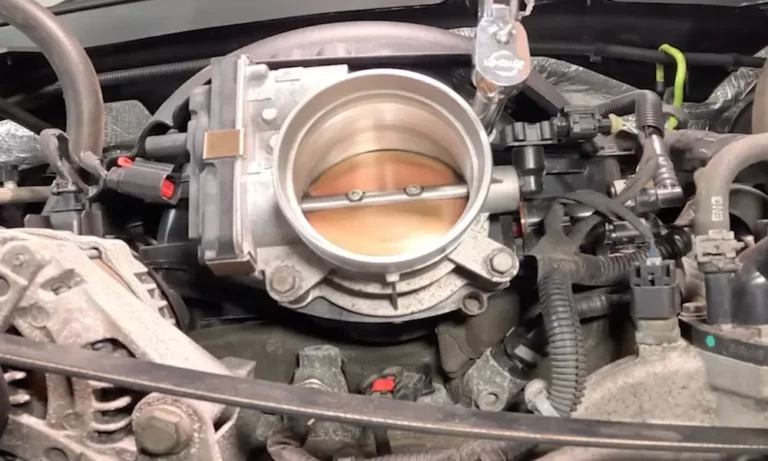
Your Chevy’s acting up with rough idling, hesitation, or that annoying check engine light? The culprit might be your throttle position sensor. The good news? You can reset it yourself in just a few minutes and get your truck running smooth again.
What Is a Throttle Position Sensor Reset?
A chevy throttle position sensor reset recalibrates the communication between your throttle body and engine computer. Think of it as teaching your truck’s brain to recognize the throttle’s full range of motion again.
The throttle position sensor (TPS) tells your engine computer exactly where your accelerator pedal sits. When this sensor gets confused or dirty, your engine receives mixed signals. That’s when you’ll notice:
- Jerky acceleration
- Poor gas mileage
- Rough idling
- Random stalling
Resetting the TPS clears these communication errors and restores proper throttle response. It’s like hitting the refresh button on your engine’s computer.
Signs You Need a Throttle Position Sensor Reset
Engine Performance Issues
Your Chevy will tell you when the TPS needs attention. Watch for these telltale signs:
Erratic idling tops the list. Your RPMs bounce around like a ping-pong ball, especially at red lights. Sometimes your engine stalls completely when you come to a stop.
Hesitation during acceleration makes merging onto highways scary. You press the gas pedal, but your truck responds like it’s thinking about it first. This delay can be dangerous in traffic.
Poor fuel efficiency hits your wallet hard. When the TPS sends wrong signals, your engine burns more gas than needed. You’ll find yourself filling up more often than usual.
Dashboard Warning Lights
The check engine light is your truck’s way of saying “something’s wrong.” Common trouble codes related to TPS issues include:
| Code | Description | Severity |
|---|---|---|
| P0120 | TPS Circuit Malfunction | High |
| P0220 | TPS2 Circuit Fault | High |
| P0122 | TPS Circuit Low Input | Medium |
| P0123 | TPS Circuit High Input | Medium |
These codes trigger when your engine computer detects voltage readings outside normal ranges. Don’t ignore them – they often lead to reduced power mode where your truck limits performance to prevent damage.
Physical Symptoms You Can Feel
Beyond dashboard lights, your truck gives physical clues. The accelerator pedal might feel unresponsive or overly sensitive. Some drivers describe it as a “dead spot” where pressing the pedal does nothing.
Your engine might surge unexpectedly, especially during idle. This happens when the computer can’t maintain steady airflow because it’s getting bad position data.
Quick Reset Method: The 5-Minute Fix
The Accelerator Pedal Method
This method works for most Chevy trucks with electronic throttle control. You don’t need any tools – just your key and patience.
Step 1: Turn your ignition to “ON” without starting the engine. You want all dashboard lights on but the engine off.
Step 2: Slowly press your accelerator pedal to the floor over 4 seconds. Hold it down for exactly 3 seconds, then release it gradually over another 4 seconds.
Step 3: Repeat this pedal cycle two more times. The timing matters here – rushing through it won’t work.
Step 4: Turn off the ignition for 10 seconds, then start your engine. Let it idle for 5-10 minutes without touching the gas pedal.
This procedure teaches your engine computer the throttle’s full range of motion. The slow, deliberate movements ensure accurate calibration.
Battery Disconnection Method
When the pedal method doesn’t work, try clearing your computer’s memory completely.
Safety first: Park on level ground with the parking brake engaged. Locate your negative battery terminal (marked with a minus sign).
Disconnect the negative cable using a wrench. Leave it disconnected for 15 minutes minimum. This clears all stored memory in your engine computer.
Reconnect the cable tightly. Start your engine and let it idle without touching the accelerator. Your truck might idle rough initially – that’s normal.
Complete the reset by driving above 45 mph for 10-15 minutes. This allows your computer to relearn normal driving patterns.
Advanced Reset Procedures
Using an OBD-II Scanner
Professional-grade resets require an OBD-II scanner with manufacturer-specific capabilities. Basic code readers won’t cut it here.
Connect your scanner to the diagnostic port under your dashboard. Navigate to the “Special Functions” or “Service” menu. Look for options like:
- Throttle Body Relearn
- Idle Air Control Reset
- Electronic Throttle Calibration
Follow your scanner’s prompts exactly. Each step must be completed in sequence, or the reset fails. Quality scanners like Autel or Snap-on provide step-by-step guidance.
The scanner method works best after replacing throttle body components. It performs deeper calibration than manual methods can achieve.
Post-Replacement Calibration
Installing a new throttle body or TPS requires specific reset procedures. Skipping these steps triggers error codes and poor performance.
Initial startup: Start your engine immediately after installation. Let it idle in park for exactly 3 minutes. Don’t rev the engine or press the accelerator.
Cooling cycle: Turn off the ignition for 60 seconds, then restart. Idle again for 3 minutes. This two-cycle process helps your computer recognize the new component.
Road test: Drive normally with multiple stops and starts. Include highway speeds if possible. Your computer needs real-world data to complete calibration.
Some replacement parts require specific GM procedures that vary by model year. Check your service manual for vehicle-specific requirements.
Troubleshooting Reset Failures
When Error Codes Keep Coming Back
Persistent trouble codes after resetting usually indicate deeper problems. The TPS reset worked, but something else needs attention.
Check your wiring first. Corroded connections or damaged wires cause intermittent faults. Look for green corrosion around connectors or frayed wire insulation.
Test sensor voltage with a multimeter. A healthy TPS receives steady 5-volt reference voltage. Fluctuating readings point to electrical problems, not sensor issues.
Clean your throttle body thoroughly. Carbon buildup prevents proper sensor operation even after successful resets. Use throttle body cleaner and a soft brush to remove deposits.
Mechanical Problems That Block Resets
Sometimes mechanical issues prevent successful TPS resets. A sticking throttle plate can’t be fixed with electronic procedures.
Remove your air intake tube and inspect the throttle plate visually. It should move smoothly without binding. Heavy carbon buildup often causes mechanical sticking.
Worn throttle shaft bushings create play that confuses position sensors. This wear typically appears in high-mileage vehicles and requires throttle body replacement.
Environmental Factors
Cold weather can interfere with TPS resets. Perform reset procedures with your engine at normal operating temperature when possible.
Low battery voltage during reset procedures causes failures. Ensure your battery shows at least 12.6 volts before starting. Turn off unnecessary electrical loads like headlights and air conditioning.
Prevention and Maintenance Tips
Regular Throttle Body Cleaning
Clean throttle bodies prevent most TPS problems. Schedule cleaning every 30,000 miles or when you notice performance issues.
Use proper cleaners designed for throttle bodies. Carburetor cleaners can damage sensitive sensors and coatings.
Remove the air intake for access. Clean both sides of the throttle plate and the bore thoroughly. Pay attention to areas where carbon typically builds up.
Reassemble carefully and perform a TPS reset after cleaning. This ensures proper calibration with the clean surfaces.
Quality Replacement Parts
When replacement becomes necessary, invest in quality components. Cheap aftermarket sensors often fail prematurely or calibrate incorrectly.
OEM parts guarantee proper fit and function. They’re designed specifically for your truck’s computer system and provide reliable long-term operation.
Consider upgrading to improved designs when available. Some newer TPS designs resist carbon buildup better than original equipment.
Driving Habits That Help
Your driving style affects TPS longevity. Gradual acceleration and deceleration reduce sensor wear compared to aggressive driving.
Regular highway driving helps keep throttle bodies clean. Extended idle periods and short trips promote carbon buildup.
Address performance issues quickly. Ignoring early symptoms often leads to more expensive repairs later.
Model-Specific Reset Variations
Silverado and Sierra Trucks
Full-size Chevy trucks use similar TPS reset procedures across model years. However, 2007 and newer trucks with drive-by-wire systems require specific timing.
The accelerator pedal method works reliably on these trucks. Hold each position for the full recommended time – rushing causes reset failures.
Some Silverado models need additional steps after throttle body cleaning. Consult your owner’s manual for vehicle-specific requirements.
Suburban and Tahoe SUVs
Large SUVs share powertrain components with Silverado trucks but may have different computer programming. The basic reset procedures remain the same.
These vehicles often accumulate more idle time than trucks, leading to increased carbon buildup. More frequent throttle body cleaning helps prevent TPS problems.
Colorado and Canyon Mid-Size Trucks
Smaller trucks use different throttle body designs that may require modified reset procedures. The four-cylinder and V6 engines have distinct calibration requirements.
Check for model-specific technical service bulletins that address known TPS issues. GM occasionally releases updated procedures for problematic vehicles.
Cost Comparison: DIY vs. Professional Service
| Service Type | DIY Cost | Shop Cost | Time Required |
|---|---|---|---|
| Basic Reset | $0 | $80-120 | 15 minutes |
| Scanner Reset | $150 (tool) | $100-150 | 30 minutes |
| TPS Replacement | $75-150 | $200-350 | 1-2 hours |
| Throttle Body Cleaning | $15-25 | $120-200 | 45 minutes |
Professional service makes sense for complex problems or when you lack proper tools. But basic resets are well within most DIY capabilities.
Investing in a quality OBD-II scanner pays off if you maintain multiple vehicles. The tool cost spreads across many uses over time.
Advanced Diagnostic Techniques
Reading Live Data
Beyond simple trouble codes, live data reveals detailed sensor performance. Watch TPS voltage while slowly pressing the accelerator pedal.
Healthy sensors show smooth voltage changes from 0.5 to 4.5 volts. Jumps, drops, or flat spots indicate sensor problems that resetting won’t fix.
Compare readings between multiple sensors on trucks with dual TPS systems. Both sensors should track closely throughout the throttle range.
Monitoring Adaptation Values
Modern trucks store adaptation values that show how much your computer compensates for component variations. Extreme values suggest mechanical problems.
These values reset during TPS calibration procedures. Monitor them afterward to ensure successful calibration and stable operation.
Professional scanners display adaptation data in real-time. This information helps diagnose intermittent problems that don’t trigger obvious symptoms.
Performing a chevy throttle position sensor reset solves many common drivability problems and restores your truck’s performance. Start with simple manual procedures before moving to advanced diagnostic methods. Most issues resolve with basic resets, saving time and money while getting you back on the road quickly.
Remember that preventive maintenance beats reactive repairs. Regular throttle body cleaning and prompt attention to performance issues keep your TPS functioning properly for years to come.