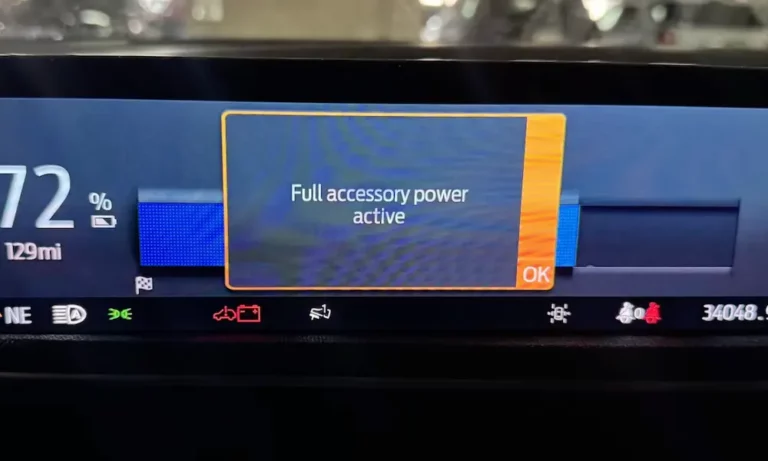
Ever noticed that “Full Accessory Power Active” message on your Ford’s dashboard? It’s not just random text—it’s your vehicle telling you something important about its power status. This feature lets you use your car’s electrical systems without running the engine, but there’s a lot more to understand about how it works, potential issues, and how to make the most of it.
What Does “Full Accessory Power Active” Actually Mean?
When you see “Full Accessory Power Active” displayed on your Ford’s dashboard, it means your vehicle’s electrical systems are powered up while the engine remains off. This clever feature gives you access to your windows, navigation, radio, climate control, USB ports, and power outlets without burning fuel.
You’ll activate this mode by pressing the start button without stepping on the brake pedal. It’s perfect for those times when you’re waiting for someone in your car and want to stay comfortable, need to check if your lights or wipers are working properly, want to charge your phone, or just feel like listening to music while parked.
Modern Fords come packed with electronic features, making this accessory mode incredibly useful for everyday situations where you need power but not engine operation.
How to Activate Ford’s Accessory Power Mode
Getting your Ford into accessory mode is straightforward, though the exact process varies slightly between models:
- For push-button start vehicles (most modern Fords):
- Press the engine start button once without touching the brake pedal for basic accessory mode
- Press it a second time to reach “Full Accessory Power Active” status
This two-step approach prevents accidental activation while giving you full access when needed.
The system works differently depending on whether you have a traditional gas-powered Ford or an electric model like the F-150 Lightning or Mustang Mach-E:
| Vehicle Type | Power Source | Capabilities |
|---|---|---|
| Gas-powered | 12-volt battery only | Basic electronics, limited climate control |
| Electric | High-voltage traction battery supplements 12-volt system | Full climate control, extended usage time |
Ford has built in safeguards to prevent battery drain. The system automatically shuts down after specific timeouts:
- F-150 trucks: Up to 75 minutes
- Bronco models: Approximately 30 minutes
These timeouts can trigger earlier if the system detects your battery voltage dropping too low—Ford prioritizes making sure you can start your vehicle over keeping your accessories running.
Different Implementations Across Ford’s Vehicle Lineup
Ford tailors its accessory power management to each model’s specific needs and capabilities:
F-150 Lightning: The Power Heavyweight
The F-150 Lightning represents Ford’s most advanced implementation, featuring not just standard accessory power but also the impressive Pro Power Onboard system. This setup offers either 2.4kW or 9.6kW of exportable power, essentially turning your truck into a mobile power station. You can run construction tools, power appliances, or even provide backup power to your home during outages.
Ford Maverick: Entry-Level Approach
The Maverick takes a simpler approach with a 70-80 minute timeout period but lacks the Pro Power Onboard capabilities of its bigger siblings. Recent Maverick models have faced some challenges with 12-volt battery management, leading to frequent “battery saver mode” activations. Ford addressed manufacturing defects in the 12-volt batteries supplied to Maverick and Bronco Sport models with a recall in January 2025.
Traditional F-150 Models
Gas-powered F-150s offer Pro Power Onboard in various configurations (2.0kW, 2.4kW, or 7.2kW) depending on trim and options. Their electrical architecture includes sophisticated battery management systems that monitor charging performance and automatically shut down non-essential functions when battery voltage drops too low.
Common Problems with Ford’s Accessory Power System
While generally reliable, Ford’s accessory power system can experience issues that might leave you scratching your head:
Getting Stuck in Accessory Mode
The most common complaint is when the system prevents the engine from starting, trapping your vehicle in accessory mode. You’ll see the “Full Accessory Power Active” message on the dashboard, but the vehicle won’t respond to normal starting procedures, even when you’re pressing the brake pedal correctly.
Battery-Related Problems
The primary culprit behind most accessory power malfunctions is battery issues. Weak or failing 12-volt batteries (particularly those reading below 12.4 volts) can trigger the system to stay in accessory mode as a protective measure.
This is especially problematic in Ford’s electric vehicles, where the 12-volt battery powers critical systems including door locks, infotainment, and climate control. If the 12-volt battery fails in these models, the vehicle becomes completely inoperable until you jump-start or replace the battery.
Software and Firmware Glitches
Modern Fords rely heavily on computerized modules for power management, and glitches in these systems can cause erratic behavior. The Telematics Control Unit (TCU) has been identified as a particular problem source in some models, with failures causing persistent 12-volt battery drain.
Environmental Factors
Weather extremes can make accessory power problems worse. Both hot and cold temperatures stress the 12-volt battery and can trigger protective modes more frequently. Ford vehicles automatically enter “Deep Sleep” mode after:
- 14 days of inactivity
- Battery voltage drops below 9.5 volts
- Extreme weather conditions
How to Fix Accessory Power Problems
When you’re facing issues with the “Full Accessory Power Active” system, try these solutions:
The Basic Reset Procedure
- Let your vehicle sit undisturbed for 30-60 minutes (this allows the electrical systems to attempt an automatic reset)
- Press the start button without touching the brake pedal to turn off accessory mode
- Then properly start the engine by pressing the brake pedal and pushing the start button
Check and Test Your Battery
A healthy 12-volt battery should measure:
- 12.4-12.6 volts with the engine off
- 13.8-14.4 volts with the engine running
If your battery reads below 12.4 volts, it needs charging or replacement. Jump-starting might provide temporary relief, but an underlying battery degradation problem often requires complete replacement.
Reset Your Vehicle’s Electronics
For persistent software-related issues, try disconnecting the negative battery terminal for 5-10 minutes. This resets the vehicle’s electronic control modules and clears temporary fault codes. Be aware this will also erase your radio presets, clock settings, and learned driving parameters.
More severe cases may require professional diagnosis using OBD-II scanners to identify specific module failures or communication errors.
Consider Battery Upgrades
Ford has acknowledged widespread 12-volt battery issues across multiple model lines. Owners experiencing chronic problems often benefit from upgrading to Absorbed Glass Mat (AGM) batteries, which provide better performance and longevity compared to standard lead-acid batteries.
How Ford’s Battery Management System Works
Modern Ford vehicles use sophisticated Battery Management Systems (BMS) that constantly monitor battery health and power consumption:
Active Monitoring
The BMS continuously tracks:
- Battery voltage
- Current flow
- Charging system output
When it detects declining battery performance, it systematically disables non-essential functions, prioritizing critical systems like engine starting and safety equipment.
Different Approaches for Different Vehicles
| Vehicle Type | Charging Method | Characteristics |
|---|---|---|
| Traditional Gas Models | Alternator charging during engine operation | Limited power generation when stopped |
| Electric Vehicles | DC-DC converters maintain 12V charging from high-voltage battery | More consistent power availability but more complex |
Automatic Timeout Features
Ford implements various timeouts to preserve battery life:
- Interior lighting: Active for 10 minutes after engine shutdown
- Power outlets and USB ports: Up to 75 minutes
- Radio systems: Approximately 60 minutes
These timeouts shorten if the BMS detects battery voltage declining, ensuring enough reserve power to start your vehicle.
What’s Coming Next and Warranty Considerations
Ford continues evolving their accessory power systems to meet customer needs and incorporate new technology. The company has acknowledged the chronic 12-volt battery issues affecting multiple models and committed to improving battery chemistry and software management.
Warranty Coverage
If you’re experiencing repeated accessory power problems, Ford’s warranty typically covers battery replacement and related electrical system repairs. However, some dealers might initially resist warranty claims, requiring you to demonstrate persistent problems through multiple service visits.
Documenting recurring issues and escalating to Ford customer service can improve your chances of successful warranty claims.
Future Developments
Ford’s integration of advanced power management features like Pro Power Onboard shows their commitment to expanding vehicle utility beyond transportation. Future developments may include:
- Enhanced energy storage capabilities
- Improved battery chemistry
- More sophisticated power export systems
These innovations will further blur the line between vehicles and mobile power stations.
Making the Most of Your Ford’s Accessory Power
Understanding Ford’s “Full Accessory Power Active” system helps you maximize your vehicle’s capabilities while avoiding common pitfalls:
- Use accessory mode strategically when you need electrical systems but not engine power
- Monitor your battery’s health regularly, especially before long periods of non-use
- Consider upgrading to an AGM battery if you frequently use accessory mode
- Be aware of your specific model’s timeout periods
- In electric models, remember that the 12-volt battery remains critical despite the presence of the high-voltage system
With proper management, Ford’s accessory power system adds convenience and functionality to your driving experience. By recognizing early warning signs of battery issues and following proper maintenance procedures, you’ll avoid getting stranded while enjoying all the modern features your Ford has to offer.