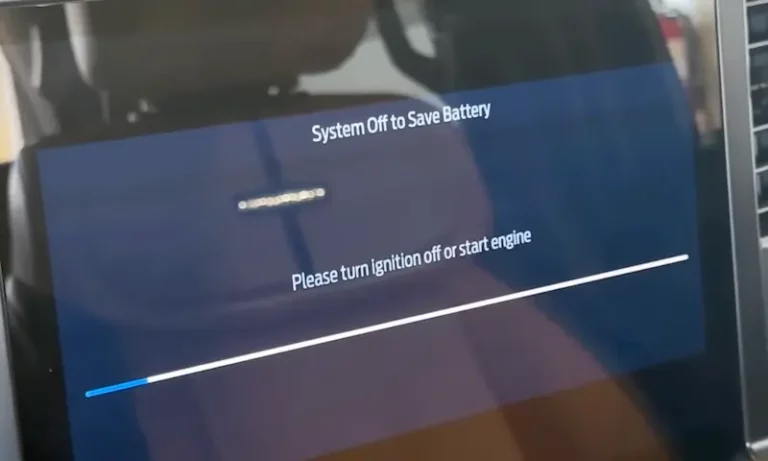
Ever been ready to enjoy some music in your parked Ford only to see that annoying “System Off to Save Battery” message pop up on your screen? It’s frustrating when your radio and other accessories suddenly shut down even though you know your battery is fine. You’re not just imagining things—this is a common issue affecting many Ford owners across multiple models.
What Causes the “System Off to Save Battery” Message?
When your Ford displays this message, it’s your vehicle’s Battery Management System (BMS) taking protective action. This sophisticated system monitors your battery’s voltage and charge levels through an Electric Battery Sensor (EBS) mounted on the negative battery terminal.
The system activates when it detects:
- Battery voltage dropping below approximately 9.5 volts
- Extended periods without driving (typically 14+ days)
- Potentially harmful electrical conditions
This affects numerous Ford models including F-150, Explorer, Edge, Fusion, Escape, Bronco, Maverick, and Lincoln vehicles manufactured from around 2012 onwards.
The Two Main Culprits Behind This Message
1. Faulty Electric Battery Sensor (EBS)
The most common cause isn’t actually your battery at all—it’s the sensor that monitors it. The EBS is a small circular device with a purple interior that wraps around the negative battery cable. This little component can cause big headaches when it malfunctions.
Why the sensor fails:
- Moisture infiltration
- Battery acid corrosion
- Simple electronic failure
- Hypersensitivity triggering false warnings
Many mechanics report that this sensor frequently triggers battery conservation mode prematurely, even when batteries are perfectly healthy. This happens especially in trucks with short driving cycles or those left parked for extended periods.
2. Actual Battery Issues
Sometimes, the message appears because your battery truly is struggling:
- Batteries typically begin showing reduced performance after 3 years
- Short trips don’t allow the alternator sufficient time to fully recharge
- Extreme temperatures (both hot and cold) affect battery performance
- Multiple electronic accessories drawing power simultaneously
Ford’s Deep Sleep mode activates to prevent complete battery discharge that would require professional jump-starting or replacement, but it also disables convenient features like those accessible through the FordPass mobile application.
Systems Affected When Battery Conservation Mode Activates
When your Ford enters battery conservation mode, several systems are systematically disabled:
| System | What Happens |
|---|---|
| Auto Start-Stop | Displays “Not Available” message |
| Passive Entry | Keyless door unlocking stops working |
| Power Seats | Memory functions disabled |
| Climate Control | Automatic features may reduce functionality |
| Interior Lighting | Switches to manual-only operation |
| FordPass Connectivity | Remote features become unavailable |
| Infotainment System | Reduced functionality, especially for memory settings |
How to Fix the “System Off to Save Battery” Message
Solution 1: EBS Sensor Bypass (Quick Temporary Fix)
The fastest way to stop this message is bypassing the problematic sensor:
- Open your hood and locate the negative battery terminal
- Find the circular EBS sensor (with purple interior coloring)
- Press the small tab on the bottom while gently pulling to remove the connector
- Secure the loose sensor with zip ties to prevent unwanted contact
This quick bypass method immediately restores normal accessory operation and eliminates the annoying message. You’ll be able to use your radio and other electronics normally when parked.
Warning: This is a temporary fix that prevents proper battery monitoring. You could potentially drain your battery completely if you leave electrical loads on for too long.
Solution 2: Battery Management System Reset
Ford provides a manual reset procedure that recalibrates the system’s understanding of your battery’s condition:
- Turn ignition to ON position without starting engine
- Turn headlights to ON position (not automatic)
- Flash high beams exactly five times within 10 seconds
- Press brake pedal three times completely to the floor
- Watch for the red battery warning light to flash three times (confirms successful reset)
- Turn ignition OFF, then restart normally
This standardized reset procedure works across most Ford models from 2015 onwards and takes about 30-60 seconds. It immediately updates the BMS parameters to recognize your battery’s current condition.
Some vehicles require turning the ignition off and back on after the brake pedal presses, then watching for the battery light confirmation.
Solution 3: Battery Replacement and Proper Charging
If the above solutions don’t work, your battery might actually need replacement, especially if it’s over three years old. Modern Ford vehicles require specific charging procedures:
- Professional battery testing should include load testing and voltage testing under various conditions
- Many batteries that pass basic tests may still lack capacity for modern vehicle demands
- When charging, connect the positive clamp to the positive terminal but connect the negative clamp to a chassis ground point (not directly to the negative terminal)
This “downstream” charging ensures the BMS registers charging current and updates the battery state calculations correctly, as demonstrated in this helpful guide.
Solution 4: Parasitic Draw Testing
If you’ve tried everything else, your vehicle might have an electrical component draining the battery when it shouldn’t be.
Normal specifications:
- Ford vehicles typically maintain current draws between 50-85 milliamps when properly shut down
- Newer models sometimes show up to 185 milliamps due to increased electronic modules
Professional parasitic draw testing involves:
- Connecting an ammeter between the negative battery cable and terminal
- Systematically removing fuses to identify circuits causing excessive current draw
Common culprits include interior lighting circuits, computer modules that fail to enter sleep mode, stuck relay switches, and alternator diode failures. The National Highway Traffic Safety Administration recommends having this specialized testing done by qualified technicians.
Preventing Future “System Off to Save Battery” Messages
To avoid seeing this message again:
- Drive your vehicle regularly for longer distances to allow full alternator charging
- Use a battery tender or trickle charger during extended storage periods
- Regularly clean battery terminals to prevent corrosion that can affect sensor operation
- Consider upgrading to a higher-capacity battery, particularly AGM (Absorbed Glass Mat) technology
- Park in temperature-controlled areas when possible (extreme temperatures stress batteries)
- Have your charging system tested annually, especially before winter
Which Ford Models Are Most Affected?
This issue appears across numerous Ford vehicles, but these models seem particularly prone to displaying the message:
| Model | Years Most Affected |
|---|---|
| F-150 | 2015-2023 |
| Explorer | 2016-2023 |
| Edge | 2015-2023 |
| Escape | 2017-2023 |
| Bronco/Bronco Sport | 2021-2023 |
| Maverick | 2022-2023 |
| Fusion | 2013-2020 |
| Transit | 2015-2023 |
While annoying, remember that Ford’s “System Off to Save Battery” message serves an important purpose—preventing complete battery discharge that would leave you stranded. By understanding the causes and solutions outlined above, you can address this common issue effectively and get back to enjoying your vehicle’s features without interruption.
The F-150 owner forums contain numerous discussions about this issue, showing just how widespread it is among Ford owners. Many have successfully resolved it using the methods described above.
Remember that proper battery maintenance is especially important in modern vehicles with sophisticated electronics. Taking preventative steps now can save you significant frustration later.