Is your Honda’s wireless charging pad more decorative than functional? You place your phone down expecting that satisfying charging icon to appear, but nothing happens. Or worse, it charges for a few seconds before giving up. You’re not just imagining things—this is a widespread issue across multiple Honda models.
The Main Reasons Your Honda Wireless Charging Fails
Honda’s wireless charging systems have several fundamental flaws that prevent them from working reliably with modern smartphones. Let’s break down what’s actually happening.
Slippery Slopes: The Ergonomic Design Flaw
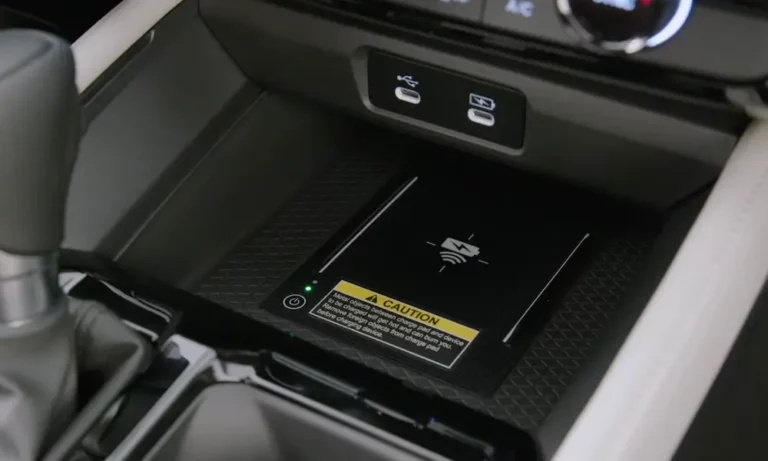
The wireless charging pad in many Honda models (particularly 10th-generation Accords and CR-Vs) uses a sloped design that’s practically designed to fail. Your phone needs to stay perfectly aligned with the charging coil, but Honda’s sloped surfaces cause phones to slide out of position, especially during normal driving.
This misalignment breaks the connection between your phone’s charging coil and the pad’s transmitter, cutting off power within seconds of placing your device down. It’s particularly problematic if you don’t use a case, as the smooth back of modern phones offers zero grip on Honda’s equally smooth charging surface.
Many owners have created DIY solutions using furniture pads or weather stripping to add friction, though these modifications might void your warranty if they cause damage.
Size Matters: Your Phone Might Be Too Big
Honda designed their charging pads for smaller phones—typically devices under 160mm in length. This creates immediate compatibility issues with popular phones like:
- iPhone 15 Pro Max (160.7mm)
- Samsung Galaxy S23 Ultra (163.4mm)
- Google Pixel 8 Pro (162.6mm)
The space constraints are even worse in models like the 2022 Odyssey, where the center-console charger can only fit phones under 150mm when using a protective case. Honda’s OEM charging components simply weren’t designed with today’s larger flagship phones in mind.
The Camera Bump Problem
If you’re using any iPhone from the 12 series onward, the raised camera array creates a physical gap between your phone and the charging surface. This 2-3mm elevation prevents proper contact with the charging coil in 2021-2023 models like the Passport Elite and CR-V Touring.
Unlike aftermarket chargers that can adjust coil positioning, Honda’s fixed design can’t accommodate these modern smartphone features. The result? Weak or non-existent charging as the magnetic flux can’t properly couple through the increased distance.
Technical Issues Behind the Scenes
Beyond the physical design problems, your Honda’s wireless charger may be failing due to technical limitations Honda hasn’t addressed.
Software and Firmware Problems
Honda has acknowledged firmware errors in their wireless chargers through Technical Service Bulletin (TSB) 24-061. This bulletin identifies software issues in 2019-2023 Honda and Acura vehicles that cause charging to terminate even when phones are correctly positioned.
Affected models include:
- Passport
- Pilot
- Ridgeline
- Civic Touring
Unfortunately, these issues require hardware replacements rather than simple software updates, meaning you’ll need to visit a dealer for resolution.
Your Phone Charges Too Fast (Yes, Really)
Modern smartphones using Qi-certified fast wireless charging (15W-30W) can confuse Honda’s older 5W-10W charging systems. When your iPhone 14 Pro or Samsung Galaxy S23 tries to enter rapid charge mode, Honda’s hardware can’t keep up.
This incompatibility triggers thermal protection circuits that shut down charging within 20-30 seconds. It’s like trying to drink from a fire hose—your phone wants more power than Honda’s system can safely deliver.
External Factors That Disrupt Charging
Sometimes the problem isn’t with your phone or even the charging system itself, but with how you’re using it.
Metal Objects Blocking the Connection
Leaving coins, keys, or RFID cards on or near the charging pad creates interference through eddy currents. These unwanted electrical flows can:
- Reduce charging efficiency by 40-60%
- Trigger overheating alerts
- Completely block the charging signal
This interference isn’t just inconvenient—it can potentially damage both your phone and the charging system over time.
Key Fob Interference
If you keep your key fob near the wireless charger, you might experience both charging failures and “Key Not Detected” errors. Honda’s engineering documentation suggests keeping key fobs at least 203mm (about 8 inches) away from active chargers to prevent RF interference.
How to Fix Your Honda Wireless Charging Problems
While there’s no perfect solution short of Honda redesigning their charging systems, you can try several approaches to improve your experience.
Official Honda Fixes
If your vehicle is covered under TSB 24-061, schedule a service appointment with your Honda dealer. They’ll replace your charging unit with an updated version (part number 39570-TG7-A02) that includes:
- Modified current delivery algorithms
- Reinforced shielding against RF interference
- Improved thermal management
This service typically takes around an hour, though Honda’s labor template allocates just 0.3 hours for the procedure.
DIY Improvements You Can Try Today
- Remove your phone case: Eliminating your case reduces the vertical gap by 1-2mm, potentially improving coil alignment for iPhone 14/15 and Pixel 7/8 series phones. While not ideal for protection, it might be worth trying to confirm if your case is the culprit.
- Add anti-slip material: Apply small furniture pads or rubber strips to the charging surface to prevent phone movement. Many Honda forum users report success with 3M Command strips or silicone furniture bumpers.
- Adjust phone positioning: Instead of centering your phone on the pad, experiment with different positions. Some users find success placing their phone slightly off-center to better align the internal charging coils.
- Clear cache on Honda’s infotainment system: Some charging issues relate to the infotainment system’s connection to the charging module. Try performing a factory reset of your infotainment system (check your owner’s manual for specific instructions).
Alternative Charging Solutions
If you’ve tried everything and your wireless charger still won’t cooperate, consider these alternatives:
- Use your USB port: The USB-C Power Delivery ports in 2022+ Honda models provide 18-27W charging—significantly faster than the wireless system’s 5-10W maximum.
- Aftermarket charging solutions: Third-party charging pads like The Ridge Store’s RLS-Wireless-Kit offer larger surface areas and adjustable coils. However, compatibility varies by model year, so research carefully before purchasing.
- MagSafe car mounts: If you have an iPhone 12 or newer, MagSafe car mounts with integrated charging can bypass Honda’s system entirely while keeping your phone visible for navigation.
Device-Specific Compatibility Issues
Different phones encounter unique problems with Honda’s wireless charging system. Here’s a breakdown by major device types:
iPhone Compatibility Problems
| iPhone Model | Common Issues | Potential Solutions |
|---|---|---|
| iPhone 12-15 | Camera bump prevents contact; MagSafe conflicts | Remove case; position phone with camera off the pad edge |
| iPhone 13 Mini/SE | Too small for reliable contact | Use an elevated adapter or switch to wired charging |
| iPhone 15 Pro Max | Too large for pad; overheating | Remove case; use only for short charging sessions |
Android Phone Compatibility
| Android Model | Common Issues | Potential Solutions |
|---|---|---|
| Samsung Galaxy S22/S23 | Fast charge conflicts; size issues | Disable fast wireless charging in phone settings |
| Google Pixel 7/8 | Position detection problems | Place phone off-center; use thinner case |
| OnePlus/Xiaomi | Proprietary charging protocols | Enable Qi compatibility in battery settings |
Honda Models Most Affected by Charging Problems
Certain Honda models experience wireless charging issues more frequently than others. Based on user forums and technical bulletins, these are the most problematic:
- 2019-2022 Honda Passport: Particularly the Elite trim with the angled charging pad
- 2020-2023 Honda Civic Touring: Software conflicts with iOS 16+ devices
- 2021-2023 Honda Ridgeline: Charging pad alignment issues
- 2022-2023 Honda Odyssey: Limited size compatibility in console charger
- 2023 Honda CR-V Touring/Hybrid: Firmware problems with charging termination
Models with lower issue rates include the 2023+ Accord, which features a redesigned charging pad with improved phone retention.
Environmental Factors That Impact Charging
Your Honda’s wireless charging performance isn’t just about technology—environmental conditions play a significant role too.
Temperature Effects
Wireless charging generates heat, and Honda’s systems lack sophisticated cooling mechanisms. When ambient temperatures rise above 95°F (35°C), charging efficiency plummets. Samsung explicitly warns against wireless charging in high temperatures.
This explains why many owners report worse performance during summer months or in warmer climates like Arizona and Florida. The charger’s thermal protection circuits activate more frequently, cutting off power to prevent overheating.
Driving Conditions Impact Charging
Rough roads and frequent stops affect charging consistency. Each bump or turn can shift your phone out of alignment with the charging coil. Highway driving typically provides the most stable charging experience, while city driving with frequent stops and starts causes more interruptions.
Looking Ahead: Will Honda Fix These Issues?
Honda has been slow to address wireless charging problems comprehensively. While TSB 24-061 provides hardware replacements for some models, it doesn’t solve the fundamental design limitations.
Future Honda models (2024+) show signs of improvement with:
- Flatter charging surfaces with anti-slip materials
- Support for faster 15W Qi2 charging standards
- Adjustable coil positioning for better phone compatibility
If you’re considering a new Honda purchase and wireless charging is important to you, research the specific implementation in newer models or consider aftermarket alternatives.
The Bottom Line on Honda Wireless Charging
Honda’s wireless charging implementation suffers from both design flaws and technical limitations that prevent reliable operation with modern smartphones. While some issues can be addressed through dealer service or DIY modifications, the fundamental problems require Honda to redesign their charging systems.
Until then, your best options are:
- Visit your dealer if your vehicle is covered by TSB 24-061
- Try the DIY solutions outlined above
- Consider using wired charging for more reliable results
Remember that wireless charging in any vehicle is typically slower than wired alternatives. If keeping your phone powered during drives is essential, a high-quality USB cable connected to your car’s fastest USB port remains the most dependable solution.