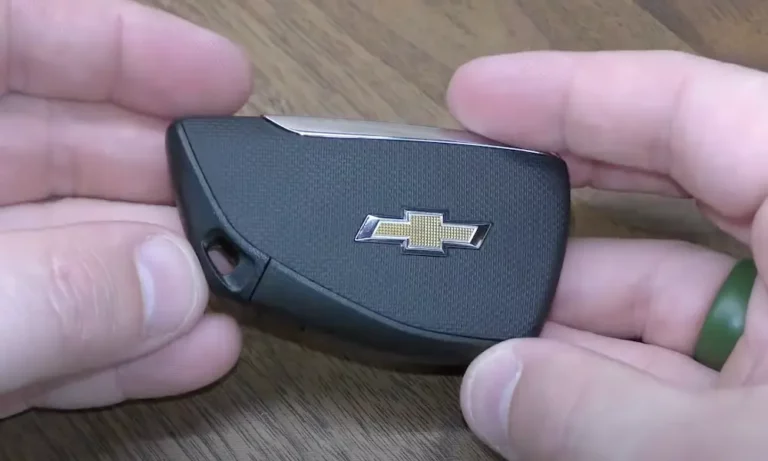
Your Chevy key fob is acting up — slow to respond, weak range, or totally dead. Good news: you don’t need a dealership visit or a mechanic. This guide covers how to replace battery in Chevy key fob for every fob type — smart fob, flip key, and classic remote. Stick around, because the battery type and method vary more than you’d think.
First, Which Chevy Key Fob Do You Have?
Before you grab a screwdriver, you need to know which fob you’re working with. Not all Chevy fobs open the same way.
Here’s a quick breakdown:
| Fob Type | Years | Common Vehicles |
|---|---|---|
| Standard Remote | 1998–2009 | Silverado, Suburban, Tahoe |
| Classic Integrated | 2006–2010 | Impala, Cobalt, Monte Carlo |
| Flip Key | 2010–2016 | Cruze, Malibu, Equinox, Camaro |
| Smart Proximity Fob | 2015–2020 | Tahoe, Traverse, Impala, Blazer |
| Next-Gen Smart Fob | 2021–Present | Silverado 1500, Tahoe, Corvette |
Still not sure? Look at your fob. Does the key blade flip out when you press a button? That’s a flip key. Does it have no physical key at all? That’s a smart fob. Does it have a fixed blade or just buttons? That’s a classic or standard remote.
What Battery Does a Chevy Key Fob Use?
Most Chevy fobs use a CR2032 battery. Newer models with remote start and push-button ignition often need the beefier CR2450.
| Model Era | Battery Type | Expected Lifespan |
|---|---|---|
| Pre-2020 Chevrolet Models | CR2032 | 3–5 years |
| 2020+ Silverado / Tahoe | CR2450 | 2–4 years |
| 2010–2016 Flip Key Models | CR2032 | 3–4 years |
| Early 2000s Classic Remotes | CR2032 or CR2016 | 4–6 years |
| 1993–1997 Corvette | CR2450 | 2–3 years |
Both batteries cost under $5 at any auto parts store. Compare that to $30–$70 at a dealership for the exact same swap. You do the math.
Signs Your Chevy Key Fob Battery Is Dying
Don’t wait until you’re stuck in a parking lot. Your fob gives you plenty of warning.
Watch for these signs:
- Reduced range — A healthy fob works from 50+ feet away. A dying one might only respond from 5–10 feet.
- Intermittent response — You press the button once and nothing happens. Press it again and it works. That’s the battery scraping together just enough charge for a second attempt.
- “Key Fob Battery Low” message — Newer Chevy models display this warning on the Driver Information Center. You’ve typically got a few weeks before it dies completely.
- Remote start stops working first — Remote start needs the most power. It’s usually the first feature to go.
Extreme temperatures speed up battery drain too. Leaving your fob in a hot car or a freezing garage chews through the charge faster than normal use.
How to Replace Battery in Chevy Smart Key Fob (Push-Button Start Models)
This covers 2015–present Tahoe, Silverado, Traverse, Blazer, and similar models.
What you need:
- CR2450 (2020+) or CR2032 (2015–2019) battery
- Small flathead screwdriver
- Clean cloth
Step-by-step:
- Find the small chrome release button on the side of the fob. Press it and slide out the emergency key blade.
- Insert the tip of your flathead screwdriver into the slot where the key blade sat.
- Gently twist — don’t pry hard. The two halves of the casing will separate.
- Locate the round battery inside the compartment.
- Pop the old battery out using the screwdriver tip. Don’t bend the metal contact prongs.
- Install the new battery positive side down (flat side facing down into the compartment).
- Press the two halves back together until you hear all the tabs click.
- Slide the emergency key back in.
Pro tip: Handle the new battery by its edges only. Skin oils on the flat surface create resistance and shorten battery life. If you touch it, wipe it clean with a microfiber cloth first.
| Installation Step | What to Do | What to Avoid |
|---|---|---|
| Case Separation | Gentle twisting motion | Forcing with heavy vertical pressure |
| Battery Removal | Use non-conductive tool | Bending the metal contact prongs |
| Polarity Check | Positive side facing down | Flipping it the wrong way |
| Housing Closure | Even pressure until tabs click | Trapping the rubber gasket outside |
How to Replace Battery in Chevy Flip Key Fob (2010–2016 Models)
This covers Equinox, Cruze, Malibu, Camaro, and Volt with the switchblade-style key.
What you need:
- CR2032 battery
- Flathead screwdriver (or just your thumb)
Step-by-step:
- Press the chrome release button to flip the key blade out into the open position.
- With the key extended, you can now see the back cover of the fob.
- Insert a flathead screwdriver into the groove near the hinge area — or simply press your thumb firmly against the seam at the bottom of the remote.
- The back cover pops off. Many flip key covers come off with thumb pressure alone, no tools needed.
- Pop out the old CR2032 battery.
- Install the new battery positive side down.
- Snap the back cover on firmly.
- Test the flip key spring mechanism — make sure the cover doesn’t block the hinge rotation.
How to Replace Battery in Chevy Standard Remote (1998–2009 Models)
This covers older Silverado, Suburban, Tahoe, and Express vans.
What you need:
- CR2032 or CR2016 battery (check your existing one)
- Flathead screwdriver or coin
Step-by-step:
- Look for a slot on the side or bottom of the casing. Insert a coin or flathead screwdriver and twist to separate the two halves.
- Some older remotes have a small screw on the back instead — use a precision screwdriver to remove it first.
- Once open, check the metal contacts. If they look dull or corroded, clean them with a cotton swab and contact cleaner.
- Remove the old battery. Note the orientation carefully.
- For classic standard remotes, the positive side faces UP — opposite to the smart fob. Look for the small “+” symbol engraved inside the battery cradle.
- Snap the case back together.
Some very early remotes use two stacked CR2016 cells instead of one CR2032. Match exactly what you take out.
Does Replacing the Battery Erase the Programming?
Usually, no. Your vehicle’s computer keeps the remote’s identity stored in memory. Pop in a fresh battery and you’re good to go.
But if the fob still doesn’t respond after the swap, you’ll need to re-sync it.
Re-Syncing a Keyed Ignition Chevy
- Unlock the driver’s door manually. Close all other doors and sit in the driver’s seat.
- Insert the key into the ignition but don’t turn it.
- Hold the Unlock button on the driver’s door panel.
- While holding it, turn the ignition to “On” then back to “Off” twice quickly. Don’t start the engine.
- Release the door Unlock button. The door locks will cycle — that’s your cue the system entered programming mode.
- Press and hold both Lock and Unlock on the fob simultaneously until the locks cycle again.
- Done. The fob and vehicle have re-synced.
Re-Syncing a Push-Button Start Chevy
Push-button models have a transmitter pocket for exactly this situation.
- Bucket seat models: The pocket is usually at the bottom of the center console bin or in the cup holder area.
- Bench seat models: Check the compartment under the center seat cushion.
Place the fob in the pocket. Put the vehicle in accessory mode. Hold the Start/Stop button for 5–10 seconds. The dashboard will confirm when pairing is complete. This works even with a completely dead battery — the vehicle reads the transponder chip through induction.
Troubleshooting: Still Not Working After the Swap?
| Symptom | Likely Cause | Fix |
|---|---|---|
| No response at all | Wrong battery orientation | Flip the battery, recheck polarity |
| Range still short | Dirty contacts or interference | Clean terminals, move away from power lines |
| One button dead | Worn internal micro-switch | Replace the entire fob unit |
| “No Remote Detected” | Lost sync | Use transmitter pocket and re-pair |
| Intermittent response | Battery not seated firmly | Check contact prong tension with tweezers |
If one button works and another doesn’t, that’s almost always a failed internal micro-switch — not a battery issue. A new fob is the practical fix there.
Also worth checking: if your vehicle’s 12-volt battery is very low, the keyless entry module might not have enough power to operate at all — even with a brand-new fob battery inside.
The Smart Way to Stay Ahead of a Dead Fob
- Replace the battery every 3 years, whether it’s acting up or not. It’s a $3–$5 insurance policy.
- Keep a spare CR2032 and CR2450 in your glove box. They have a shelf life of up to 10 years if stored properly.
- Know where your emergency key blade is and how to use it. Most smart fobs hide one inside — don’t get caught not knowing this.
- When you swap the battery, take 30 seconds to inspect the inside of the fob for moisture or corrosion. Catching it early beats buying a new fob later.
When you’re done, don’t toss the old coin cell in the trash. Most auto parts stores and hardware stores have drop-off bins for used lithium batteries. Takes two seconds and keeps those materials out of landfills.