
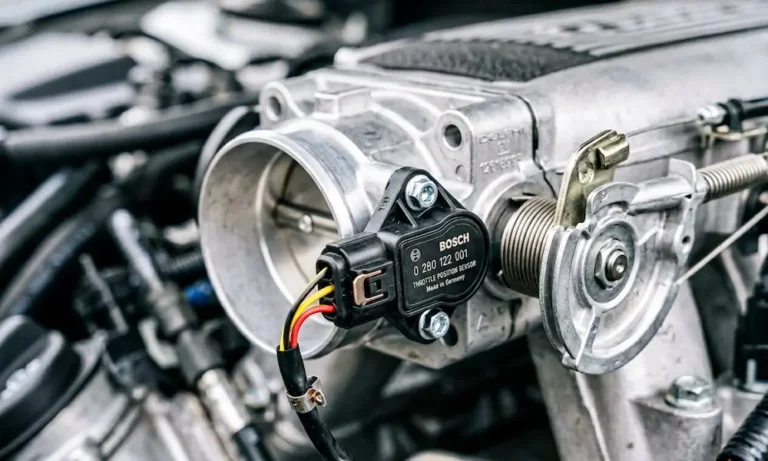
Your car’s idling rough, surging, or stalling after a throttle body cleaning? That’s your engine’s computer holding onto old data it no longer needs. This guide shows you exactly how to reset a throttle body sensor — whether you drive a Nissan, Honda, Ford, GM, or Chrysler product — so you can get back to smooth, reliable driving fast.
What’s Actually Happening When You Reset a Throttle Body Sensor
Your engine’s computer (called the PCM or ECU) stores learned values in something called Keep Alive Memory. It uses this data to compensate for carbon buildup and normal engine wear over time.
Here’s the problem: when you clean or replace the throttle body, you remove the carbon that the computer was actively compensating for. The computer doesn’t know that. So it keeps applying old corrections to a now-clean throttle plate — and your idle shoots sky-high or bounces around like it’s trying to escape.
A throttle body sensor reset is essentially a zeroing process. It tells the computer: “Start over. Learn what normal looks like right now.”
Signs Your Throttle Body Sensor Needs a Reset
Before you start pulling cables or doing pedal dances, confirm this is actually your problem. These symptoms point directly to a calibration issue:
| Symptom | What You’ll Notice | Why It Happens |
|---|---|---|
| Unstable idle | RPM bounces or “hunts” at stops | Computer over-corrects for airflow errors |
| Stalling | Engine dies when braking to a stop | Throttle fails to open fast enough at low speed |
| Sluggish acceleration | Delayed response when you press the pedal | Drive-by-wire synchronization errors |
| Poor fuel economy | Worse MPG with no driving habit changes | Incorrect air-to-fuel ratio |
| Harsh shifting | Transmission hunts or lurches | Shared data errors between engine and transmission modules |
| Warning lights | Wrench icon, red lightning bolt, or check engine light | System outside factory tolerances |
If you see any of these after a cleaning or battery disconnect, a reset is your first move — not a parts replacement.
The Universal Reset Methods (Work on Many Vehicles)
Battery Disconnect Method
This is the most straightforward way to wipe the Keep Alive Memory. Here’s how to do it correctly:
- Turn the engine off and remove the key
- Disconnect the negative battery terminal
- Keep the cable away from any metal surface
- Wait 15 to 30 minutes — some complex systems need longer
- For faster capacitor drain: hold the negative cable against the positive cable (not the battery post) for 2–3 minutes
- Reconnect the battery
- Turn the key to the “On” position for 60 seconds before starting — this lets the computer identify all connected sensors
- Start the engine and let it idle until it reaches full operating temperature
Ignition Initialization Method
For vehicles that don’t need a full memory wipe, this simpler sequence forces the throttle plate to recalibrate its hard stops:
- Insert the key and turn to “On/Run” — don’t crank the engine
- Wait 10 to 60 seconds — you’ll hear clicking or humming from the engine bay (that’s normal)
- Turn the ignition off and wait 10 seconds
- Start the engine and let it idle up to operating temperature
That clicking you hear is the throttle motor sweeping the plate through its full range. It’s doing exactly what it’s supposed to do.
How to Reset a Throttle Body Sensor by Vehicle Brand
Nissan and Infiniti — The “Pedal Dance”
Nissan’s procedure is the most timing-sensitive of all the major brands. The computer will reject the relearn if you rush it. Use a stopwatch — seriously.
Before you start: Engine and transmission must be at operating temperature. Turn off the A/C, radio, and headlights. Keep the steering wheel straight.
Follow this exact sequence:
- Turn ignition to “On” for 2 seconds, then “Off” for 10 seconds — repeat twice
- Turn ignition to “On”, wait exactly 3 seconds
- Rapidly press and release the accelerator 5 times within 5 seconds
- Release pedal and wait exactly 7 seconds
- Press the pedal fully to the floor and hold — the “Service Engine Soon” light will blink, then go solid
- The moment it goes solid, you have 3 seconds to release the pedal and start the engine
- Let it idle for 20 seconds, then rev it a few times to confirm the idle returns to normal
Miss any of those timing windows and you’ll need to restart from step one.
Honda and Acura — The Thermal Cycling Method
Honda takes a different approach. It’s less about precise timing and more about letting the engine warm up through a full thermal cycle before the computer will commit to new values.
After a battery disconnect or throttle body cleaning, follow these steps:
- Disconnect the battery for 15 minutes, all accessories off
- Restart and hold the engine at 3,000 RPM in Park or Neutral
- Maintain that RPM until the radiator fan kicks on
- Release the pedal and let the engine idle for 5 full minutes
- If the cooling fans run during those 5 minutes, pause the timer — the count resumes when they stop
Heads up for newer Hondas: Vehicles with the 9-speed automatic often need a factory-capable scan tool to manually clear the throttle learning value. The manual procedure alone won’t stick.
General Motors (Chevy, GMC, Buick, Cadillac)
GM uses a multi-cycle idle strategy to populate what are called “idle cells” in the ECU’s memory. These cells store the correct air and fuel combinations for different load conditions.
Here’s the GM procedure:
- Start the engine and idle in Park for 3 minutes — expect a very high idle at first
- Turn the ignition off for exactly 60 seconds
- Restart and idle for another 3 minutes — RPM should start dropping toward normal
- If the idle is still unstable, you’ll need a drive cycle: get the vehicle above 44 mph, then decelerate and idle several times
Important: The check engine light may come on during this process. That’s a high idle speed code telling you the target RPM hasn’t been reached yet. Clear it with a scanner and let the process continue — otherwise the computer freezes its current (wrong) settings.
Ford and Lincoln — KAM Reset + Drive Cycle
Ford vehicles are built around adaptive learning, and that learning can take days to fully optimize on its own. A forced reset gets you there much faster.
For a thorough KAM reset:
- Disconnect the negative battery cable
- Connect that cable to the positive terminal with a jumper wire for 2 minutes (don’t touch the battery post)
- This drains the internal capacitors completely
Then run this idle relearn drive cycle:
- Idle for 1 minute with all accessories off
- Turn on the A/C and idle for 1 minute
- Put it in Drive with your foot on the brake (A/C still on) and idle for 1 more minute
- Drive for ~30 miles with a mix of city and highway to finish the adaptation
Chrysler, Dodge, Jeep, and Ram — Pedal Synchronization
The Mopar method is the most straightforward of all. It’s designed to sync the pedal sensor signal with the throttle motor’s physical movement — and it clears that red lightning bolt warning light.
- Turn ignition to “On/Run” — don’t start the engine
- Wait for all dashboard chimes and lights to settle
- Slowly press the accelerator to the floor — take 5 to 10 seconds, don’t rush it
- Slowly release the pedal back to rest — same slow pace
- Turn ignition off and wait 10 to 60 seconds
- Start the engine and check that the warning light is gone and idle is steady
Clean It Right Before You Reset
A reset only sticks if the throttle body is actually clean. Here’s what you need to know before you spray anything:
Use the right cleaner. Most modern throttle bodies have a molybdenum coating on the bore and plate edges. Carb cleaner strips it. Always use a dedicated throttle body cleaner — the label will say it’s safe for sensors and coatings.
Remove it if you can. Cleaning it in-car risks sending dissolved carbon into the intake manifold, which can foul plugs and damage the catalytic converter.
Don’t force the plate open. On drive-by-wire systems, the throttle plate connects to a motor with small gears. Force it too hard and you’ll strip them. Gentle pressure only.
Using an OBD-II Scanner for the Reset
A scanner is the most reliable way to reset a throttle body sensor — and it removes all the guesswork. Tools like the Foxwell NT510 or similar give you direct access to the PCM.
| Scanner Function | What It Does | Result |
|---|---|---|
| Clear KAM/Adaptive Values | Wipes all learned data | Reverts to factory baseline |
| TP Position Reset | Calibrates zero and full-throttle voltages | Syncs pedal and plate |
| Idle Air Volume Learn | Commands ECU to calculate idle needs | Stabilizes RPM at a standstill |
| DTC Scan | Identifies sensor or circuit faults | Prevents unnecessary parts replacement |
Connect to the OBD-II port under the dash, select your vehicle, navigate to Engine → Special Functions → Throttle Relearn, and follow the on-screen prompts. The scanner handles the timing automatically.
If the Reset Doesn’t Work — Check These First
Still hunting or stalling after the reset? The computer can’t learn a stable idle if something else is interfering:
- Vacuum leak — a cracked intake hose or bad manifold gasket lets in unmetered air. The ECU can’t lower the idle no matter what the throttle plate does
- Weak battery or bad alternator — inconsistent voltage sends “noisy” signals from the TPS, and the computer aborts the relearn to stay safe
- Dirty MAF sensor — bad airflow data from the mass airflow sensor makes the throttle relearn useless. Clean it with dedicated MAF cleaner
- Stuck PCV valve — acts like a significant vacuum leak and throws off idle calculations
Fix the underlying issue first, then run the reset procedure again.














