Ever noticed a “Service Rear Vision System” message pop up in your vehicle? This warning isn’t just an annoying dashboard alert—it signals a problem with one of your car’s key safety features. Your backup camera might not be working properly, putting you and others at risk when reversing. Let’s break down what this warning means, what causes it, and how you can get your rear vision system back in working order fast.
What Is a Rear Vision System?
A rear vision system is more than just a fancy tech feature in modern vehicles—it’s a critical safety component mandated by regulations like FMVSS 111. The system includes:
- A rearview camera (typically mounted near your license plate)
- A video processing module (VPM) that handles the camera signal
- The display screen in your dashboard where the image appears
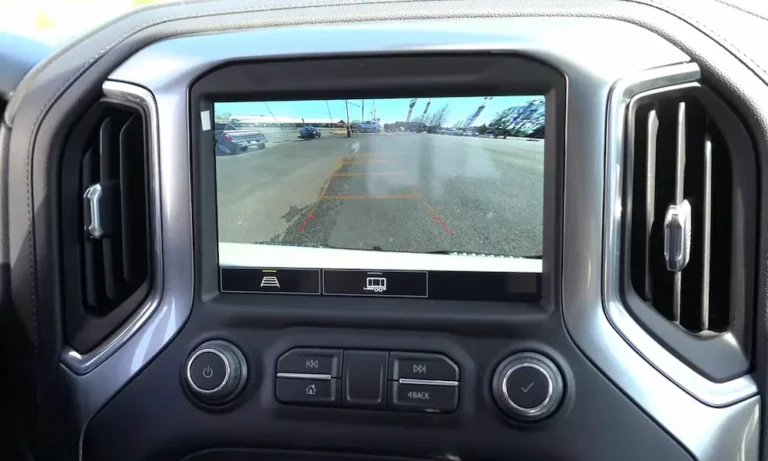
When you shift into reverse, the camera activates and sends real-time video to your dashboard screen, often with helpful parking guidelines. Many systems also integrate with parking sensors and cross-traffic alerts to give you a complete picture of what’s behind you.
The main purpose? Eliminating dangerous blind spots that mirrors can’t cover, especially the area directly behind your vehicle where children or obstacles might not be visible.
What Does “Service Rear Vision System” Mean?
When your vehicle displays the “Service Rear Vision System” warning, it’s telling you that something in this camera system isn’t working correctly. This doesn’t always mean a total failure—you might still see an image, but it could be:
- Blurry or distorted
- Blue or black screen
- Flickering or freezing
- Showing incorrect guidelines
- Not appearing at all when you shift to reverse
Regardless of the specific symptoms, this warning should never be ignored since it affects your ability to reverse safely.
Common Causes of Rear Vision System Problems
Water Damage and Corrosion
One of the most frequent culprits behind rear vision problems is water infiltration. Your camera isn’t always as waterproof as it should be.
Multiple manufacturer bulletins have identified water intrusion issues in vehicles like the Chevrolet Silverado and GMC Sierra. Once moisture gets into the camera housing or wiring connections, corrosion quickly follows.
Signs of water damage include:
- White or green corrosion on connectors
- Intermittent camera function (works sometimes but not others)
- Camera failures during or after rainy weather
In severe cases, water can travel through the wiring harness to the Video Processing Module (VPM) located inside your vehicle, causing extensive damage to this expensive component.
Damaged Wiring and Connections
The camera connects to your vehicle’s systems through a specialized coaxial cable that runs from the rear of your vehicle to the dashboard area. This wiring is vulnerable to:
- Fraying from road debris
- Pinching during repairs or manufacturing
- Loose connections from vehicle vibration
- Damage from rodents (who sometimes chew on wiring)
Technical service bulletins from multiple manufacturers have identified wiring issues as a common source of rear vision system failures. Sometimes the problem is as simple as a disconnected plug, but other times the entire wiring harness needs replacement.
Electrical and Fuse Issues
Like any electrical system, your rear vision camera relies on proper power supply:
- Blown fuses (often 10A fuses labeled F40 in GMC or F107 in Dodge vehicles)
- Power surges that damage the camera or module
- Poor grounding causing electrical interference
- Battery-related issues affecting voltage to the system
These electrical problems often cause the system to fail completely rather than showing distorted images.
Software and Module Glitches
Modern vehicles are essentially computers on wheels, and software problems are inevitable:
- Outdated VPM firmware misinterpreting camera signals
- Corrupted SD card data (where calibration information is stored)
- System conflicts after other vehicle repairs or updates
- Memory errors in the radio or infotainment system
GM has issued specific bulletins addressing software-related issues that cause blue or black screens with the “Service Rear Vision System” message.
Physical Camera Damage
Sometimes the problem is simple physical damage to the camera itself:
- Cracked lens from impact (rocks, debris, minor collisions)
- Dirt or mud covering the camera lens
- Camera misalignment from bumper damage
- Deteriorated lens coating causing cloudy images
How to Diagnose Rear Vision System Problems Yourself
Before heading to a mechanic, try these steps to diagnose the problem:
Step 1: Basic Visual Inspection
- Check the camera lens: Look at your backup camera lens (usually near your license plate or trunk handle). Is it:
- Visibly cracked or damaged?
- Covered with dirt, mud, or road grime?
- Misaligned or hanging loose?
- Clean the lens: Use a microfiber cloth with a small amount of glass cleaner or isopropyl alcohol to clean the lens. Sometimes this simple step solves the problem completely.
- Look for obvious damage: Check the visible wiring around the camera and the area where it connects to your vehicle. Any signs of damage, corrosion or loose connections?
Step 2: Check Fuses
Locate your vehicle’s fuse box (check your owner’s manual for the exact location) and find the fuse for the rear vision system. Common locations include:
- Under the dashboard on the driver’s side
- In the engine compartment
- Sometimes in a separate fuse panel in the trunk
The rear camera fuse is typically labeled in your owner’s manual or on the fuse box cover. For example, in GMC Terrain models, it’s often the F40 fuse. Check if the fuse is blown and replace it if necessary with one of the same amperage (usually 10A).
Step 3: Test Basic Functionality
- Start your vehicle and shift into reverse (with the parking brake on and foot on the brake for safety). What happens?
- If you see no image at all, try cycling the backup camera system by:
- Shifting from park to reverse multiple times
- Turning the vehicle off and on again
- Disconnecting the battery for 15 minutes (this resets many vehicle systems)
- If the camera works intermittently, try moving wiring near the camera gently to see if the image comes and goes. This indicates a wiring problem.
DIY Fixes for Common Rear Vision Issues
If you’re handy with basic tools, you might be able to resolve simpler issues yourself:
Cleaning and Maintenance
- Thorough lens cleaning: Use a microfiber cloth with alcohol or glass cleaner to remove all dirt and film from the camera lens.
- Connection cleaning: If you can access the camera’s electrical connector, disconnect it (with the vehicle off), check for corrosion, and clean the terminals with electrical contact cleaner.
- Weather sealing: Apply dielectric grease to camera and wiring connections to prevent future moisture problems. Some vehicle owners add additional silicone sealant around the camera housing for extra protection.
Fuse Replacement
- Identify the correct fuse for your rear vision system (consult your owner’s manual).
- Remove the old fuse using the fuse puller tool usually provided in the fuse box.
- Insert a new fuse of identical amperage (usually 10A).
- Test the system by shifting into reverse.
If the fuse blows again immediately, you have a short circuit that requires professional diagnosis.
Camera Alignment
If your camera is loose or misaligned:
- Check for mounting screws or clips that may have come loose.
- Gently adjust the camera to point in the correct direction.
- Tighten any loose hardware.
Professional Repair Options and Costs
When DIY fixes aren’t enough, professional repair becomes necessary:
Dealership vs. Independent Shop Repairs
Dealership Pros:
- Access to manufacturer-specific diagnostic tools
- Technicians trained on your exact vehicle
- Ability to perform software updates and programming
- Access to latest technical service bulletins
Dealership Cons:
- Higher labor rates ($120-180 per hour typically)
- May recommend complete assemblies rather than repair
- Sometimes longer wait times for appointments
Independent Shop Pros:
- Generally lower labor rates ($80-120 per hour typically)
- May offer more repair options rather than replacement
- Often more flexible scheduling
Independent Shop Cons:
- May lack specialized diagnostic equipment
- Less access to manufacturer-specific training
- Limited ability to program certain modules
Typical Repair Costs
| Repair Type | Parts Cost | Labor Hours | Total Estimated Cost |
|---|---|---|---|
| Camera Lens Cleaning | $0 | 0.5 | $40-90 |
| Fuse Replacement | $5-10 | 0.5 | $45-100 |
| Camera Replacement | $150-400 | 1-2 | $230-760 |
| Wiring Harness Repair | $200-500 | 2-4 | $360-1220 |
| VPM Replacement | $300-900 | 1-3 | $380-1440 |
| Complete System Replacement | $600-1500 | 3-6 | $840-2580 |
These costs vary significantly based on:
- Vehicle make and model
- Your location
- Dealership vs. independent shop
- Whether genuine or aftermarket parts are used
Insurance Coverage Possibilities
In some cases, your car insurance might cover rear vision system repairs:
- Comprehensive coverage may apply if damage was caused by vandalism, weather, or environmental factors
- Collision coverage might apply if the camera was damaged in an accident
- Extended warranties often cover electronic components like the rear vision system
Check your policy details and consider whether the repair cost exceeds your deductible before filing a claim.
Vehicle-Specific Issues and Recalls
Some vehicles have known issues with their rear vision systems:
GM Vehicles (Chevrolet, GMC, Buick, Cadillac)
GM has issued several technical service bulletins addressing rear vision problems:
- 2019-2020 Silverado/Sierra models with water intrusion issues
- Equinox, Terrain, and Malibu models with software glitches causing blue screens
- Cadillac models with VPM module failures
Common GM diagnostic trouble codes for rear vision problems include:
- B395A: Loss of video frames
- B101D: VPM hardware fault
- B101E: SD card corruption
Chrysler/Dodge/Jeep Vehicles
These vehicles often experience:
- Wiring harness chafing issues in Grand Cherokee models
- Radio/infotainment system glitches affecting camera display
- Power distribution center (PDC) fuse problems (often fuse F107)
Ford Vehicles
Ford has identified corrosion issues in F-150 camera harnesses due to inadequate sealing. Problems include:
- Water intrusion at camera connectors
- Frayed wiring near the tailgate hinge point
- SYNC system software bugs affecting camera display
Prevention and Maintenance Tips
Keep your rear vision system working properly with these maintenance practices:
Regular Cleaning
- Clean the camera lens monthly with a soft cloth and glass cleaner
- Remove any built-up dirt, salt, or road grime that could obstruct the view
- Be gentle—excessive pressure can scratch the lens or damage its mounting
Protective Measures
- Consider a small aftermarket “eyebrow” protector for your camera to shield it from direct water spray
- Apply dielectric grease to camera connections during regular service
- Keep tailgate or trunk seals in good condition to prevent water intrusion
System Testing
- Regularly test your backup camera by shifting into reverse
- Listen for unusual beeps or alerts from parking sensors
- Check that guidelines move correctly with steering input (if your vehicle has this feature)
- Inspect any dashboard messages or warnings immediately
Professional Maintenance
During regular service visits, ask your technician to:
- Check camera mounting and alignment
- Inspect wiring connections for early signs of corrosion
- Apply protective dielectric grease to electrical connections
- Verify proper camera operation and image quality
Advanced Features and Upgrades
If you’re replacing your rear vision system, consider upgrading to newer technology:
High-Definition Cameras
Newer replacement cameras often offer better resolution than original equipment, providing:
- Clearer images in low light conditions
- Wider viewing angles
- Better color reproduction
- Enhanced water resistance
Multi-Camera Systems
Some aftermarket systems offer:
- 360° surround view capability
- Split-screen functionality
- Trailer hitch view for easier towing
- Integration with dash cameras
Smart Features
Advanced replacement systems might include:
- Motion detection with smartphone alerts
- Night vision or infrared capabilities
- Distance markers and audible warnings
- Integration with parking sensors
Understanding Rear Vision System Technology
To truly appreciate why your rear vision system is worth fixing, it helps to understand how it contributes to safety:
Safety Impact and Statistics
- Backup cameras reduce backup crashes by approximately 17%
- They’re particularly effective at preventing crashes involving children, reducing these incidents by over 30%
- The NHTSA estimates that rearview cameras prevent about 58-69 deaths per year
How Modern Systems Work
Modern rear vision systems incorporate multiple technologies:
- Digital cameras with weather-resistant housings
- Signal processing to enhance image quality
- Integration with other safety systems like cross-traffic alerts
- Distance sensing to warn of approaching objects
- Software algorithms that generate parking guidelines
The Future of Rear Vision Technology
As vehicle technology evolves, we’re seeing:
- Cameras with self-cleaning features
- AI-enhanced systems that identify and highlight potential hazards
- Integration with autonomous parking systems
- Cameras that continue recording even when the vehicle is off
Taking Action
Don’t ignore your “Service Rear Vision System” warning. This critical safety feature deserves prompt attention:
- Try the simple fixes first: lens cleaning and fuse checking
- Document when the problem occurs to help with diagnosis
- Check if your vehicle has any relevant recalls or technical service bulletins
- Get professional help if basic troubleshooting doesn’t resolve the issue
Remember that a functioning rear vision system isn’t just about convenience—it’s about preventing accidents and potentially saving lives. The cost of repair is almost always worth the safety benefit it provides.