Your Subaru key fob just stopped working, and you’re standing in a parking lot feeling frustrated. Before you panic or call a tow truck, there’s a good chance you can fix this yourself in minutes. This guide walks you through every likely cause — from a dead battery to a tricky sync issue — so you can get back on the road fast.
Start Here: The Most Common Reason Your Subaru Key Fob Isn’t Working
Nine times out of ten, a dead or weak battery is the culprit. Subaru key fobs use small coin cell batteries that don’t give you much warning before they quit entirely.
The tricky part? The battery doesn’t just “die” one day. It hits a voltage drop point where the fob’s internal circuit can’t fire a signal — especially in cold weather when battery performance drops even further. You might notice the fob works sometimes and not others. That’s your warning sign.
Which Battery Does Your Subaru Key Fob Need?
The battery type depends entirely on your fob style. Using the wrong size can cause intermittent failures even with a brand new battery installed.
| Fob Style | Model & Years | Battery |
|---|---|---|
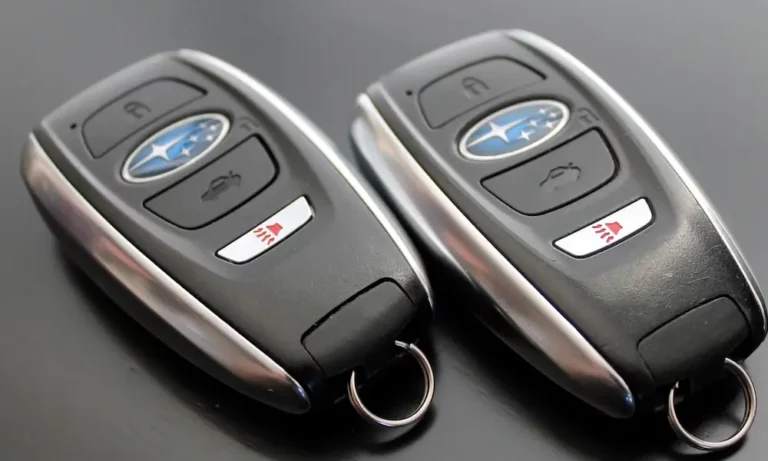
| Rectangular proximity (Smart Key) | 2020–2024 Forester, Outback, Ascent | CR2032 |
| Teardrop remote fob | 2010–2019 Impreza, Legacy, WRX | CR2025 |
| Integrated metal blade key | 2005–2014 Forester, Crosstrek base trims | CR1620 |
| Legacy rectangular fob | 2000–2009 Legacy, Outback, Baja | CR2025 |
A quick note: the CR2032 (3.2mm thick) and CR2025 (2.5mm thick) look almost identical but aren’t interchangeable. If you stuff a thinner CR2025 into a housing designed for a CR2032, the spring contacts won’t hold a solid connection. You’ll get frustrating on-and-off behavior that looks like a bigger problem than it actually is.
How to Replace the Battery
Replacing the battery takes about two minutes:
- Find the emergency key blade. Press the small silver tab on the back of newer fobs to release it.
- Pry the fob open. Use the emergency key as a lever in the seam. Don’t use a screwdriver — it’ll crack the housing.
- Swap the battery. Note the orientation (positive side up, typically) before you pull the old one out.
- Clean the contacts. Use a cotton swab with a little rubbing alcohol. Oxidation on those contacts adds resistance and kills performance.
- Snap the fob shut and test it.
If you’ve replaced the battery with the correct size and the fob still won’t work, keep reading.
Your Fob Might Be in Sleep Mode (Seriously)
This one catches a lot of Subaru owners off guard. Modern Smart Key fobs have a built-in sleep mode designed to stop the fob from constantly chatting with the car — useful when you’re camping near your vehicle or storing it long-term.
If your fob is in sleep mode, it won’t respond to anything. The door handles won’t react to your touch, and the car won’t unlock. It looks like a dead fob, but it’s not.
Here’s how to check and disable sleep mode:
- Hold the Lock button down
- While still holding Lock, press Unlock twice
- The red LED on the fob flashes four times — that means it was in sleep mode and is now awake
Simply pressing any button on the fob also wakes it up in most cases. If that solves your problem, great. If not, there’s more to investigate.
Signal Interference Is Blocking Your Fob
Your Subaru key fob transmits on a UHF radio frequency. Plenty of everyday things can drown out or block that signal.
Common culprits include:
- Your phone. Keeping your fob in the same pocket as your smartphone can desensitize the fob’s receiver. Try moving your phone to a different pocket and testing the fob again.
- RFID-blocking wallets. These create a small Faraday cage that stops signals from getting in or out. Great for protecting credit cards, terrible for key fob range.
- High-density urban areas. Power lines, cell towers, and large LED displays all generate electromagnetic noise that can overwhelm your fob’s low-power burst.
- Aftermarket accessories. Poorly shielded LED license plate bulbs or dash cameras plugged into your 12V port can generate interference that reaches your car’s internal RF receiver. Unplug anything non-essential and test the fob again.
If your fob works fine in one location but not another, interference is likely the problem.
Your Fob Has Fallen Out of Sync
Key fobs use a rolling code system — every button press generates a new unique code so the signal can’t be copied. If you’ve pressed the fob buttons many times while out of range, or if the battery died completely for an extended period, the fob and car can lose sync.
The fix depends on which generation of Subaru you drive.
DIY Programming for Older Models (Pre-2015, Teardrop Fobs)
You can re-sync these fobs yourself without any tools. You’ll need the 8-digit transmitter code printed on the label inside your fob housing — open it up and look for a sticker on the circuit board.
| Step | What to Do |
|---|---|
| 1 | Sit in the driver’s seat and close all doors |
| 2 | Open and close the driver’s door once |
| 3 | Turn the ignition from LOCK to ON 10 times within 15 seconds |
| 4 | Open and close the driver’s door again |
| 5 | Enter your 8-digit code using the door lock switch |
| 6 | Repeat the code for confirmation |
How to enter the code: Use the door lock button as a number pad. To enter the digit “8,” press Lock eight times, then press Unlock once to move to the next digit. Repeat for all eight digits. A chime and a lock/unlock cycle confirm you’ve done it correctly.
Newer Smart Keys Need a Dealer or Diagnostic Tool
If you drive a 2015 or newer Subaru with a rectangular proximity fob, DIY programming isn’t an option. These systems use more advanced encryption that requires the Subaru Select Monitor (SSM) or a compatible diagnostic tool connected to the OBD-II port. A dealer or a qualified automotive locksmith can handle this.
Your Car’s Battery or Telematics Module Is the Problem
If multiple fobs stop working at the same time, the issue isn’t the fobs — it’s the car.
Weak Car Battery
When the vehicle’s 12V battery drops in charge, the Body Integrated Unit (BIU) — the module that processes your fob’s signal — starts rationing power. Proximity sensors and keyless entry features get disabled first to preserve power for the immobilizer and engine start. Test your car battery with a multimeter or take it to any auto parts store for a free check.
The Starlink DCM Parasite Drain
Owners of 2016–2024 Subarus with Starlink connectivity should know about this one. Older Starlink Data Communication Modules designed for 3G networks can get stuck in a continuous network search loop after 3G infrastructure was decommissioned. The module never sleeps, drains your battery steadily, and eventually knocks out your keyless entry system.
Subaru has issued software updates and, in some cases, a physical DCM bypass to fix this. If you’ve had repeated dead battery issues alongside key fob problems, ask your dealer to check for this specifically.
How to Get In and Start Your Subaru If the Fob Is Completely Dead
Don’t panic if your fob battery is fully dead. Subaru built two backup options into every car.
Option 1 — Use the physical key:
Pull out the emergency blade from inside your fob (press the small silver tab on the back). Insert it into the driver’s door lock cylinder. Turn it firmly past the initial spring resistance point. The alarm will likely sound — start the car to deactivate it by holding the fob against the push-button start so the immobilizer chip registers.
Option 2 — Passive RFID start:
Every Subaru fob contains a passive RFID chip that doesn’t need battery power. Here’s how to use it:
- Press and hold the brake pedal
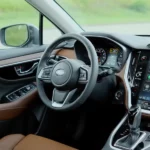
- Hold the fob with the Subaru logo side touching the push-button start
- The start button light turns solid green when it reads the chip
- Press the start button normally
This works because a short-range exciter coil behind the button powers the chip magnetically. No fob battery required.
Physical Damage: When the Fob Itself Is Broken
If you’ve dropped your fob recently, the solder joints on the circuit board may have cracked. The crystal oscillator — a tiny component that keeps the fob’s timing accurate — is especially fragile. Cracked solder on the battery contacts causes exactly the kind of intermittent behavior that’s easy to misdiagnose as a dead battery.
Moisture is another common killer. Even though most Subaru fobs have silicone gaskets, they’re not waterproof. If your fob got wet, open it up, let it dry completely, and clean the battery contacts with rubbing alcohol before reassembling.
What a Replacement Key Fob Actually Costs
If you need a full replacement, here’s what to expect:
| Fob Type | Dealer Cost | Locksmith Cost | DIY Parts Only |
|---|---|---|---|
| Basic transponder key | $150–$250 | $100–$180 | $50–$100 |
| Teardrop remote fob | $250–$350 | $180–$260 | $80–$150 |
| Smart proximity key | $400–$600 | $250–$450 | Not available |
Automotive locksmiths often save you real money and many offer mobile service so you don’t need a tow. Dealers use OEM hardware with stronger warranties, which matters more for newer Smart Key systems tied to the Starlink telematics.
Either way, you’ll need proof of ownership — registration and a valid driver’s license — before any legitimate provider will cut a key or reset an immobilizer.
Quick Diagnostic Checklist
Work through these in order before spending any money:
- ✅ Check the fob battery and replace it with the correct size (CR2032, CR2025, or CR1620 depending on your model)
- ✅ Clean the battery contacts with isopropyl alcohol
- ✅ Make sure the fob isn’t in sleep mode — press any button or use the Lock + Unlock twice sequence
- ✅ Move away from potential interference sources (phone, RFID wallet, aftermarket accessories)
- ✅ Test whether the car starts with the fob held against the start button — if yes, the transponder chip is fine and only the RF transmitter is the issue
- ✅ Check the car’s 12V battery voltage
- ✅ If you drive a 2016–2024 model with Starlink, ask a dealer to check for the DCM parasitic drain issue
- ✅ Inspect the fob circuit board for moisture damage or cracked solder if it’s been dropped
Most cases of a Subaru key fob not working trace back to one of these — and most of them are fixable without a dealer visit.