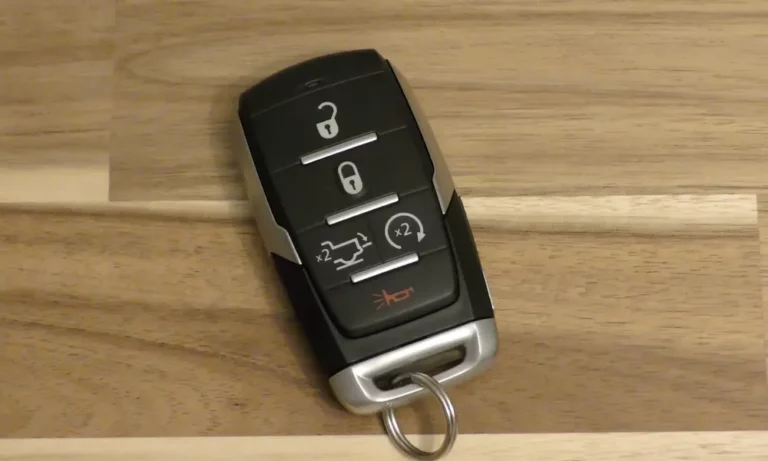
Your Dodge key fob is acting up — buttons feel sluggish, range has shrunk, or your dashboard just flashed “Key Not Detected.” Good news: a dead battery is almost always the culprit, and fixing it takes about five minutes. This guide walks you through everything, from picking the right battery to getting your car started when the fob dies completely.
Which Battery Does Your Dodge Key Fob Need?
Before you buy anything, you need to know your fob type. Dodge has used several remote designs over the years, and each takes a specific battery.
Here’s a quick breakdown:
| Dodge Model & Year | Fob Type | Battery Needed |
|---|---|---|
| Charger, Challenger, Ram 1500 (2015–2025) | Proximity Smart Key | CR2032 |
| Durango (2014–2025, advanced proximity) | Smart Key with remote start | CR2450 |
| Grand Caravan, Journey, Durango (2008–2014) | Fobik | CR2032 |
| Ram, Neon (1999–2005) | Separate Remote | 2x CR2016 |
The CR2032 is the most common battery across the Dodge lineup. It’s a 3-volt lithium coin cell with a 20mm diameter and 3.2mm thickness. The numbers aren’t random — they describe the exact size.
Don’t swap in the wrong size. A CR2025 shares the same diameter as a CR2032, but it’s 0.7mm thinner. That gap causes loose contact and a shorter lifespan. And a CR2032 won’t fit a CR2025 slot at all — forcing it can crack the circuit board.
The Dodge Durango with remote start features often needs a CR2450, which holds 620 mAh — nearly three times the capacity of a CR2032. That extra juice supports continuous signal monitoring for proximity unlock and remote start.
| Battery | Diameter | Thickness | Voltage | Capacity |
|---|---|---|---|---|
| CR2032 | 20mm | 3.2mm | 3V | 220–235 mAh |
| CR2450 | 24mm | 5.0mm | 3V | 620 mAh |
| CR2025 | 20mm | 2.5mm | 3V | 160–170 mAh |
| CR2016 | 20mm | 1.6mm | 3V | 90 mAh |
Signs Your Dodge Key Fob Battery Is Dying
A fob battery doesn’t quit overnight. It gives you plenty of warning first.
Watch for these signals:
- Shrinking range — You used to unlock your car from across the parking lot. Now you have to stand next to the door. That’s the most common early sign.
- Buttons that need multiple presses — A weak battery can’t always push out the rolling security code on the first try.
- Slow response — The car takes two or three seconds to react instead of instantly.
- Dashboard warning — Most Dodge vehicles from 2011 onward display “Key Fob Battery Low” or “Key Not Detected” when voltage drops too low.
- Panic button fails — The alarm needs a strong signal burst. A dying battery often cuts this function first.
Cold weather makes things worse. Low temperatures increase a battery’s internal resistance, which temporarily drops voltage output. If your fob acts dead in January but seems fine in a warm garage, the battery is on its way out.
How to Replace the Battery in a Modern Dodge Smart Key (2015–2025)
This process covers the majority of current Dodge vehicles, including the Charger, Challenger, Ram 1500, and Durango.
Work on a flat surface covered with a soft cloth. Small parts bounce.
Step 1: Remove the emergency metal key.
Flip the fob over and slide the small latch on the back. Pull the metal blade out and set it aside. This blade is your backup entry method — don’t lose it.
Step 2: Find the pry notch.
Look inside the slot where the metal key was stored. That cavity often hides the pry point. Some models have a notch along the bottom seam instead.
Step 3: Open the case.
Slide a small flat-head screwdriver into the notch and twist gently. The internal clips will pop. Don’t force it — cracking the case can break the water-resistant seal.
Step 4: Note battery orientation before removing it.
In most modern Dodge fobs, the positive side faces down toward the buttons. Use a fingernail or plastic tool to lift the battery out. Avoid metal tools directly on the circuit board — you can short it.
Step 5: Install the new battery.
Slide the new CR2032 under the metal contacts with the positive side facing the same direction as the old one. Press it in firmly.
Step 6: Close and test.
Snap the two halves together around the entire edge until it clicks. Reinsert the metal key. Walk to your car and test the lock and unlock buttons right away.
How to Replace the Battery in a Fobik Remote (2008–2014)
The Fobik is that rectangular fob with no metal blade — common in the 2008–2010 Dodge Charger, Grand Caravan, and Journey. It inserts into a dash slot like a key.
After removing the emergency key, look for a tiny Phillips head screw securing the case on some versions. Remove it before prying. Once open, the electronics and battery holder often lift out as one unit. Handle it by the edges — skin oils can contaminate the contact pads.
Replace with a CR2032, reassemble, and test.
How to Replace Batteries in Older Separate Remotes (1999–2005)
Legacy remotes like those for the 1999–2005 Dodge Ram use two CR2016 batteries stacked together. A small notch on the side usually opens with a coin.
Two rules here:
- Always replace both batteries at the same time. Mixing an old and new battery creates uneven voltage across the circuit.
- Check the rubber button membrane. After 20-plus years, rubber gets brittle and cracks. A torn membrane lets moisture into the circuit board. If it looks rough, replacement fobs are available at AutoZone and Advance Auto Parts.
What To Do When Your Fob Battery Is Completely Dead
Dodge engineers built backup systems specifically for this situation. You won’t get stranded.
Getting Into the Car
Use the hidden mechanical key to unlock the driver’s door. On modern vehicles, this may be the only visible lock cylinder. Fair warning — manually unlocking the door often triggers the anti-theft alarm. It’ll stop once the ignition system authenticates the fob through the emergency start method below.
Starting a Push-Button Dodge With a Dead Fob
Hold the dead fob directly against the Start/Stop button. While pressing the brake pedal, use the nose or side of the fob to physically press the button. The ignition coil generates a small electromagnetic field that powers the fob’s transponder chip just long enough to verify the security code. This works even with a completely flat battery.
Starting a Fobik Vehicle With a Dead Battery
On Fobik systems, the Start/Stop button is often removable. Gently pull it out of the dashboard — this reveals a slot. Insert the Fobik’s nose directly into that slot and turn it like a traditional key.
| Fob Type | Entry Method | Start Method |
|---|---|---|
| Smart Key (2015+) | Metal key in driver’s door | Press Start button with fob touching it |
| Fobik (2008–2014) | Metal key in driver’s door | Remove button cap, insert fob nose in slot |
| Integrated Key (pre-2008) | Insert key in door lock | Insert key in ignition, turn |
Fob Still Not Working After a Battery Change?
A fresh battery doesn’t always mean instant results. Sometimes the fob loses sync with the vehicle’s receiver.
How to Re-Sync Your Dodge Key Fob
Try this in-cabin sequence to restore the connection:
- Get in the vehicle and lock all doors using the door-mounted switch.
- Insert the key and turn to the “RUN” position.
- Press and hold “UNLOCK” for four seconds. While still holding it, press “PANIC” for one second.
- Release both buttons at the same time. Listen for a chime or watch for the door locks to cycle — that means the system entered programming mode.
- Press “LOCK” and “UNLOCK” together and release. Then press “UNLOCK” once more.
If that doesn’t fix it, check the internal battery contacts. Metal tabs can compress over time and lose their grip on the battery. A gentle bend upward with a small tool restores contact. Corrosion from moisture? A cotton swab with isopropyl alcohol cleans the contacts and the board.
One more thing to check — the fuse. In a Dodge Charger, a blown 15-amp fuse in the Body Control Module kills the entire remote keyless entry receiver. No fob will work until you replace it, regardless of how fresh the battery is.
Where to Buy the Right Replacement Battery
You’ve got plenty of options for Dodge remote key battery replacement without going to a dealership.
| Store Type | Examples | What They Offer |
|---|---|---|
| Pharmacies | CVS, Walgreens | CR2032 packs, same-day delivery in many areas |
| Big-Box Retail | Walmart, Target | Budget multi-packs, online ordering |
| Auto Parts Stores | AutoZone, Advance Auto | Expert advice, free testing, replacement fobs |
| Battery Specialists | Batteries Plus, Interstate All Battery | On-site replacement, programming services |
| Hardware Stores | Home Depot, Lowe’s | Bulk CR2450 and CR2032 options |
Stick with Duracell or Energizer for coin cells. Duracell applies a bitter coating on their batteries to discourage kids from swallowing them — a real safety feature worth noting. Swallowing a lithium coin cell causes serious internal burns within two hours. If you have young kids at home, child-resistant packaging matters.
Is Professional Replacement Worth It?
For most people, DIY Dodge remote key battery replacement saves money with minimal effort. But if your fob is damaged, waterlogged, or completely unresponsive after a battery swap, professional service makes sense.
A dealership charges $10–$30 for a battery replacement with labor. A full fob replacement runs $150–$300 for the hardware, plus $120–$150 for programming — and modern Dodge models from 2018 onward often require dealership-level programming tools.
Interstate All Battery Centers offer dealership-quality remotes and programming at roughly 75% less than dealer prices. That’s a meaningful difference if you need a full replacement.
Check your insurance policy too. Some comprehensive plans cover key fob replacement. But if your deductible is $500 or $1,000, it usually doesn’t make financial sense to file a claim for a $300 key.
The smartest move? Replace the battery every two to three years before it fails. That small habit eliminates every inconvenient scenario in this guide.