Your Subaru’s key fob is acting up — doors won’t unlock from a distance, or the push-button start ignores you. Nine times out of ten, a dead battery is the culprit. The good news? You can fix this yourself in under five minutes. Stick around, and we’ll walk you through exactly how to replace your Subaru key fob battery based on your specific fob type.
First, Figure Out Which Fob You Have
Not all Subaru key fobs are the same. Each design takes a different battery, so getting this right first saves you a wasted trip to the store.
Here’s a quick breakdown:
| Fob Style | Vehicle Era | Battery You Need |
|---|---|---|
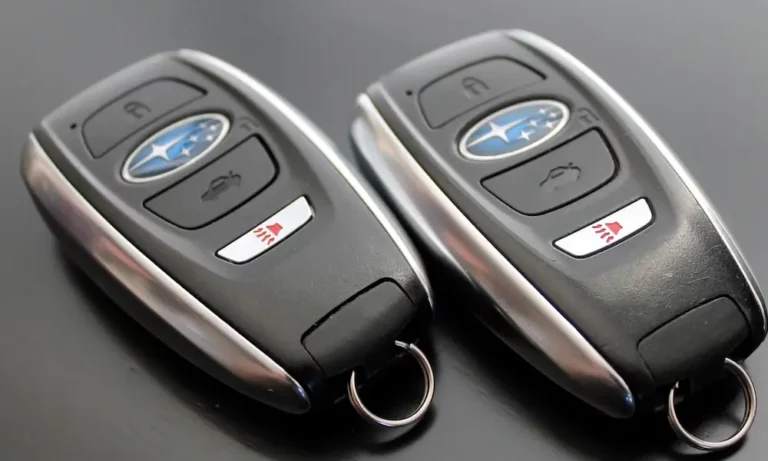
| Bulging rectangular (push-button start) | 2015–Present | CR2032 |
| Teardrop shaped (separate key) | 2005–2014 | CR2025 |
| Integrated key-head (key with buttons) | Various | CR1620 |
| Square legacy remote | 1998–2004 | 23AE |
Quick tip on the CR2032 vs CR2025: Both have the same diameter, but they’re not interchangeable. The CR2032 is 3.2mm thick; the CR2025 is only 2.5mm. Using the wrong one causes loose contacts and an intermittent signal — more frustrating than the dead battery you started with.
Signs Your Subaru Key Fob Battery Is Dying
Before you crack it open, confirm that a weak battery is actually the problem.
Watch for these warning signs:
- Shrinking range — You used to unlock the car from across a parking lot. Now you’re practically pressing the fob against the door handle. This happens because a dying battery can’t power a strong enough radio signal.
- Multiple button presses needed — One press used to do it. Now you’re jabbing it three or four times. That’s your fob struggling to send a clean signal.
- Delayed response — There’s a noticeable lag between pressing the button and the locks actually moving.
- “Key Battery Low” message — Modern Subarus display this warning right on the dashboard display when voltage drops below a set threshold.
- Dim or dead LED — Most fobs flash a small light when you press a button. A dim flash or no flash at all means the battery’s nearly gone.
If your push-button start fails to detect the fob even when you’re sitting in the car, the battery is likely completely dead — not just weak.
What You’ll Need Before You Start
Gather these items before opening anything up:
- Small flathead screwdriver (the narrower, the better)
- Vinyl tape or a cloth to wrap the screwdriver tip — this prevents scratching the housing
- Replacement battery (correct type from the table above)
- Clean paper towel or microfiber cloth to work on
- Nitrile gloves (optional but smart — skin oils corrode battery contacts over time)
One thing worth knowing: if you’re doing this in winter, let the fob warm up to room temperature first. Cold plastic cracks at the locking tabs, and a cracked housing means buying a whole new fob.
How to Replace a Subaru Key Fob Battery: Step-by-Step by Fob Type
Modern Rectangular Fob (CR2032) — 2015 to Present
This is the push-button start fob with a hidden emergency key inside it.
Step 1: Find the small silver release tab on the back of the fob. Slide or press it to release the hidden mechanical key, then pull the key out by the key ring.
Step 2: Look at the slot where the key just came out. There’s a small notch in there — insert your cloth-wrapped flathead screwdriver into that notch and give it a gentle twist. The two halves of the case will separate.
Step 3: Inside, you’ll find the CR2032 battery. Pry it out with your fingernail or a non-metal tool — avoid metal tools near the circuit board. Install the new battery positive side (the “+” marked side) facing up. Press it in until it clicks.
Step 4: Snap the housing back together and reinsert the mechanical key.
Teardrop Remote (CR2025) — 2005 to 2014
This standalone fob has no hidden key built in.
Step 1: Look along the seam of the fob for a small indentation — it’s usually near the key ring loop at the bottom.
Step 2: Insert your wrapped screwdriver into that indentation and twist gently to create a gap. Work slowly around the seam if it doesn’t pop right away. These older fobs can be stubborn.
Step 3: The CR2025 battery sits in a circular metal bracket. Slide it out and replace it with the new one, positive side facing up.
Step 4: Before snapping it shut, double-check that the rubber button pad lines up correctly with the holes in the front cover. Misalignment will make the buttons feel mushy and they won’t make proper contact.
Integrated Key-Head Unit (CR1620) — Various Models
This is the key where the remote buttons are built right into the key head.
Step 1: Find the small slot along the edge of the plastic key head. Insert your screwdriver and twist to separate the two halves of the key head.
Step 2: Inside, you’ll see a small rectangular transmitter module. It has tiny plastic tabs along its edges. Press these tabs to open the module and reach the CR1620 battery.
Step 3: Note the orientation of the old battery before you pull it out. Most Subaru integrated keys use positive side up, but some models like the BRZ use positive side down toward the board. When in doubt, match exactly what you removed.
Step 4: Close the module, tuck it back into the key head, and snap the outer casing shut.
Cleaning the Contacts While You’re in There
Since you’ve already got the fob open, take two extra minutes to clean the battery contacts. Oxidation builds up over years of use and acts like an insulator — even a fresh battery can’t overcome it.
| Cleaning Tool | What It Does |
|---|---|
| Pencil eraser | Scrubs away oxidation without scratching metal contacts |
| Cotton swab + isopropyl alcohol (70%+) | Removes skin oils, residue, and eraser particles |
| Dry soft toothbrush | Clears lint and dust from button gaps and seams |
A pencil eraser works surprisingly well on dull or slightly corroded contacts. Follow up with a quick wipe using isopropyl alcohol to remove any residue. Never spray liquid directly onto the circuit board.
What to Do If the Fob Still Doesn’t Work After Battery Replacement
Don’t panic — this happens sometimes. Here’s how to troubleshoot it.
Check polarity first. Flip the battery over and try again. An upside-down battery is the most common post-replacement mistake.
Check the metal contacts. Make sure the metal tabs inside the battery compartment didn’t bend during removal. They need to press firmly against the battery surface.
Re-sync the proximity fob. If you have a push-button start model, sit in the car with the door closed, press the brake pedal, and hold the key fob directly against the start button for a few seconds. This triggers a near-field communication handshake that re-links the fob to the car without needing any dealer tools.
Check for radio interference. High-power RF sources like cellular towers or large electronic displays can temporarily disrupt fob synchronization. Move the car to a different location and try again.
How to Manually Re-Program Older Subaru Fobs at Home
If you have a teardrop or integrated key-head fob, you can often re-program it yourself at home using the 8-digit code stamped inside the fob. This process works on many pre-2015 models and doesn’t require a dealer.
Step 1 — Enter programming mode:
- Sit in the driver’s seat with all doors closed
- Use the power lock switch to unlock all doors
- Close the driver’s door
- Turn the ignition from Off to On and back to Off 10 times within 15 seconds
- Listen for a chime — that means the car is in learning mode
Step 2 — Enter your 8-digit code:
You now have 45 seconds. For each digit, press the “Lock” button that many times, then press “Unlock” once to move to the next digit. For a zero, press “Unlock” immediately without pressing Lock.
Step 3 — Confirm: After all 8 digits, the car will chime. Enter the full sequence a second time for verification. The locks will automatically cycle to confirm successful programming.
This at-home method works great for legacy fobs. Modern push-button start systems typically need dealer or professional programming equipment.
Emergency Start When the Fob Battery Is Completely Dead
Completely dead battery and no replacement on hand? You’re not stuck.
For push-button start models, press the brake pedal and hold the key fob directly against the start button. The button itself emits a small magnetic field that powers the transponder chip inside the fob just enough to confirm your identity. The car will start.
For manual entry, use the emergency mechanical key hidden inside your proximity fob to unlock the driver’s door directly. Fair warning: this will likely trigger the alarm. Disarm it by pressing the unlock button on your fob (even with a dead battery, some vehicles accept it) or by getting the car started quickly.
How to Make Your Fob Battery Last Longer
A few small habits add months — sometimes years — to a battery’s life:
- Don’t store the fob on a sunny windowsill or dashboard. Heat speeds up chemical degradation inside lithium batteries.
- Keep the fob away from loose change and keys. Metal objects cause accidental button presses that drain the battery and wear down the switches.
- Don’t use a heavy keychain. Constant leverage on the plastic housing causes stress fractures around the key ring hole, and eventually moisture gets in.
- Swap the battery every 2–3 years on proximity fobs even if it hasn’t died yet. These fobs constantly poll the vehicle for proximity, which burns power faster than older button-press-only remotes.