Tired of fumbling with cables every time you get in your Honda? You’re probably wondering if there’s a cleaner way to get CarPlay running without plugging anything in. Good news — there is, and it depends on your model year and trim. Read to the end, because one of these three options will work for your exact situation.
Does Your Honda Actually Support Wireless CarPlay?
Before anything else, you need to know what you’re working with. Not every Honda supports wireless Apple CarPlay from the factory. Honda first introduced wireless CarPlay in the 2022 Civic Touring trim, and it’s been expanding across the lineup ever since.
Here’s the quick version: if you’re driving a 2022 or newer Honda on a mid-to-high trim, there’s a solid chance you’ve got wireless support already. Older models? You’ve still got options — just different ones.
The table below breaks down exactly where wireless CarPlay stands across the 2025 Honda lineup.
| 2025 Honda Model | Wireless Available | Wired Only Trims | Wireless Standard Trims |
|---|---|---|---|
| Accord | Yes | LX, SE | Sport, EX-L, Sport-L, Touring (Hybrid) |
| Civic | Yes | LX, Sport | Sport Touring Hybrid |
| CR-V | Yes | LX, EX, Sport | EX-L, Sport-L, Sport Touring |
| HR-V | Yes | LX, Sport | EX-L |
| Pilot | Yes | Sport only | EX-L, TrailSport, Touring, Elite, Black Edition |
| Ridgeline | Yes | None | All trims (standard) |
| Odyssey | Yes | None | All trims (standard) |
| Passport | No | All trims | None (wired only) |
| Prologue | Yes | None | All trims (standard) |
One surprise worth flagging: the 2025 Honda Passport — despite being a premium mid-size SUV — still requires a USB cable across every trim. If you drive a Passport, skip to the third-party adapter section below.
Method 1: Connect Wireless CarPlay on a Factory-Equipped Honda
If your Honda came with wireless CarPlay built in, the setup process is straightforward. You only need to do this once. After that, your phone connects automatically every time you start the car.
What You Need Before Starting
- iPhone with Bluetooth and Wi-Fi turned on
- Siri enabled (this is critical — CarPlay won’t launch without it)
- No active VPN on your iPhone (a running VPN can block the Wi-Fi handshake that CarPlay needs)
Step-by-Step Pairing Process
Step 1: Park the car and turn the power on.
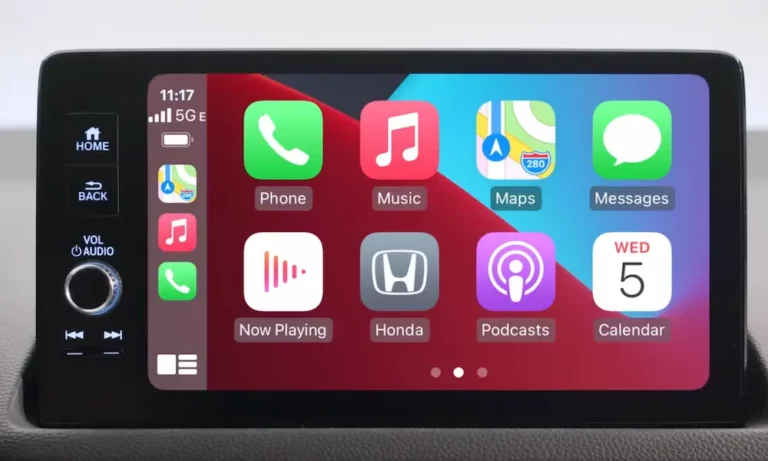
Step 2: On your Honda’s touchscreen, tap the Apple CarPlay icon. It’s usually on the home screen or under “Smartphone Connection.”
Step 3: Select “Connect New Phone.” The car starts broadcasting its Bluetooth signal.
Step 4: On your iPhone, go to Settings > Bluetooth. Find your vehicle in the list — it’ll appear as something like “Honda HFT” or your model name.
Step 5: Tap to connect. Both screens show a six-digit code. Confirm they match, then tap “Pair” on your iPhone.
Step 6: Your iPhone will ask: “Use CarPlay with [Vehicle Name]?” Tap “Use CarPlay.”
Step 7: On your Honda’s screen, select “Always Enable” so the car reconnects automatically every future drive.
That’s it. The system uses Bluetooth only for that initial handshake, then shifts to a 5GHz peer-to-peer Wi-Fi connection to run the actual CarPlay interface. This is why the connection is fast and stable — it’s not running over Bluetooth audio.
A quick note on Siri: CarPlay depends entirely on Siri to function. Go to Settings > Siri & Search and make sure “Listen for Hey Siri” and “Allow Siri When Locked” are both switched on. If Siri is off, CarPlay simply won’t open.
Method 2: The Official Honda Accord Wireless Retrofit (2018–2022 Models)
Own a 2018–2022 Honda Accord with wired CarPlay? Honda has an official factory-authorized retrofit program that upgrades your system to full wireless functionality.
Who Qualifies
The program covers approximately 631,000 US Accord vehicles from the 2018–2022 model years. Eligible units are those originally built with the eight-inch touchscreen and wired CarPlay — these units have the wireless hardware already installed, it just wasn’t activated at the factory.
What It Costs
This isn’t a free over-the-air update. Here’s the breakdown:
- Software fee: $112 (manufacturer’s suggested retail price)
- Labor: $60–$150 depending on your dealership’s hourly rate
One big exception: if you’re buying a qualifying Accord as a Honda Certified Pre-Owned vehicle, Honda requires the wireless upgrade to be installed at no charge before the sale.
To get started, visit the Honda DreamShop or call your local Honda service center. Honda describes it as a “quick software update,” and the dealer handles everything with their diagnostic tools. You walk in with wired, you drive out with wireless.
Method 3: Third-Party Wireless Adapters for Older Hondas
No native wireless support and not eligible for the Accord retrofit? A wireless CarPlay adapter is your best path forward. These work on any Honda with existing wired CarPlay — so models going back to 2016.
How Adapters Actually Work
The adapter plugs into your Honda’s smart USB port — the same one you’d normally use for a cable. Once plugged in, it creates its own Bluetooth and Wi-Fi environment. You pair your iPhone to the adapter (not the car’s system directly). The adapter then translates your phone’s wireless signal into something the car reads as a standard wired connection.
Setup takes less than two minutes, and after the first pairing, it reconnects automatically every time you start the car — as long as Bluetooth and Wi-Fi stay active on your iPhone.
Top Adapters Worth Considering
| Adapter | Best For | Key Spec |
|---|---|---|
| CarlinKit Mini 5 SE | Overall performance | Wi-Fi 6 support, minimal lag |
| Ottocast U2-Air | Multiple drivers | 18-second boot, easy phone switching |
| The Magic Link | CarPlay + Android Auto | Works for both systems |
| Teeran Wireless Adapter | Budget buyers | Stable, discreet, no-frills |
| Carlinkit 5.0 (2air) | Dual-system households | Separate iOS/Android channels |
| Ottocast Mini Pico | Households with two drivers | Physical button to switch users |
What Can Go Wrong With Adapters
Adapters aren’t perfect. Two things to watch:
Interference: In busy cities with dense Wi-Fi networks, 2.4GHz adapters can drop audio or freeze maps. Always choose an adapter that uses the 5.8GHz band for a more stable signal.
Battery drain: Your iPhone broadcasts wirelessly, runs GPS, and streams audio all at once. Battery drops fast. Keep a wireless charging pad or a 12V charger handy, especially on long drives.
CarPlay Won’t Connect? Try These Fixes First
Even on factory-equipped systems, wireless connections occasionally fail. Run through this checklist before assuming something is broken.
Check Siri first. It sounds odd, but a disabled Siri is the most common silent reason CarPlay won’t launch. Confirm it’s on in Settings > Siri & Search.
Kill your VPN. If you run a VPN app, it can block the Wi-Fi handshake CarPlay needs. Go to Settings > General > VPN & Device Management and turn it off.
Reboot the infotainment system. On most 2017 and newer Hondas, hold the audio power knob for 10–15 seconds. The screen asks if you want to reboot — say yes. This clears the system cache and resets the wireless modules. On newer touch-screen models like the 2025 Accord, hold the Home icon for five seconds instead.
Factory reset as a last resort. If rebooting doesn’t help, go to Settings > System > Factory Data Reset. This wipes all pairings, presets, and history — but it often fixes persistent connection bugs. You’ll re-pair your phone fresh afterward.
Steering Wheel Controls and Sharing Music With Passengers
Once you’re connected wirelessly, you don’t need to touch the screen at all. Honda’s steering wheel controls activate Siri for navigation commands, texts, and music — hands stay on the wheel, eyes stay on the road.
If you’re in a Pilot or Odyssey with a full car of people, iOS 17 and later supports SharePlay in the car. Passengers can add songs to the queue directly from their own iPhones — no messing with the driver’s phone — as long as there’s an active Apple Music subscription.
What’s Coming Next for Honda CarPlay
Honda is already moving past simple phone mirroring. Models like the 2025 Civic Sport Touring Hybrid ship with Google Built-in baked into the firmware — native Google Maps and Google Assistant sit alongside wireless CarPlay, so you pick the interface you prefer.
Longer term, Honda has committed to supporting Apple’s next-generation CarPlay, which goes beyond the center screen to take over the digital instrument cluster and secondary displays. Speed, fuel level, and climate info all live inside the CarPlay environment. That’s a fundamentally different relationship between phone and car — and it makes the cable-free connection even more essential.
Whether you’re setting up a 2025 Pilot, paying $112 for the Accord retrofit, or plugging in a CarlinKit adapter on your 2019 CR-V, cutting the cord is genuinely doable right now. Pick the method that fits your Honda and get it done.