Choosing between Uconnect 4 vs 5 isn’t as simple as “newer is better.” Both systems have real strengths — and real drawbacks. Whether you’re shopping for a used Ram, a new Jeep, or just trying to understand what you’re paying for, this breakdown covers everything that actually matters. Stick around — the reliability section alone might save you a headache.
What’s the Core Difference Between Uconnect 4 and Uconnect 5?
The short answer: Uconnect 5 is a completely different animal.
Uconnect 4 runs on Stellantis’s older Powernet electrical architecture. It’s stable, familiar, and does its job well. Uconnect 5 runs on the newer Atlantis architecture, which handles far more data and supports multiple screens at once.
This isn’t just a software update. The wiring and communication protocols are completely different, which is why you can’t retrofit Uconnect 5 into an older vehicle. They’re built on entirely different foundations.
Think of Uconnect 4 as a reliable flip phone. Uconnect 5 is a smartphone. Both make calls — but one does a lot more.
Hardware and Processing Power: It’s Not Even Close
Here’s where the gap becomes obvious. Uconnect 5 claims to be five times more powerful than its predecessor. That’s not marketing fluff — the specs back it up.
| Technical Parameter | Uconnect 4 (8.4″) | Uconnect 5 | Uconnect 5 Plus |
|---|---|---|---|
| Processor Performance | Standard SOC | 20K MIPS | 50K MIPS |
| System RAM | Not disclosed (low) | 2GB | 6GB |
| Flash Storage | Not disclosed (low) | 32GB | 64GB |
| Display Resolution | Standard HD | 2 million pixels | 15 million pixels (Ultra HD) |
| Architecture | Powernet | Atlantis | Atlantis |
| Data Speed | Baseline | 5x faster | 5x faster |
That 6GB of RAM in the Uconnect 5 Plus isn’t just impressive on paper. It lets the system handle navigation, wireless CarPlay, voice recognition, and background services simultaneously without stuttering. And the 64GB of storage means your maps and apps live locally — no signal required.
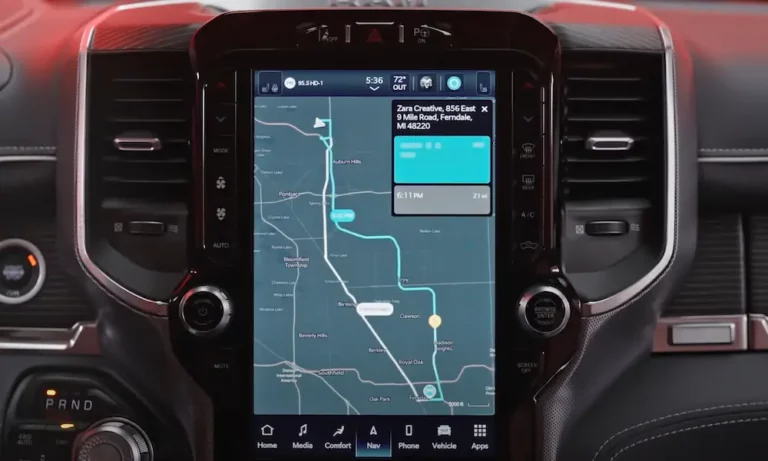
Uconnect 4’s display topped out at the 8.4-inch and 12-inch vertical screens found in models like the Ram 1500. Uconnect 5 supports screens from 7 to 12.3 inches with ultra-HD resolution — and it can drive up to four independent displays inside the cabin simultaneously.
Software: From Proprietary to Android Automotive
Uconnect 4 ran on a proprietary software stack (mostly QNX). It was rock-solid but closed off. Developers couldn’t build for it, and updates were slow.
Uconnect 5 switches to Android Automotive OS. That’s a massive shift. It opens the system to a global developer ecosystem, which means faster app support, better compatibility, and — most importantly — proper over-the-air updates.
With Uconnect 4, getting a software update often meant a USB stick or a dealer visit. Uconnect 5 handles firmware updates automatically in the background, called Firmware Over The Air (FOTA). New features, map updates, and bug fixes arrive without you doing anything.
The Interface Change: Dock vs. Cards
Uconnect 4 used a dock-and-menu layout — a persistent bar at the bottom of the screen with quick access to Radio, Climate, Apps, Navigation, and Phone. Clean and simple.
Uconnect 5 ditches the dock for a customizable card-based home screen. You pick your cards — navigation, media, phone, whatever — and arrange them how you want. The goal is two-touch access to anything. Most drivers get there after a short learning curve.
Some Uconnect 4 fans actually miss the dock. It was predictable. But once you dial in your Uconnect 5 layout, it’s genuinely faster to use.
Personalization: One Profile vs. Five
Uconnect 4 had some memory features, but they were mostly tied to physical key fobs or door buttons — seat position, mirror angles, that kind of thing.
Uconnect 5 supports up to five digital user profiles, plus a valet mode. Each profile remembers:
- Home screen layout and widgets
- Radio presets and media favorites
- Climate settings and seat position
- Navigation history and saved destinations
- Vehicle settings like suspension height (Jeep/Ram models)
One tap switches between drivers. For families sharing a vehicle or commercial fleets rotating drivers, this is genuinely useful — not just a gimmick.
Connectivity: Wires vs. Wireless
Uconnect 4 supported Apple CarPlay and Android Auto, but for most of its life, you needed a USB cable. That’s not a dealbreaker, but it gets old fast when your phone is buried in your bag.
Uconnect 5 makes wireless CarPlay and Android Auto standard. Pair it with a wireless charging pad and your phone never needs to leave your pocket. Walk up, get in, it connects.
There’s also dual-phone Bluetooth. Uconnect 5 handles two phones at once — driver’s phone for calls and navigation, passenger’s phone for music. You assign priority for each function to avoid conflicts. Small thing, but it removes real friction on road trips.
Voice Control: Button vs. Wake Word
| Feature | Uconnect 4 | Uconnect 5 |
|---|---|---|
| Trigger | Steering wheel button only | Wake word or button |
| Language Style | Rigid command phrases | Natural conversation |
| Background Noise | Sensitive | Improved mic filtering |
| Smart Home Control | External Alexa skill | Alexa built-in |
| Google Integration | Phone-tethered only | “Hey Google” compatible |
Uconnect 4’s voice system needed exact phrasing. “Tune to 95.5 FM.” “Call John Smith.” It worked, but it felt robotic.
Uconnect 5 understands natural speech and responds to brand-specific wake words — “Hey Jeep,” “Hey Ram,” “Hey Dodge,” or “Hey Chrysler.” You don’t need to reach for a button.
Amazon Alexa integration also goes much deeper. In Uconnect 4, Alexa was an add-on skill — mostly useful for remote commands from home. In Uconnect 5, Alexa lives inside the vehicle. Ask it to play music, check the weather, add groceries to your list, or control your smart home devices — all while driving.
Navigation: Garmin Out, TomTom In
This is the most debated part of the Uconnect 4 vs 5 conversation.
Uconnect 4 used Garmin-based navigation — clean 2D/3D maps, simple routing, and a loyal fanbase. It wasn’t flashy, but it worked.
Uconnect 5 replaces Garmin with TomTom, and it brings some genuinely useful features:
- Maps Over the Air: Updates download automatically in the background
- Last Mile Navigation: Walking directions from your parking spot to the destination via the Uconnect app
- Dynamic Range Mapping: Shows how far EVs and hybrids can travel based on battery, terrain, and traffic
- Real-Time Search: Cloud-based points of interest instead of a static offline database
The tradeoff? Some users find TomTom’s routing aggressive — it’ll send you down a residential street to save 90 seconds. But the system works fully offline, which matters if you’re wheeling a Jeep somewhere with no cell signal or crossing remote stretches of the American West.
Specialized Features for Trucks and Off-Roaders
Ram Trucks and Fleet Use
Ram owners get custom home screens built around towing — trailer brake status, tire pressures, transfer case info. The Telematics Box Module (TBM) included with Uconnect 5 acts as a data recorder for fleet managers, tracking driving behavior, fuel use, and maintenance needs across entire fleets.
Jeep Off-Road Pages
Jeep’s Off-Road Pages+ include detailed trail maps and difficulty ratings for over 200 off-road routes across the U.S., GPS trail logging, and shareable route data. All of it’s stored locally on the 64GB drive — so it works even when you’re deep in the backcountry with zero signal.
Reliability: What Actually Goes Wrong
Neither system is perfect. Here’s the honest breakdown.
| Generation | Reliability Profile | Key Issues |
|---|---|---|
| Uconnect 4 | High software stability; physical wear over time | Screen delamination and “ghost touches” |
| Uconnect 5 | Early software bugs; rapid OTA patching | Wireless connectivity drops, black screen on startup |
Uconnect 4’s most notorious problem is screen delamination — the adhesive between the digitizer and LCD fails, especially in hot climates. The screen gets an oily, bubbly look and starts registering phantom touches. Annoying and expensive to fix without a replacement screen.
Uconnect 5’s early issues were software-driven. The 2021 and 2022 rollout brought intermittent reboots and wireless CarPlay drops, which briefly tanked Ram’s J.D. Power Initial Quality rankings. The good news: those bugs get patched over the air. You don’t need a dealer visit for most fixes — Stellantis pushes updates remotely, and the system keeps improving throughout the vehicle’s life.
Uconnect 4 vs 5: Which One Should You Pick?
Here’s the straight answer:
Pick Uconnect 4 if you want a proven, simple system that’s rock-solid and doesn’t need constant updates. Great for older used vehicles where you’re not paying a premium for infotainment.
Pick Uconnect 5 if you want wireless everything, a system that improves over time, real personalization, and hardware built for the next decade. It’s the clear choice for anyone buying new or shopping 2021+ models.
The Uconnect 4 vs 5 debate really comes down to simplicity vs. capability. Uconnect 4 is finished — what you see is what you get. Uconnect 5 is a living platform that keeps getting better. For most drivers shopping today, that future-proofing is worth it.