Your VW key fob is acting up — weak signal, slow response, or your dash is flashing a battery warning. Good news: replacing the battery takes about five minutes and costs less than $5. This guide walks you through every VW fob type so you get it right the first time.
First, Know Which VW Key Fob You Have
Not all VW fobs open the same way. The steps depend on your fob’s generation. Here’s a quick breakdown:
| Fob Type | Era | How to Spot It |
|---|---|---|
| Fixed blade (integrated) | Pre-1999 | Bulky plastic head, permanent metal key |
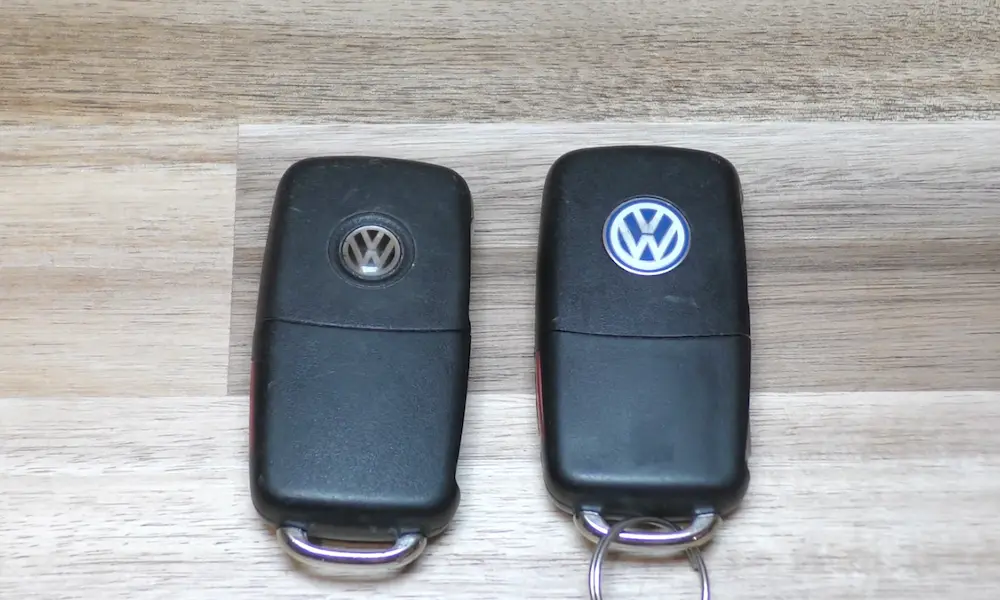
| Switchblade / pod | 1999–2015 | Spring-loaded blade folds into the housing |
| MQB smart key | 2015–Present | Slim profile, hidden emergency blade |
| ID. / Golf 8 series | 2021–Present | Ultra-slim, keyless-only design |
Once you know your type, jump to the right section below.
What Battery Does a VW Key Fob Take?
Most VW fobs use a CR2032 battery. Some newer slim-profile models use a CR2025. These two look nearly identical, but they’re not interchangeable.
Here’s why it matters:
- CR2032: 20mm diameter, 3.2mm thick, ~225 mAh capacity
- CR2025: 20mm diameter, 2.5mm thick, ~160 mAh capacity
That 0.7mm size difference is enough to cause real problems. Drop a CR2025 into a CR2032 slot, and you’ll get poor terminal contact and intermittent signal failures. Forcing a CR2032 into a CR2025 slot can crack the housing or damage the circuit board.
Always check the battery type stamped inside your fob’s battery cover before buying a replacement.
| Battery | Diameter | Thickness | Capacity | Common VW Use |
|---|---|---|---|---|
| CR1632 | 16mm | 3.2mm | Lower | Early fixed-blade keys |
| CR2025 | 20mm | 2.5mm | ~160 mAh | Golf 8, slim smart keys |
| CR2032 | 20mm | 3.2mm | ~225 mAh | Most VW fobs 1999–present |
Signs Your VW Key Fob Battery Is Dying
Catch the warning signs early and you’ll never get stranded. Here’s what to watch for:
- Reduced range: You used to unlock your car from across a parking lot. Now you’re standing right next to it. Range drops linearly as voltage fades — often from 30–50 meters down to just 2 meters.
- Intermittent button response: The first press works, the second doesn’t. The panic button dies before lock/unlock functions do.
- Dim or no LED flash: Press a button and watch the small light on the fob. A bright flash means healthy battery. A dim flicker — or nothing — means it’s time.
- Dashboard warning: Modern VWs display a “Key Battery Low” or “Change Key Battery” message when the cell hits roughly 20–30% capacity. That’s your window to act before it dies completely.
How to Replace a VW Switchblade Key Fob Battery (1999–2015)
This is the most common VW fob type. The spring-loaded blade makes it easy to open.
What you need:
- Small flat-head screwdriver
- Protective tape (optional, prevents scratches)
- New CR2032 battery
Steps:
- Press the release button to pop out the metal key blade. This exposes the gap you’ll use as a pry point.
- Wrap your screwdriver tip in tape to protect the plastic housing.
- Insert the screwdriver into the gap where the key blade sits when folded. Apply gentle, even pressure to separate the two halves.
- Work around the seam gradually. Don’t force one spot — the housing has multiple plastic clips around the edge.
- Pop out the old battery using a fingernail or the screwdriver tip.
- Check polarity before installing the new one. On most switchblade fobs, the positive (+) side faces down into the fob. Some model years are reversed — always check the markings inside the housing.
- Press the new CR2032 into the cradle until it clicks under the retention tabs.
- Snap the housing shut. You should hear an audible click as the clips re-engage.
- Test the buttons. The LED should flash brightly.
How to Replace a VW Smart Key / Proximity Fob Battery (2015–Present)
Smart keys don’t have a switchblade, so you access the battery through the emergency blade slot.
Steps:
- Find and slide out the emergency blade. There’s usually a small latch or side button. Pull the blade out completely.
- Look inside the blade cavity. You’ll find a small notch or slot — that’s your pry point for the rear panel.
- Use the blade tip or a thin tool to gently pop off the rear cover. Work slowly. These clips are smaller and more fragile than the older switchblade design.
- Remove the old battery and note the polarity markings inside the housing.
- Install the new battery, ensuring it sits flat under the metal contact clips. A poorly seated battery will prevent the cover from snapping back on.
- Snap the rear cover back in place and reinsert the emergency blade.
- Test immediately — press a button and confirm the LED flashes.
How to Replace a VW ID.4 or Golf 8 Key Fob Battery (2021–Present)
These ultra-slim fobs are the trickiest to open. The clips are small and the tolerances are tight.
Steps:
- Use a plastic pry tool or eyeglass screwdriver — metal tools can snap the thin housing clips.
- Start at a corner seam and work gently around the edge to release the back panel.
- Note the polarity. On ID.4 and Golf 8 fobs, the positive side usually faces up — the opposite of older switchblade keys. This catches people out.
- Press the new battery in — typically CR2032 or CR2025 depending on the variant. Check your specific model.
- Reattach the back cover with firm, even pressure until it’s fully seated.
How to Re-Sync Your VW Key Fob After a Battery Change
Most VW fobs keep their programming even after a battery swap. But if yours stops working after the change, it may need a quick re-sync.
This happens when:
- You pressed buttons repeatedly while far from the car (the rolling code advances out of range)
- The battery was out long enough for internal capacitors to discharge
For Cars with a Door Key Lock
- Stand right next to your locked car.
- Press the Unlock button on the fob once.
- Within 60 seconds, use the physical key to manually unlock the driver’s door.
- That physical action tells your car’s security module to accept the new rolling code.
For Push-Button Start Cars
No visible lock cylinder? No problem. Hold the key fob directly against the start button or the area around the steering column. The car has a built-in induction coil that reads the fob’s data up close. Press Start while holding it there.
Success check: The door locks respond to button presses, and the hazard lights flash when you hit lock or unlock. If that doesn’t work after a few attempts, the issue is likely beyond a battery fix.
What to Do If Your VW Key Fob Is Completely Dead
A flat battery doesn’t mean you’re locked out. VW builds in backup systems.
Hidden door lock: Most VW door handles have a concealed lock cylinder under a plastic cap. Insert the mechanical key into the small notch on the underside of the handle and pry the cap off gently. The lock is underneath.
Dead fob in a push-button car: Even with zero battery, the fob contains a passive transponder chip. Hold it against the steering column or the start button area — the car emits a low-frequency field that powers the chip just enough to verify your identity and let you start the engine.
Troubleshooting: Battery Changed But Fob Still Doesn’t Work
| Symptom | Likely Cause | Fix |
|---|---|---|
| No LED flash | Wrong polarity or no contact | Flip battery, check orientation |
| Reduced range still | Wrong battery type installed | Confirm CR2032 vs CR2025 |
| “Key Not Found” alert | Rolling code out of sync | Re-sync using steps above |
| Intermittent response | Loose terminal contact | Gently re-tension the metal contact tabs |
| Fob won’t close properly | Wrong battery thickness | Verify correct battery size |
If the fob still fails after replacing the battery with the correct type and re-syncing, check the metal spring terminals inside. They lose tension over time. A bent terminal won’t grip the battery firmly, causing intermittent contact. Carefully re-bend the tabs inward to restore tension.
Moisture damage is another culprit. If you spot any white residue or corrosion inside the housing, the circuit board may need cleaning or the fob may need replacing entirely.
How Long Does a VW Key Fob Battery Last?
A quality CR2032 in a standard VW fob typically lasts 3 to 4 years. Proximity smart keys drain faster — expect 1 to 2 years since they’re constantly communicating with the vehicle even when parked.
To stretch battery life:
- Don’t store your keys near the car (proximity fobs stay active and drain faster)
- Replace at the first sign of range reduction — don’t wait for a total failure
- Stick with name-brand batteries (Panasonic, Energizer, Duracell) — cheap alternatives have lower actual capacity than advertised
And when you’re done — don’t toss the old battery in the trash. Take it to a battery recycling point. Coin cells contain materials that shouldn’t go into landfill.