Ever turned on your Volkswagen only to find your radio displaying “SAFE” or “CODE”? That sinking feeling when your favorite tunes are held hostage isn’t fun. Whether your battery died, was disconnected, or you’ve purchased a used VW, dealing with radio lockouts is a common headache for Volkswagen owners. But here’s the good news: you don’t need to shell out $180 at the dealership to get your music back.
What Are Volkswagen Radio Codes and Why Do You Need Them?
Volkswagen radio codes are four-digit security PINs uniquely assigned to your radio unit. They’re tied to your radio’s serial number (not your VIN) and serve as an anti-theft measure to prevent stolen radios from working.
When your VW’s battery loses power or gets disconnected, the radio security system activates automatically. Your display might show messages like:
- “SAFE”
- “CODE”
- “Error Code 1000”
- “SAFE 2” (after failed attempts)
This security feature was developed when car stereo theft was rampant. By requiring a specific code after power loss, Volkswagen made stolen radios essentially worthless to thieves. Smart for security, but sometimes frustrating for legitimate owners!
Where to Find Your VW Radio Code (Free Methods First!)
Before paying anyone a dime, try these free methods to locate your radio code:
Check Your Vehicle Documentation
Your radio code might be hiding in plain sight! Look in these common locations:
-
Owner’s manual: Many VW manuals include the radio code in the audio section or on the final pages. Some even have a special business card-sized insert with the code.
-
Code stickers in your vehicle: Volkswagen often places code stickers in these spots:
- Inside the glove compartment (check walls and door)
- In the trunk near the spare tire
- On door jambs
- Behind the radio itself
I once helped a friend who’d been quoted $120 by a dealer for his radio code. We found it written on a small sticker inside his glove box in under 2 minutes!
Call VW Customer Service
Many owners have success by calling VW Customer Service directly at 1-800-822-8987. Have your VIN and proof of ownership ready. While experiences vary, many report getting codes for free this way instead of paying dealer fees.
How to Find Your Radio’s Serial Number
If you can’t locate your code through documentation, you’ll need your radio’s serial number. Here’s how to find it:
-
Remove the radio from your dashboard:
- Use trim removal tools to carefully pry around the radio bezel
- Remove the four Torx screws securing the radio
- Gently pull the unit forward to access the back and sides
-
Locate the serial number:
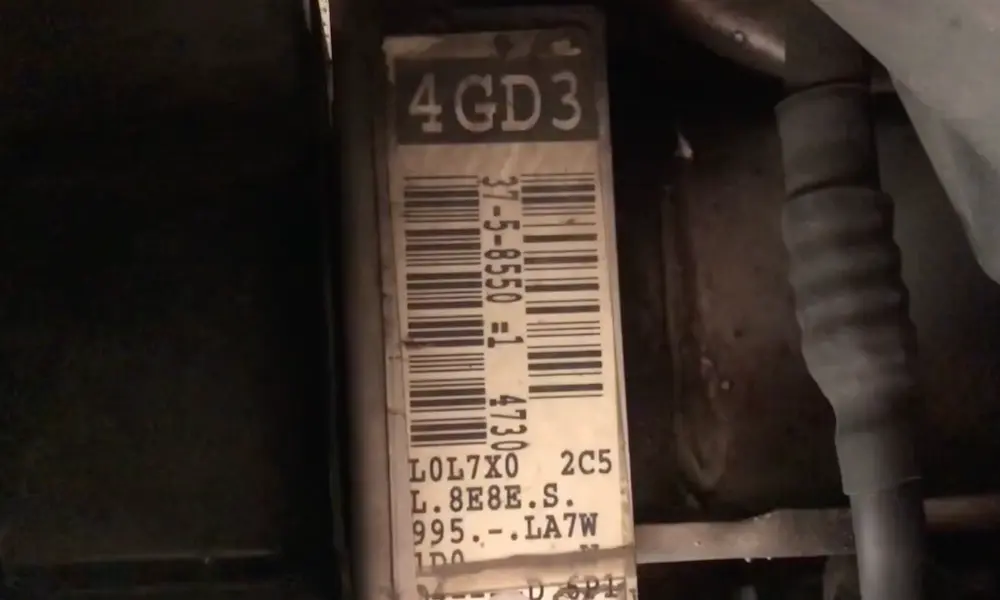
- All VW radio serial numbers begin with “VWZ” followed by 11 more characters (14 total)
- Look for a label on the side or back of the radio
- The format will look something like “VWZ1Z2K8198892”
Pro tip: Take photos of the serial number once you find it. You’ll need this for any code retrieval service, and it’s good to have for future reference.
Radio Code Retrieval Options: From Free to Fee
| Method | Typical Cost | Time Required | Success Rate |
|---|---|---|---|
| Vehicle Documentation | Free | 5-15 minutes | High (if code is present) |
| VW Customer Service Call | Free | 10-30 minutes | Varies |
| Online Code Services | $9-$15 | 2-24 hours | High |
| Local Dealership | $65-$180 | 1-3 hours | Very High |
Online Radio Code Services
If the free methods don’t work, online services offer a much cheaper alternative to dealerships:
- VWCodes.org: Highly rated (4.7 stars from 468+ reviews) and charges about $10-15
- RadioCodeFord.com: Despite the name, they handle VW codes too
- FreeRadioCodes.co.uk: Budget-friendly options with quick turnaround
These services typically deliver your code within a few hours after you submit your radio’s serial number. Most offer money-back guarantees if the code doesn’t work.
Dealership Services (Last Resort)
Dealerships can retrieve your code using either your VIN or radio serial number. However, prices have increased significantly in recent years:
- Many dealers now charge between $65-$180 for this simple service
- Some insist they must connect to VW’s ODIS system and charge diagnostic fees
- Experiences vary widely between dealerships
If you must visit a dealer, call the parts department rather than service—they often charge less for code retrieval. Better yet, call multiple dealers to compare prices, as they can vary dramatically.
How to Enter Your Volkswagen Radio Code
Once you have your four-digit code, here’s how to enter it:
- Turn on the ignition (don’t start the engine)
- Turn on the radio and wait for “SAFE” to appear, then possibly change to “1000”
- Use preset buttons 1-4 to enter each digit:
- Press button 1 repeatedly until the first digit of your code appears
- Press button 2 repeatedly for the second digit
- Continue with buttons 3 and 4 for the remaining digits
- Once all four digits are entered, press and hold the “Seek” or “>” button for several seconds
- If successful, “SAFE” disappears and your radio returns to normal operation
Different VW radio models may have slight variations in the entry process. Some older models use three-digit codes, while others might require holding different button combinations.
Troubleshooting Failed Code Entry Attempts
Entered the wrong code? Don’t panic, but act carefully:
Understanding Lockout Periods
After incorrect code attempts, your radio enters progressive lockout periods:
- 1st failed attempt: Short wait
- 2nd failed attempt: Longer wait
- 3rd failed attempt: “SAFE 2” mode with extended lockout (often 1+ hour)
Resetting a Locked Radio
If you’ve triggered a lockout:
- Turn on the radio (displays “SAFE”)
- Turn off ignition but leave key in
- Leave radio displaying “SAFE” for one hour
- This resets the radio and allows new attempts
Common Entry Errors
- Confusing “1” with “I” in serial numbers
- Using wrong confirmation buttons
- Not waiting long enough between attempts
- Entering digits incorrectly
VW Radio Models and Special Considerations
Different Volkswagen radio models have specific quirks to be aware of:
Common VW Radio Types
- RCD Series: RCD300, RCD310, RCD500, RCD510 follow standard code entry procedures
- Navigation Units: RNS-310, RNS-510 may have different entry button combinations
- Older Models: GAMMA, BETA, ALPHA radios often require special removal keys
Serial Number Identification Tips
- Valid VW serial numbers always start with “VWZ” and are 14 characters long
- Navigation units may start with “VEZ” instead
- The serial number typically appears near a barcode on a label
- Some units have the number engraved directly into the metal casing
Preventing Future Radio Code Headaches
Once you’ve gone through the hassle of retrieving your code once, take these steps to avoid future problems:
Document Your Code
Write your radio code in multiple locations:
- In your owner’s manual
- In your phone contacts
- In your vehicle maintenance records
- Take photos of any code stickers or labels
Battery Maintenance Tips
- Inform mechanics about radio codes before battery service
- Consider using a memory saver device during battery changes
- If possible, don’t let your battery completely die (especially in older VWs)
- For longer storage periods, use a trickle charger instead of disconnecting the battery
When Purchasing a Used Volkswagen
If you’re buying a used VW:
- Ask the seller for the radio code before finalizing the purchase
- Check documentation and common code locations during inspection
- Consider the potential cost of code retrieval when negotiating price
- Verify the radio works properly and isn’t already in SAFE mode
Radio Replacement Options
If you can’t get your code or your radio is damaged, you have alternatives:
- Aftermarket head units: Modern replacements with Bluetooth, Apple CarPlay/Android Auto start around $100-$300
- OEM replacement: Certified pre-owned VW radios (with codes) from salvage yards cost $50-$150
- Repair services: Some specialists can reset radio memory to bypass code requirements
The Future of VW Radio Security
Newer Volkswagens are moving away from traditional radio codes:
- Models after 2015 increasingly use Composition Media/Discover systems
- Many newer units reset differently or don’t require codes at all
- Infotainment systems may use VW account login instead of numeric codes
Dealing with Dealership Resistance
If a dealer is charging excessive fees for your radio code:
- Remind them that code retrieval should be a courtesy service
- Reference your owner’s manual if it states codes should be provided free
- Try a different dealer or department (parts vs. service)
- Consider contacting VW corporate if dealers are unreasonable
Radio codes represent a small but annoying aspect of Volkswagen ownership. With the methods outlined above, you can get back to enjoying your driving soundtrack without unnecessary expense. Remember that patience and persistence usually pay off—and almost never require paying the dealership’s premium prices for this simple service.